
Summary of SIMPLE HARDWARE SWITCH FOR OS DUALBOOTING, THANKS TO RP2040
This article describes a hardware tool that automates dual-booting between Windows and Linux. Using a TinyPICO board with an RP2040 microcontroller and a three-way rocker switch, the device manipulates GRUB variables to select the operating system upon reboot, eliminating the need to manually time selections during boot. The project simplifies OS switching by allowing users to set the desired OS via a physical switch before restarting their computer.
Parts used in the Dual-Boot Switch Project:
- TinyPICO board
- RP2040 microcontroller
- Three-way rocker switch
- Soldering equipment
- Custom.cfg file for GRUB
Dualbooting your computer can be a chore, the more switching between OSes you have to do – which is why virtualization or having separate computers are the go-to for many. Failing that, we have no choice but to smooth over our dualbooting experience with various workarounds and helpers. [William Somsky] shares one such helper tool with us – an elegant device made with a RP2040-sporting TinyPICO board and a three-way rocker switch, directing GRUB to boot into either Windows or Linux automatically, or leave us with the usual boot menu. This way, you can just flip the switch, hit “reboot” and walk away, coming back to your PC booted into OS of your choice, instead of timing your presence just so that you can catch the boot menu on time.
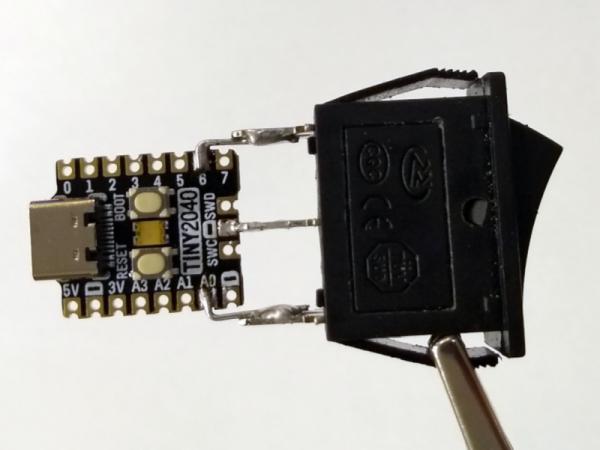
All you need to do is to solder a rocker switch to your RP2040 board of choice, then flash the RP2040 with code that detects the state of the switch, and creates a mass storage device hosting a file setting a Grub variable to either one of the 0, 1 or 2. [William] describes his journey, fighting mysterious caching problems, but tells us he got it working in the end. Sadly, [William] hasn’t shared the RP2040-side code with us, but he has at least put the Grub’s custom.cfg file in the ‘Files’ section of the Hackaday.io project.
Readily accessible microcontrollers with mass storage functions sure help make such hacks simple – earlier, we’ve seen dualboot switching like this done by modifying assembly code of the MBR. Dualbooting is a hacker’s rite of passage, and certain OSes of late can make it harder than other ones. Even if you don’t want to dualboot your PC, however, you sure can dualboot an Arduino!
Source: SIMPLE HARDWARE SWITCH FOR OS DUALBOOTING, THANKS TO RP2040
- How does this device simplify dual-booting?
The device allows users to flip a switch and reboot, automatically selecting the desired OS without timing the boot menu. - What hardware components are required for this project?
You need a TinyPICO board with an RP2040 microcontroller and a three-way rocker switch soldered to it. - Does the device use mass storage functions?
Yes, the RP2040 creates a mass storage device hosting a file that sets GRUB variables. - Can I see the code for the RP2040 side of the project?
No, the creator has not shared the RP2040-side code, though the Grub custom.cfg file is available. - What happens if I encounter caching problems during setup?
The article mentions the creator fought mysterious caching problems but eventually got the system working. - What values can the switch set in the GRUB variable?
The switch state creates a file setting a GRUB variable to either 0, 1, or 2. - Is there an alternative method mentioned for similar functionality?
Earlier projects have achieved similar results by modifying the assembly code of the MBR. - Can this concept be applied to other devices like Arduinos?
Yes, the article notes that you can also dualboot an Arduino.
