
Summary of RGB Box Clock
This article details a DIY clock and decorative RGB LED matrix project. It utilizes a NodeMCU v3 board and a Colorduino Shield for control via i2C communication, featuring an alarm system and color customization through the Blynk app. The build includes 3D printing a custom enclosure, assembling electronic components, wiring according to schematics, programming both microcontrollers in Arduino IDE, and configuring the mobile application for user interaction.
Parts used in the RGB Box Clock:
- LoLin V3 NodeMcu Lua CH340G ESP8266 Board
- Colorduino V2.0 + 2088RGB-5 8x8 Matrix
- Touch Button
- Active Buzzer
- PLA Printer Plastic
This is a clock and decorative RGB Led Matrix
It’s controlled by a Colorduino Shield and NodeMCU v3 Board using i2C communication.
With Blynk app you can setup the alarm,change colors and other things.
Parts list is:
LoLin V3 NodeMcu Lua CH340G ESP8266 Board 6€ Link
Colorduino V2.0 + 2088RGB-5 8×8 Matrix 10€ Link
Touch Button 1€ Link
Active Buzzer 1€ Link
PLA Printer Plastic 2€
Total price is about 20€
Step 1: Print the Box
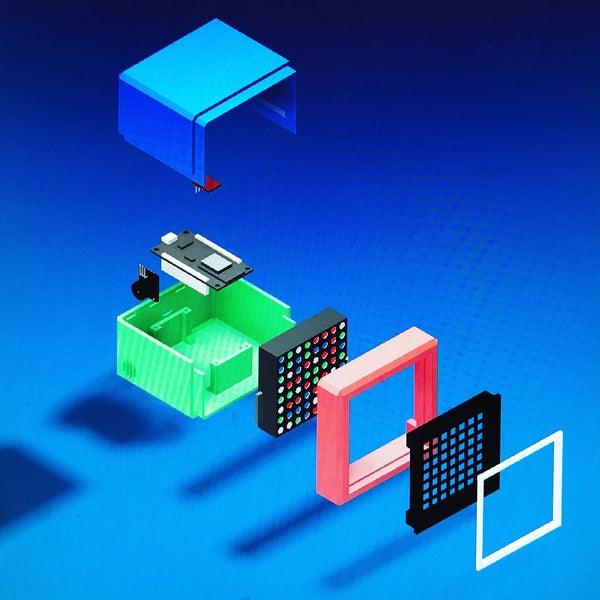
Parts available on Thingiverse
Printing setup:
- layer resolution 0.15
- infill of 25%
- 1.75mm PLA plastic
Supports, depend the part:
- Frontal.stl > Use supports
- Trasera_Superior.stl > Designed with part, don’t use support generation.
- Trasera_Inferior.stl > Designed with part, don’t use support generation.
- Frontal_Marc.stl > Don’t use supports
- Frontal_Matriu.stl > Don’t use supports
Once printed, remove gently the supports.
Be aware that the bolts holes are done only for Lolin NodeMCU v3, any other board will not fit into the holes.
Step 2: Mount the Parts
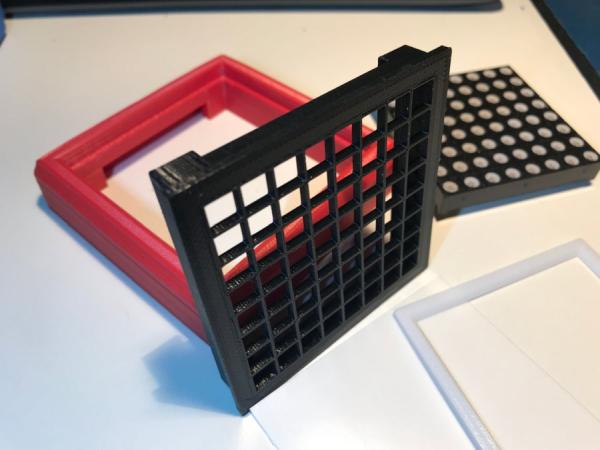
Everything must fit easily.
For the matrix cover find some kind of plastic sheet or just paper.
Step 3: Do the Wiring
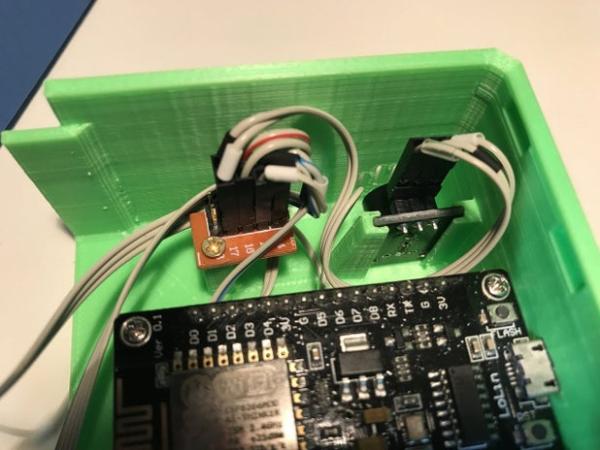
Follow the schematics in the image, is quite easy.
There’s a hole to install a little piece put together all the main power supply, I used a cutted prototyping PCB but you can use whatever you want.
Step 4: Programming the NodeMCU and Colorduino
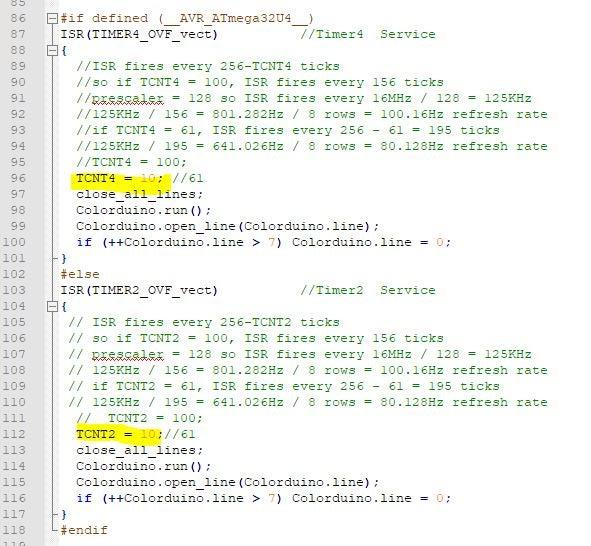
Both are coded on Arduino IDE
For NodeMCU v3 Lolin
You’ll need following Libraries
- EEPROM.h
- Wire
- Timelib.h
- ESP8266Wifi.h
- ESP8266WebServer.h
- TimeLib.h
- Blynk libraries
For Colorduino (or icDuino)
You’ll need following Libraries
Use Colorduino.cpp library to have better performance (don’t needed, just change the highlighted lines shown at the picture with code)
Colorduino boards and derivatives like icDuino (is what I used) is a Duemilanove or Decimilia MCU, so configure arduino IDE to load the code.
Step 5: Blynk App Setup
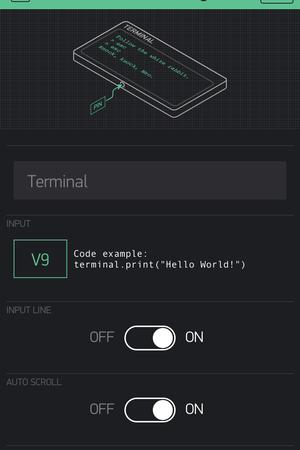
Download Blynk App on your phone or tablet
Clone the project with the QR code on the first image.
Step 6: And Play With It
Source: RGB Box Clock
- How is the clock controlled?
The device is controlled by a Colorduino Shield and NodeMCU v3 Board using i2C communication. - Can I change the colors of the matrix?
Yes, you can change colors and set alarms using the Blynk app. - What plastic settings are required for printing the box?
Use 1.75mm PLA plastic with a layer resolution of 0.15 and an infill of 25%. - Which boards fit the bolt holes in the printed case?
The bolt holes are designed specifically for the Lolin NodeMCU v3 board. - Do I need supports for all STL files when printing?
No, supports are only needed for Frontal.stl; Trasera_Superior.stl, Trasera_Inferior.stl, Frontal_Marc.stl, and Frontal_Matriu.stl do not require them. - How do I configure the Arduino IDE for the Colorduino board?
You must configure the IDE as if loading code for a Duemilanove or Decimilia MCU since it is a derivative. - What libraries are needed for the NodeMCU v3?
You need EEPROM.h, Wire, Timelib.h, ESP8266Wifi.h, ESP8266WebServer.h, TimeLib.h, and Blynk libraries. - Is there a specific library recommended for better performance on Colorduino?
Using the Colorduino.cpp library provides better performance, though it requires changing highlighted lines in the code.
