
Summary of RESTORING STARLINK’S MISSING ETHERNET PORTS
SpaceX removed the built-in Ethernet port from newer Starlink terminals, replacing it with a fragile SPX connector carrying dual Ethernet signals and requiring a proprietary adapter. Repairer Oleg Kutkov reverse-engineered the adapter and SPX pinout, then published three posts showing how to (1) open and analyze the adapter, (2) add a LAN RJ45 by tapping test points or QFN pins with custom breakout boards, and (3) eliminate the SPX connector entirely for Dishy wiring—providing schematics, boards, and repair tips for restoring Ethernet functionality.
Parts used in the Restoring Starlink’s Missing Ethernet Ports:
- Starlink terminal with SPX connector
- Starlink adapter (original proprietary adapter)
- Ethernet RJ45 (8P8C) connector
- Ethernet transformer/magnetics
- Custom breakout boards for tapping test points/QFN pins
- Soldering tools and supplies (solder, flux, iron)
- Wires and connectors for Dishy wiring
- Moisture protection materials (implied for SPX fragility repairs)
- Multimeter/oscilloscope for reverse engineering and testing
Internet connectivity in remote areas can be a challenge, but recently SpaceX’s Starlink has emerged as a viable solution for many spots on the globe — including the Ukrainian frontlines. Unfortunately, in 2021 Starlink released a new version of their hardware, cost-optimized to the point of losing some nice features such as the built-in Ethernet RJ45 (8P8C) port, and their proposed workaround has some fundamental problems to it. [Oleg Kutkov], known for fixing Starlink terminals in wartime conditions, has released three posts on investigating those problems and, in the end, bringing the RJ45 ports back.
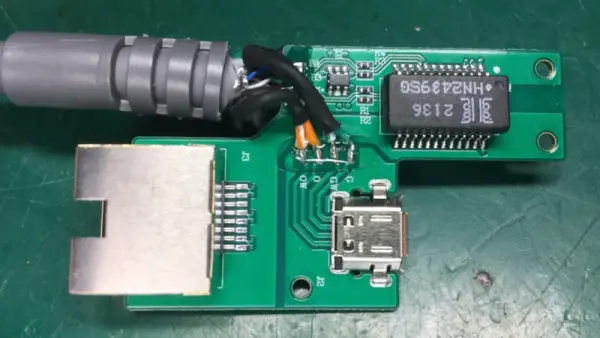
Starlink now uses an SPX connector with a proprietary pinout that carries two Ethernet connections at once: one to the Dishy uplink, and another one for LAN, with only the Dishy uplink being used by default. If you want LAN Ethernet connectivity, they’d like you to buy an adapter that plugs in the middle of the Dishy-router connection. Not only is the adapter requirement a bother, especially in a country where shipping is impeded, the SPX connector is also seriously fragile and prone to a few disastrous failure modes, from moisture sensitivity to straight up bad factory soldering.
For a start, [Oleg] has cracked the original adapter open and shows us the internals, even reverse-engineering the schematic and the SPX pinout! The adapter itself is a fundamental failure point to be tackled, so that’s where the next two hacks come in. First, he shows us how to add a LAN port without requiring the adapter. This requires you to tap into some test points or even QFN pins and add your own Ethernet transformer, but once you do that, you can get rid of the adapter for good. He shares breakout boards you can order and assemble to make this job way easier, and shows how to integrate the LAN connector into the shell.
What if the SPX connector has failed you completely? You’re in luck, the last of the three write-ups is about getting rid of the SPX connector even for Dishy wiring purposes, and that is a way simpler mod. All in all, the three articles are full of diagrams, tips and tricks, so whether you’re looking to learn more about hardware you own, mod it to improve convenience, or perhaps even repair a broken SPX connector, you’re in for a treat! Before the conflict had [Oleg] take a plunge into the Starlink repair depths, we’ve seen him build a wideband SDR station, reverse-engineer Tesla car LTE modems and Bluetooth speakers alike, and there’s much more to bee found at his blog.
Source: RESTORING STARLINK’S MISSING ETHERNET PORTS
- Why did Starlink remove the built-in Ethernet RJ45 port?
The article states Starlink released a cost-optimized hardware version in 2021 that removed the built-in Ethernet port. - What connector replaced the RJ45 on newer Starlink terminals?
The SPX connector replaced the RJ45 and carries two Ethernet connections with a proprietary pinout. - Does Starlink provide a way to get LAN Ethernet from the SPX connector?
Yes, Starlink offers a proprietary adapter that plugs between the Dishy and router to provide LAN Ethernet. - What problems exist with the SPX connector and adapter?
The SPX connector and adapter are fragile, moisture sensitive, and can have bad factory soldering, making them failure points. - Can you restore an RJ45 port without using the adapter?
Yes, Oleg shows how to add a LAN RJ45 by tapping test points or QFN pins and adding an Ethernet transformer, eliminating the adapter. - Are there custom boards available to help with adding the LAN port?
Yes, Oleg provides breakout boards you can order and assemble to simplify tapping the test points or QFN pins. - What if the SPX connector has completely failed?
Oleg's third write-up describes simpler mods to remove the SPX connector entirely even for Dishy wiring purposes. - Does the article include schematics and diagrams?
Yes, the three articles contain diagrams, schematics, tips, and tricks for repair and modification. - Who documented these repairs and modifications?
Repairer Oleg Kutkov documented the reverse engineering and repair methods in three posts. - Is this information useful for learning and repairing hardware?
Yes, the posts are useful for learning about the hardware, improving convenience, or repairing a broken SPX connector.
