
Summary of ReSpeaker Home Automation
This article details a voice-controlled home automation system using the ReSpeaker board, Arduino MKR1000, Microsoft Cognitive Services Speech API, Api.ai, and MQTT. The setup records audio via ReSpeaker, converts it to text, processes commands through Api.ai, and sends MQTT messages to toggle LEDs representing lights. Users interact by saying a trigger word like "jarvis" followed by commands such as turning bedroom or kitchen lights on or off.
Parts used in the ReSpeaker Home Automation:
- Seeed ReSpeaker Mic Array v2.0
- Arduino MKR1000
- Generic LED
- Jumper wires (generic)
ReSpeaker Home Automation Sample using Arduino MKR1000, Microsoft Cognitive Service Speech API, Api.ai and MQTT
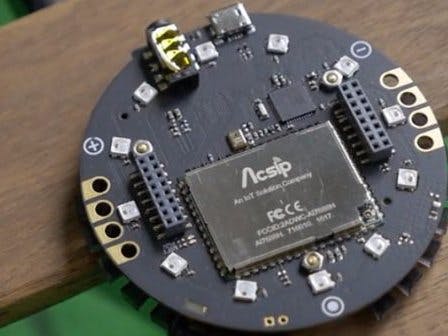
Things used in this project
Hardware components |
||||||
 |
|
× | 1 | |||
 |
|
× | 1 | |||
 |
|
× | 2 | |||
 |
|
× | 1 | |||
Software apps and online services |
||||||
 |
|
|||||
|
||||||
|
||||||
|
||||||
 |
|
|||||
Story
Probably you all heard about ReSpeaker, it is a hackable open hardware voice inteface. It is a development board based on Mediatek’s MT7688 WiFi module and runs on OpenWrt. You an program it using Arduino, Python, Node.js, Lua and C/C++. ReSpeaker also supports various hardware add-ons like Groove Expansion, Microphone Array, etc… I am one of the early beta user of ReSpeaker. Here is a link to the Kickstarter Page.
ReSpeaker supports speech recognition using Microsoft Cognitive Service, Amazon Alexa Voice Service, Google Speech API, Wit.ai, Houndify, etc…
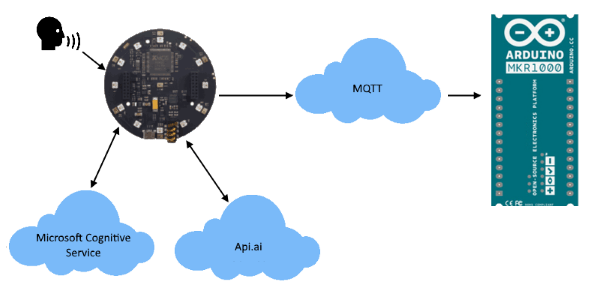
Here is a Home Automation project I worked using ReSpeaker, Microsoft Cognitive Service Speech API, Api.ai and MQTT, it controls the lights using voice interface. Basically what it does is, record audio using ReSpeaker, convert to text using Microsoft Cognitive Service Speech to Text, process and the text using Api.ai conversational voice interfaces platform, send MQTT messages to turn on/off different lights.
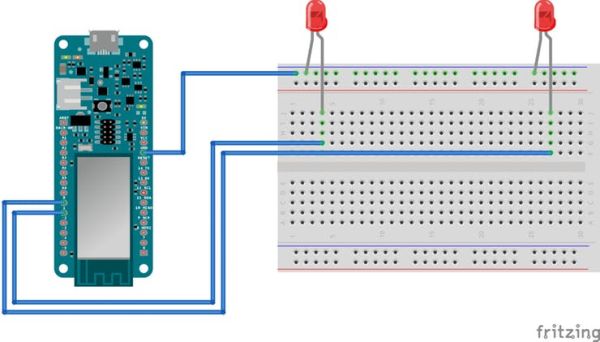
The project has two hardware components, ReSpeaker and Arduino MKR1000 to which two LEDs are connected (these LEDs represents different lights).
ReSpeaker recognize the user voice input using Microsoft Cognitive Service Speech API. If a trigger word is detected (configurable), the application turns on the LEDs on the ReSpeaker and then listens for commands. The trigger word I use for this demo is “jarvis“, but you can using any word you want. For no reason I am using this word. Here is and example of conversation:
- Jarvis, turn on turn bedroom light
- Jarvis, turn off turn bedroom light
- Jarvis, turn on turn kitchen light
- Jarvis, turn off turn kitchen light
Here is a pictorial representation of the application flow
Parts List
Setting up ReSpeaker
Follow this document to get started with ReSpeaker
Using the application
- Wire up the Arduino MKR1000 as per the schematics below
- Open Arduino IDE and flash the
ha.inoto MKR1000
- Connect your ReSpeaker to the network
- SSH to your ReSpeaker
- Create a folder to clone the project files
- Move to the folder and close the repo https://github.com/krvarma/respeakerha.git
- Got to respeaker folder
- Create an account or log on to Microsoft Cognitive Service Speech API](https://www.microsoft.com/cognitive-services/en-us/speech-api).
- Get an API Key and replace the variable
BING_KEYin the Python Scriptcreds.py.
- Create and account or log on to Api.ai
- Get Access Token and replace the variable
APIAI_TOKENin the Python Scriptcreds.py
- Open Arduino IDE and load respeaker_ha.ino`. Flash this application to your ReSpeaker
- Got to respeakerha\respeaker folder
- Install required Python package
paho-mqttusingpip install paho-mqtt
- Install required Python package
monotonicusingpip install monotonic
- Run
start_recognize.pyusingpython start_recognize.py
- Say
jarvisand wait for the lights on your ReSpeaker to turn on
- Say `turn on bedroom light/turn off bedroom light/turn on kitchen light/turn off kitchen light
If everything OK, you can turn on/off the lights using voice input.
Schematics
Demo Video
Code
Source : ReSpeaker Home Automation
- How does the project control lights?
The system records audio, converts it to text using Microsoft Cognitive Service, processes the text with Api.ai, and sends MQTT messages to turn lights on or off. - Can I use a different trigger word than jarvis?
Yes, the trigger word is configurable, though the author used jarvis for this demo. - What software is required to flash the code?
You need the Arduino IDE to flash the ha.ino file to the MKR1000 and respeaker_ha.ino to the ReSpeaker. - Does the project support Python scripting?
Yes, Python is used for scripts like start_recognize.py and requires packages such as paho-mqtt and monotonic. - What is the role of the Arduino MKR1000?
The Arduino MKR1000 connects to two generic LEDs which represent different lights controlled by the system. - How do I get the necessary API credentials?
You must create accounts on Microsoft Cognitive Service Speech API and Api.ai to obtain an API Key and Access Token respectively. - What happens when the trigger word is detected?
When the trigger word is detected, the application turns on the LEDs on the ReSpeaker and then listens for specific commands. - Can I control multiple rooms?
Yes, the example conversation demonstrates controlling both bedroom and kitchen lights using voice input.
