
Summary of REALISTIC MISSION CONTROL BOX IS A BLAST FOR ALL AGES
This article reviews a highly detailed "Mission Control Center" by [gcall1979], an electronic toy that simulates a complete space shuttle mission. Unlike simple busy boxes, it features a 10-minute countdown, powered flight, and a 90-minute orbit with tracking stations. The project uses a speed knob to accelerate simulation up to 15x real-time. It is built around an Arduino Mega for main control, an Arduino Uno for the launch computer, shift registers, an Adafruit sound board, active LEDs, toggle switches, a lighting diagram, and mushroom buttons for launch and abort functions.
Parts used in the Mission Control Center:
- Arduino Mega
- Arduino Uno
- Shift registers
- Adafruit sound board
- Active LEDs
- Covered toggle switches
- Shuttle diagram
- Mushroom buttons (launch and abort)
A lot of electronic busy boxes that are built for children are simply that — a mess of meaningless knobs and switches that don’t do much beyond actuating back and forth (which, let’s be honest, is still pretty fun to do). But this Mission Control Center by [gcall1979] knocks them all out of orbit. The simulation runs through a complete mission, including a 10-minute countdown with pre-flight system checks, 8.5 minutes of powered flight to get out of the atmosphere that includes another four tasks, and 90 minutes to orbit the Earth while passing through nine tracking stations across the world map.
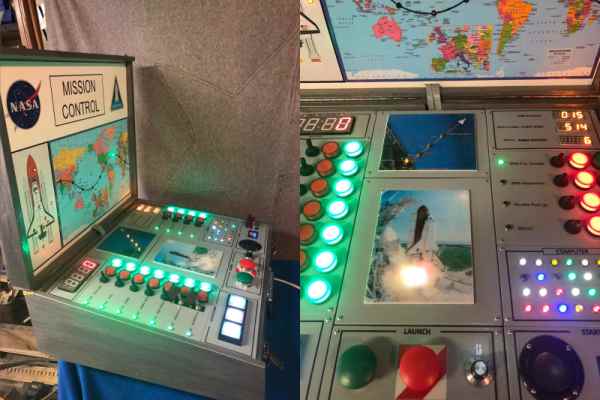
That’s a lot time to keep anyone’s attention, but fortunately [gcall1979] included a simulation speed knob that can make everything go up to 15 times faster than real-time. This knob can be twiddled at any time, in case you want to savor the countdown but get into space faster, or you don’t have 90 minutes to watch the world map light up.
The main brain of this well-built box is an Arduino Mega, which controls everything but the launch systems’ mainframe computer — this is represented by bank of active LEDs that blink along with the voice in the sound clips and runs on an Arduino Uno and a couple of shift registers. To keep things relatively simple, [gcall1979] used an Adafruit sound board for the clips.
We love everything about this build, especially the attention to detail — the more important pre-flight tasks are given covered toggle switches, and there’s a Shuttle diagram that lights up as each of these are completed. And what Shuttle launch simulator would be complete without mushroom buttons for launch and abort? Grab your victory cigar and check out the demo video after the break.
Is your child too young to be launching the Shuttle? Here’s an equally cool busy box with toddler brains in mind.
Source: REALISTIC MISSION CONTROL BOX IS A BLAST FOR ALL AGES
- What tasks are included in the simulation?
The simulation includes a 10-minute countdown with pre-flight checks, 8.5 minutes of powered flight with four tasks, and 90 minutes orbiting Earth while passing nine tracking stations. - Can the simulation speed be adjusted?
Yes, a simulation speed knob allows the user to make everything go up to 15 times faster than real-time at any time. - Which microcontroller controls the main functions?
An Arduino Mega serves as the main brain controlling everything except the launch systems' mainframe computer. - What hardware represents the launch systems' mainframe computer?
A bank of active LEDs that blink along with voice clips on an Arduino Uno and a couple of shift registers represent the mainframe. - How are the pre-flight tasks indicated visually?
A Shuttle diagram lights up as each of the more important pre-flight tasks are completed via covered toggle switches. - Are there buttons for emergency actions?
Yes, the build includes mushroom buttons specifically for launch and abort functions.
