
Summary of PRINT WITH PLASMA!
This article describes a DIY plasma printer built by [HomoFaciens] that burns images onto thermal paper using an off-the-shelf battery-powered plasma lighter. The project mounts the lighter on a 3D-printed XY mechanism driven by two stepper motors, controlled by an Arduino Uno receiving commands from a Linux command-line program via USB. It highlights the novelty of creating a printer without ink or toner, repurposing surplus thermal printing concepts for a unique plasma-based approach.
Parts used in the Plasma Printer:
- Off-the-shelf battery-powered plasma lighter
- 3D printed XY printer mechanism
- Two stepper motors
- Arduino Uno
- USB cable
- Linux box (computer)
- Thermal paper
Over the years there have been a variety of methods for a computer to commit its thoughts to paper. Be it a daisy wheel, a dot matrix, a laser, or an inkjet, we’ve all cursed at a recalcitrant printer. There’s another type of printer that maybe we don’t think of quite as often but is workhorse in a million cash registers and parking ticket machines: the thermal printer. These mechanisms can be readily found as surplus items and have made their way into more than one project here over the years. [HomoFaciens] has taken thermal printing a step further by building a plasma printer from scratch that makes use of the thermal paper.
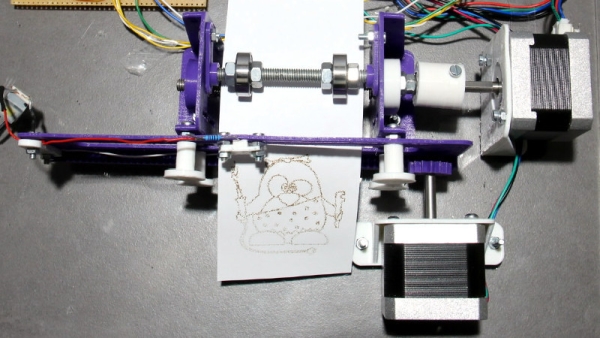
A thermal printer does its job as its name suggests, by burning the image into the paper. It may not deliver the best quality print, but scores on not needing ink ribbons, cartridges, or toner. This DIY version uses an off-the-shelf battery-powered plasma lighter to do the job, mounted on a 3D printed XY printer mechanism driven by two stepper motors. Behind the scenes is an Arduino Uno, which receives its instructions via USB from a command-line program on a Linux box. It’s admitted that this is hardly the pinnacle of printing technology, but it does at least make for a fascinating project. You can see it in action in the video below the break.
This isn’t [HomoFaciens]’ first printer, we’re instantly reminded of this ink drop printer from a few years ago.
Source: PRINT WITH PLASMA!
- How does this DIY printer work?
It uses a battery-powered plasma lighter mounted on a mechanism to burn images directly into thermal paper. - What components drive the movement of the printer?
The project utilizes a 3D printed XY mechanism driven by two stepper motors. - Which microcontroller controls the system?
An Arduino Uno serves as the controller behind the scenes. - How does the computer send instructions to the printer?
Instructions are sent via USB from a command-line program running on a Linux box. - Does this printer require ink ribbons or toner?
No, it does not need ink ribbons, cartridges, or toner because it burns the image. - What type of paper is required for this project?
The printer specifically uses thermal paper. - Is this considered high-end printing technology?
The author admits it is hardly the pinnacle of printing technology but is fascinating. - Who built this specific plasma printer?
[HomoFaciens] built this plasma printer from scratch.
