
Summary of PID Thermostat For The Arduino
This Arduino PID thermostat controls temperature using a DS18-series sensor and a solid-state relay, with configurable hardware profiles, an LCD menu, and an autotune mode to compute PID parameters. It uses Bret Beauregard’s PID and PID_Autotune libraries, supports serial deployment via ino and picocom/screen, and includes a Fritzing-designed shield option. Future plans include ramping setpoints, UI refactors, and profile import/export. Contributions via GitHub pull requests are welcome.
Parts used in the PID Thermostat:
- Arduino (platform for the sketch)
- DS18-series temperature sensor (DS18B20)
- Solid-state relay rated for your power source
- 16x2 LCD display (e.g., LCD-09052 from Sparkfun)
- 4 buttons (typically normally closed)
- Arduino shield (optional, Fritzing design available from repo/BatchPCB)
PID Thermostat
This PID thermostat is designed for the arduino platform. It provides separate tuning parameters for several hardware ‘profiles’, and features an autotune mode to calculate the PID parameters for a specific setpoint.
Installation
Hardware
- DS18-series (I’m using the DS18B20) temperature sensor
- Solid-state relay rated for your power source
- 16×2 LCD display (I’m using the LCD-09052 from Sparkfun)
- 4 buttons (I think mine are normally closed)
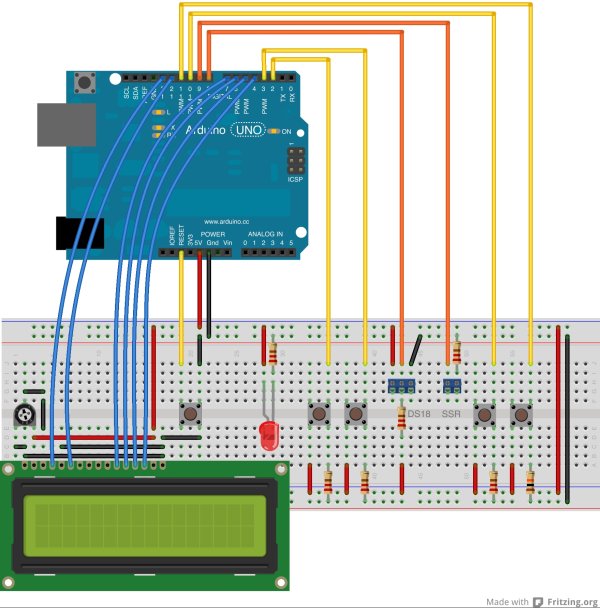 There’s an arduino shield designed specifically for this sketch which can be ordered for around $25 on BatchPCB. The fritzing source files for the PCB layout are in the
 fritzing directory.
Software
OSX:
sudo pip install ino
brew install picocom
Other OS’s will have their own picocom install process. Picocom is only really necessary if you want to use ino serial. I prefer to use screen /dev/tty.foo, FWIW.
Sketch
# get it
git clone [email protected]:kerinin/arduino-thermostat.git ./
cd arduino-thermostat
git submodule init && git submodule update
# deploy it
ino build
ino upload
Using
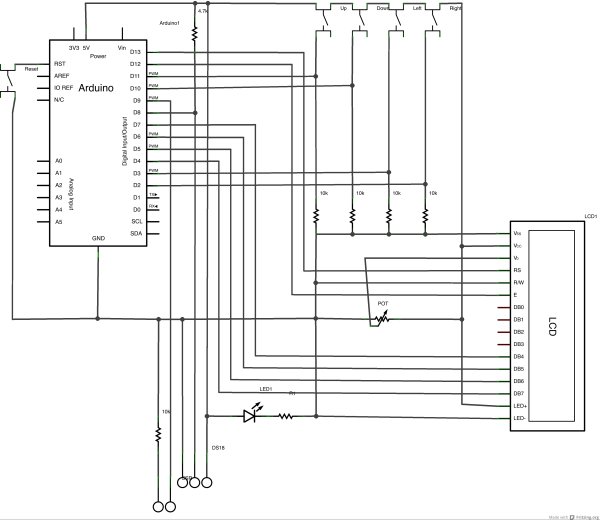
Make sure to review the pin settings and make changes to your wiring to match them or update them to work with your hardware.
The settings menus can be navigated using the up & down buttons, while values can be adjusted by using the left & right buttons. Establish your desired temperature and the SSR will begin operating.
If you notice frequent oscillations or periodic temperature spikes with extended ramp down periods, consider performing an autotune cycle. This operates by increasing the power to maximum and monitoring until the temperature exceeds a specific range around your desired setpoint (managed by the ‘Tuning Range’ parameter). It reduces the power to 0% and stays idle until the temperature drops below the specified range. Continue to wash and repeat until a consistent oscillation is established, then adjust the PID parameters according to the amplitude and frequency of the oscillation.
The PID and autotune features use the awesome PID and PID_Autotune libraries by Bret Beauregard. For more information on how they work take a look at this post about the PID library and this post about the Autotune library
 Contributing
Please do! Fork the repo, make some changes and send me a pull request!
Future Directions
- on/off switch
- I’d like the temperatures to ramp from their current value to the target value over some time period based on the tuning parameters. This should reduce oscillation and overshoot.
- Refactor the different files into self-contained classes. (Stop sharing global state!!!)
- Improve the MenuBackend library’s UI handling. Try to remove that case statement in the display code
- Import / Export profile data from console
For more detail: PID Thermostat For The Arduino
- What temperature sensor does the project use?
The project uses a DS18-series temperature sensor, specifically the DS18B20 in the example. - Can I control power output to a heater from the Arduino?
Yes, the sketch drives a solid-state relay rated for your power source to control the heater. - How do I interact with the thermostat settings?
Use the up and down buttons to navigate menus and left and right buttons to adjust values on the 16x2 LCD interface. - Does the project provide an autotune mode?
Yes, an autotune mode increases power to establish oscillation and calculates PID parameters based on the tuning range. - How is the sketch deployed to the Arduino?
Clone the repo, run ino build, and then ino upload; serial tools like picocom or screen can be used for serial access. - Are there libraries required for PID and autotune?
Yes, the project uses the PID and PID_Autotune libraries by Bret Beauregard. - Is there a PCB or shield option available?
Yes, a dedicated Arduino shield is available and the Fritzing source files are included in the fritzing directory. - What should I do if I see oscillations or temperature spikes?
Consider running the autotune cycle and then adjust PID parameters based on the resulting oscillation amplitude and frequency.
