
Summary of PICOSCOPE 6000E 8-CHANNEL 500MHZ MIXED-SIGNAL OSCILLOSCOPES
The PicoScope 6000E series introduces high-performance 8-channel oscilloscopes featuring 5GSa/s sampling and 4GSa memory. Available as models 6804E and 6824E, they offer up to 12-bit resolution and optional digital channels via TA369 pods. Key features include a built-in 14-bit AWG, SuperSpeed USB 3.0 connectivity, advanced FFT spectrum analysis, and dual-monitor support within the PicoScope 6 software environment for comprehensive signal analysis.
Parts used in the PicoScope 6000E Series:
- PicoScope 6804E oscilloscope
- PicoScope 6824E oscilloscope
- TA369 MSO pods
- 14-bit 200MS/s arbitrary waveform generator (AWG)
- SuperSpeed USB 3.0 interface
- PicoScope 6 software
- 4K monitor
- Dual monitor setup
The PicoScope 6000E series brings very high speed performance to an 8 analog channel, 16 digital channel oscilloscope with 5GSa/s sampling and 4GSa deep memory.
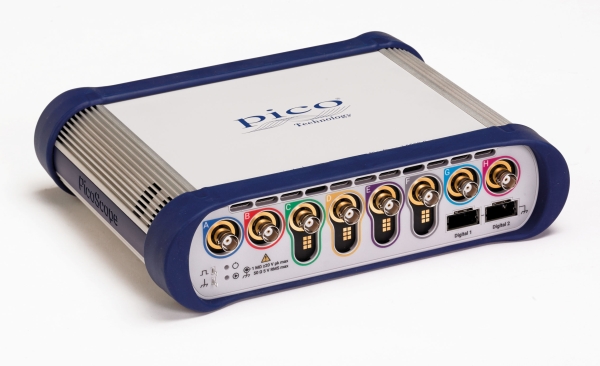
Saelig Company, Inc. has introduced the PicoScope 6000E Series 8-channel 500MHz Oscilloscopes, which provide 8 to 12 bits of vertical resolution, 5GSa/s sampling rate, and 4GSa memory, allowing these scopes to display single-shot pulses with 200ps time resolution. The two models in the 6000 series are the PicoScope 6804E with 8-bit A/D resolution and the PicoScope 6824E with 8, 10, or 12 bits “FlexRes” resolution. Both models can operate with an extra 4 bits of resolution with the enhanced vertical resolution software feature — a digital signal processing technique built into PicoScope 6. These oscilloscopes offer 8 analog channels, plus 8 or 16 optional digital channels when using the plug-in TA369 MSO pods, enabling accurate time-correlation of analog and digital channels.
Both 6000E models include a 14-bit 200MS/s arbitrary waveform generator (AWG). Its variable sample clock avoids the jitter on waveform edges seen with fixed-clock generators and allows the generation of accurate frequencies down to 100μHz. AWG waveforms can be created or edited using the built-in editor, imported from oscilloscope traces, loaded from a spreadsheet or exported to a .csv file. The SuperSpeed USB 3.0 interface and hardware acceleration ensure that the display is smooth and responsive even with long captures. PicoScope 6 software includes decoders for many serial protocols.
With up to a million points, PicoScope’s FFT spectrum display has excellent frequency resolution and a low noise floor. A click of a button will display a spectrum plot of the active channels, with a maximum frequency of up to 500MHz. Using a 4K monitor attached to the controlling PC, PicoScope 6 software can display more than ten times the information of ordinary oscilloscopes. PicoScope software also supports dual monitors, allowing instrument control and waveforms displayed on one, and large data sets from serial protocol decoders or DeepMeasure results on the second monitor.
Read more: PICOSCOPE 6000E 8-CHANNEL 500MHZ MIXED-SIGNAL OSCILLOSCOPES
- What are the main differences between the two 6000E models?
The PicoScope 6804E has 8-bit A/D resolution while the 6824E supports 8, 10, or 12 bits FlexRes resolution. - How can I add digital channels to these scopes?
You can add 8 or 16 optional digital channels by using the plug-in TA369 MSO pods. - Does the PicoScope 6000E have an internal signal generator?
Yes, both models include a 14-bit 200MS/s arbitrary waveform generator with variable sample clock. - Can the AWG generate very low frequencies?
Yes, the variable sample clock allows generation of accurate frequencies down to 100μHz. - What is the maximum frequency for the FFT spectrum display?
The FFT spectrum display supports a maximum frequency of up to 500MHz. - How does the software handle large data sets on monitors?
The software supports dual monitors allowing instrument control on one screen and large data sets like DeepMeasure results on the second. - Can I import waveforms into the AWG from other sources?
Yes, AWG waveforms can be imported from oscilloscope traces or loaded from a spreadsheet. - What interface ensures smooth display performance?
The SuperSpeed USB 3.0 interface combined with hardware acceleration ensures smooth and responsive displays.
