
Summary of OPENSCAN 3D SCANS ALL OF THE (SMALL) THINGS
OpenScan is an open-source 3D scanner for small objects, utilizing Arduino or Raspberry Pi hardware and photogrammetry to generate 3D models from multiple images. Recent updates include a web interface for visualizing scan features, allowing users to optimize results before finalizing the model. The project, led by Thomas, offers comprehensive guides, parts availability via an e-shop, and community support through GitHub and Reddit.
Parts used in the OpenScan:
- Arduino or Raspberry Pi
- 3D printed hardware components
- Common electronic components
- Web interface software
The OpenScan project has been updated quite a bit since its inception. OpenScan is an open source, Arduino or Raspberry Pi-based 3D scanner for small objects that uses 3D printed hardware and some common electronic components to create 3D scans using photogrammetry; a process by which a series of still images from different angles are used to create a 3D point cloud of an object, which can then be used to generate a 3D model.
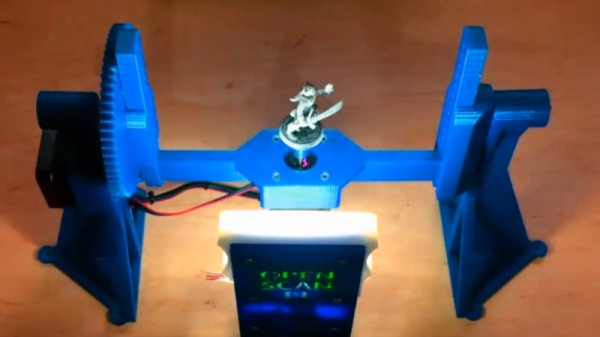
Photogrammetry is a somewhat involved process that relies on consistent conditions, so going through the whole process only to find out the results aren’t up to snuff can be tiresome. Happily, OpenScan offers some interesting new functions such as feature visualization via the web interface, which helps a user judge scan quality and make changes to optimize results without having to blindly cross their fingers quite so much. OpenScan remains a one-person project by [Thomas], who is clearly motivated to improve his design and we’re delighted to see it getting updates.
Embedded below is a video that walks through the installation and web interface. It’s a fairly long and comprehensive, but if you like you can skip directly to [Thomas] demonstrating the interface around the 8:22 mark, or watch it below. Interested in your own unit? [Thomas] has an e-shop for parts and the GitHub repository is right here; the project also has its own subreddit.
Photogrammetry isn’t limited to small objects. We have seen some neat applications in the past, where it was the missing link to modeling a custom control panel and making a 3d scan of a custom-molded ergonomic trackball.
Source: OPENSCAN 3D SCANS ALL OF THE (SMALL) THINGS
- What technology does OpenScan use to create 3D models?
It uses photogrammetry, which creates a 3D point cloud from a series of still images taken from different angles. - Can I build an OpenScan unit using a Raspberry Pi?
Yes, the device is based on either Arduino or Raspberry Pi hardware. - How can I judge the quality of my scans without guessing?
The updated web interface offers feature visualization to help users optimize results. - Where can I purchase the necessary parts for this project?
Thomas has an e-shop available for purchasing the required parts. - Is there a video guide available for installation?
Yes, a comprehensive video walks through the installation and demonstrates the web interface starting around the 8:22 mark. - Does OpenScan work only for very small objects?
No, while designed for small objects, photogrammetry is not limited to them and can model larger items like control panels. - Where can I find the source code for the project?
The GitHub repository is available online for those interested in the code. - Is there a community forum for OpenScan?
Yes, the project maintains its own subreddit for discussion.
