
Summary of ONION OMEGA2 PRO – A TINY, OPEN SOURCE LINUX DEV BOARD
The Omega2 Pro is a compact, open-source Linux development board featuring built-in Wi-Fi and gigabytes of storage. It runs OnionOS with an embedded OpenWrt distribution, allowing users to start projects immediately via a browser-based setup wizard without additional installations. The device supports multiple programming languages including Python, C++, and NodeJS for versatile IoT development.
Parts used in the Omega2 Pro:
- Micro USB cable
- Processor
- Memory
- Gigabytes of storage
- Wi-Fi radio
- OnionOS web-based GUI
- OpenWrt embedded Linux distro
- Browser-based setup wizard
A tiny, open source, plug-and-play Linux dev board with Wi-Fi and lots of storage.
Meet Omega2 Pro, the most powerful Omega yet.
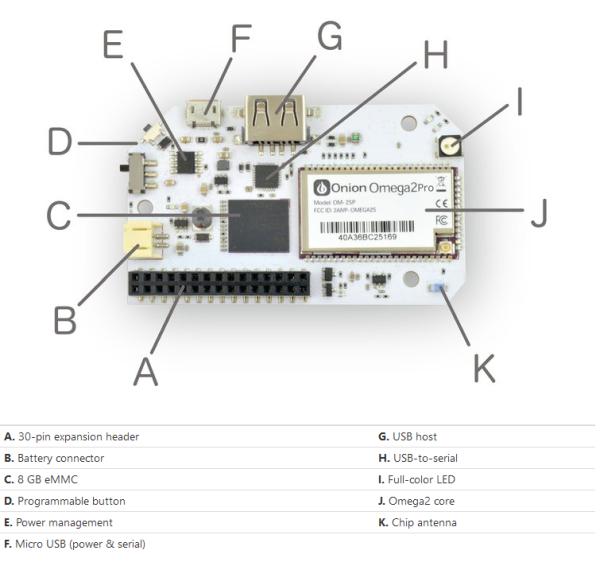
The Omega2 Pro is the next generation of our highly successful Omega2 and the most powerful IoT computer we’ve made yet. It is a standalone device – the processor, memory, gigabytes of storage, and Wi-Fi radio are all built-in, and it’s smaller than a breadboard.
The storage is pre-loaded with the OpenWrt embedded Linux distro, so getting started is as easy as plugging in a Micro USB cable for power and taking a few minutes to go through the browser-based setup wizard.
Developing
The Omega2 Pro makes it easy to jump right into building your project on your own terms:
- All you need is a Micro USB cable to provide power and it’s up and running.
- Hosted on the Omega2 Pro, OnionOS provides an intuitive user interface through your browser. Write code, run commands, and use apps to interact with your Omega2 Pro – no installation required.
- Develop your project in your favorite language: Python, GoLang, NodeJS, PHP, C, C++, and many more are supported.
Features
Software
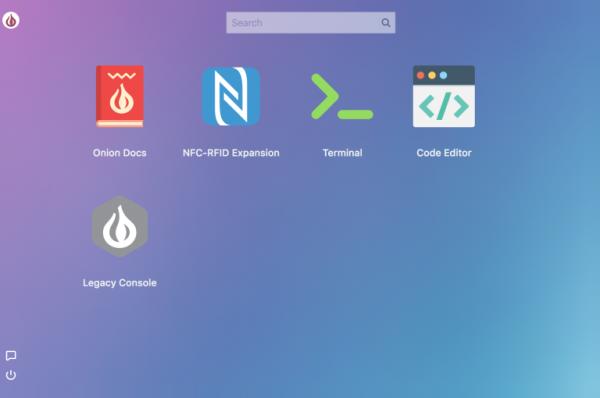
The Omega2 Pro will use the OnionOS web-based GUI that comes with different apps to control the device.
Read more: ONION OMEGA2 PRO – A TINY, OPEN SOURCE LINUX DEV BOARD
-
What makes the Omega2 Pro unique compared to other dev boards?
It is a standalone device with the processor, memory, gigabytes of storage, and Wi-Fi radio all built-in, making it smaller than a breadboard. -
How do I power up the Omega2 Pro?
All you need is a Micro USB cable to provide power and it will be up and running. -
Does the device require software installation on my computer?
No, you can write code, run commands, and use apps through the browser-hosted OnionOS interface without any installation required. -
Which programming languages are supported on the Omega2 Pro?
The device supports Python, GoLang, NodeJS, PHP, C, C++, and many more. -
What operating system comes pre-loaded on the device?
The storage is pre-loaded with the OpenWrt embedded Linux distro. -
How do I control the device features?
The Omega2 Pro uses the OnionOS web-based GUI that comes with different apps to control the device. -
Is the Omega2 Pro considered an IoT computer?
Yes, it is described as the most powerful IoT computer the manufacturer has made yet.
