
Summary of Onewire over UART
This project implements a 1-Wire bus master using a UART (per Maxim application note Using a UART to Implement a 1-Wire Bus Master). It uses a USB-to-TTL UART adapter, simple transistor/diode/resistor level circuitry, and software tools (lsow and digitemp_evil) to detect and read 1-Wire devices such as DS18x20 temperature sensors via a serial device node (e.g., /dev/ttyUSB0).
Parts used in the 1-Wire over UART Project:
- USB to UART converter (TTL level, e.g., SiLabs CP2102)
- USB to UART converter (TTL level, e.g., Prolific PL2303)
- Resistors (range 200 ohm to 20 kohm)
- Transistor (BJT or MOSFET)
- Fast, low forward-voltage diode (e.g., 1N4148) for the simplified version
- Optional MAX232 or equivalent (if using RS-232 UART)
- 1-Wire device (e.g., DS18S20, DS18B20, DS1822 temperature sensors)
- Power source for 1-Wire device (if not powered from UART board)
- Host computer with USB port and serial device node (e.g., /dev/ttyUSB0)
This project is based on Maxim’s application note: Using a UART to Implement a 1-Wire Bus Master
http://www.maximintegrated.com/app-notes/index.mvp/id/214
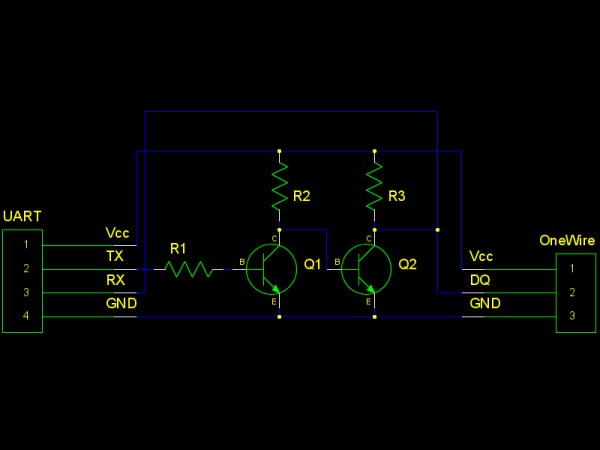
Resistors can vary from 200ohm to 20kohm. Transistors can be BJTs or MOSFETs. The diode used in the simplified version should be fast and has a low forwarding voltage. 1N4148 is known to work.
A USB to UART converter is needed. There are many USB to UART converters that have a TTL UART interface. RS-232 UARTs should be avoided since its voltage is very high and can damage your device. If you have to use one of such, insert a MAX232 or equivalent chip between the RS-232 port and the circuits mentioned above properly.
Here are a few models that are tested. Many of these are prices under $5:
SiLabs CP2102 USB to UART converters (shown below) are known to work.
Prolific PL2303 USB to UART converters (shown below) are also known to work, but most boards have problematic power output pins. Try to power your 1-wire device separately or strange things will happen.
Software
Type “make” to get “lsow” and “digitemp_evil” compiled.
lsow is a tool that list devices on a onewire bus connected to a USB to UART converter. Simply type something like “lsow /dev/ttyUSB0” and it will show device IDs found on the bus.
digitemp_evil is a demonstration program that reads temperature values from DS18S20/DS18B20/DS1822 onewire digital temperature sensors. Type “digitemp_evil /dev/ttyUSB0” and read IDs and values. Sometimes after powering up DS18B20 will give something like 85°C, you will just need retry.
For more detail: Onewire over UART
- What USB to UART converters are known to work?
SiLabs CP2102 and Prolific PL2303 USB to UART converters are known to work. - Can RS-232 UARTs be used directly?
No, RS-232 UARTs should be avoided because their high voltages can damage the device; use a MAX232 or equivalent if necessary. - What resistors values can be used in the circuit?
Resistor values can vary from 200 ohm to 20 kohm. - What type of transistors can be used?
Transistors can be BJTs or MOSFETs. - What diode should be used in the simplified version?
Use a fast, low forward-voltage diode such as 1N4148. - Do Prolific PL2303 boards have any caveats?
Yes, many PL2303 boards have problematic power output pins; power the 1-Wire device separately if issues occur. - What software is provided and how is it built?
Type make to build lsow and digitemp_evil. - What does lsow do?
lsow lists devices on a 1-Wire bus connected to a USB to UART converter (example: lsow /dev/ttyUSB0). - What does digitemp_evil do?
digitemp_evil reads temperature values from DS18S20/DS18B20/DS1822 sensors via the USB to UART converter (example: digitemp_evil /dev/ttyUSB0). - What should I do if DS18B20 returns 85°C after power-up?
Retry reading the sensor; sometimes it returns 85°C initially and a subsequent attempt will yield correct values.
