
Summary of NEW PASSWORDPUMP2.0 ENSURES YOU NEVER FORGET A PASSWORD
Dan Murphy designed PasswordPump 2.0, a USB hardware password manager that stores up to 250 credential sets encrypted with AES-256. Based on the Adafruit ItsyBitsy M4 and a custom PCB, it uses removable EEPROM chips (primary and backup), an I2C OLED (128x32), and a rotary encoder. Credentials can be entered via the encoder, keyboard, serial terminal, or a dedicated Python GUI, and can be sent as keystrokes to host systems. The device organizes accounts alphabetically and supports editing, searching, and a 15-character master password for authentication.
Parts used in the PasswordPump 2.0:
- Adafruit ItsyBitsy M4
- Custom PCB
- Pair of removable EEPROM chips
- I2C OLED display (128 x 32)
- Rotary encoder
- USB connector (implicit for USB-based device)
Using the same password on different platforms can be a security risk, but remembering different passwords, used for different accounts, can be quite the task too especially with the need to infuse special characters and numbers, and the fact that you may not use some of the passwords regularly enough for them to become easy to remember.
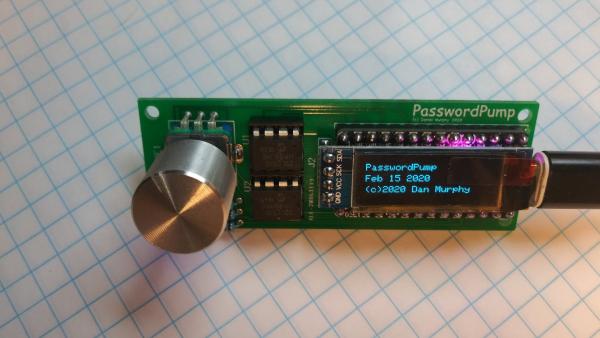
To help keep track of all these, Dan Murphy has designed a USB- based device that is capable of storing up to 250 sets of credentials, that are encrypted with AES-256 encryption, which makes gaining access to the credentials nearly impossible.
The new device called, PasswordPump 2.0, removes the need to store your credentials in the cloud or on a file where an attack could easily leave you exposed.
It is based on the Adafruit ItsyBitsy M4 and includes; a pair of removable EEPROM chips, an I2C OLED display (128 x 32), and a rotary encoder, all stacked on a custom PCB. The credentials are stored on the first EEPROM chip and backed up on the secondary for added security.
The device allows users to enter their credentials using several methods, including; the rotary encoder, the keyboard, via the serial terminal, or via the PasswordPump Python-based GUI, which was explicitly developed for this purpose.
The PasswordPump 2.0 offers a myriad of features, which are as provided by Murphy:
- Store up to 250 sets of credentials
- Authenticate with a 15 character master password
- Search for accounts
- Data entry via rotary encoder or keyboard and serial monitor, or via client Python GUI running in Windows, Ubuntu, or MacOS.
- Send username and password as if typed in via keyboard. Can also send URL, old password and account name.
- Add account name, username, password (generated or not), URL, old password
- Accounts added in alphabetical order
- Edit existing username, password, URL, style (inter-username/password character, Return or Tab), old password
Read more: NEW PASSWORDPUMP2.0 ENSURES YOU NEVER FORGET A PASSWORD
- How many credential sets can PasswordPump 2.0 store?
It can store up to 250 sets of credentials. - What encryption does PasswordPump 2.0 use?
Credentials are encrypted with AES-256. - What microcontroller is PasswordPump 2.0 based on?
It is based on the Adafruit ItsyBitsy M4. - How are credentials entered into PasswordPump 2.0?
Credentials can be entered via the rotary encoder, keyboard, serial terminal, or the PasswordPump Python GUI. - Does PasswordPump 2.0 provide a backup for stored credentials?
Yes, it uses a secondary removable EEPROM chip to back up credentials stored on the first chip. - Can PasswordPump 2.0 send credentials to a host as if typed?
Yes, it can send username and password as if typed, and can also send URL, old password, and account name. - How are accounts organized on PasswordPump 2.0?
Accounts are added in alphabetical order. - What authentication method does PasswordPump 2.0 use?
It authenticates with a 15 character master password. - On which operating systems does the Python GUI run?
The PasswordPump Python GUI runs on Windows, Ubuntu, and MacOS.
