
Summary of Marble Disorder – a marble maze simulator with tilt switches using Arduino
Marble Disorder is an Arduino-based marble maze simulator that uses two tilt switches to detect box orientation, allowing players to navigate a virtual marble. While the original version requires a spin knob and potentiometer for direction control, a newer, more intuitive version exists that simplifies gameplay. The project includes an LCD display for visual feedback and optional audio via a piezo speaker, which can be muted in the software.
Parts used in Marble Disorder:
- An Arduino
- A Hitachi HD44780 compatible LCD display
- 2 tilt switches
- A pushbutton
- 3 10K Ohm resistors
- 2 10k Ohm potentiometers
- Optional piezo speaker
Marble Disorder is a borderline case of Marble Madness 🙂
It simulates a marble maze by sensing the box’s orientation with 2 tilt switches.
Stop the press: there’s a new and more intuitive version that doesn’t require the spin knob (See video).
I keep documenting the original version below for historical purposes, but don’t watch this – watch that
Bonus game: The Marble Disorder box is compatible with Ariadne. (the only difference is the tilt switches).
Build once, play twice 🙂
Step 1: Hardware and software
Note: the new version is a bit different (and requires less components).
It is advised to build the new version (much more fun to play).
Hardware
You’ll need:
- An Arduino
- A Hitachi HD44780 compatible LCD display (I used 16×2, but 20×4 should work too)
- 2 tilt switches
- A pushbutton
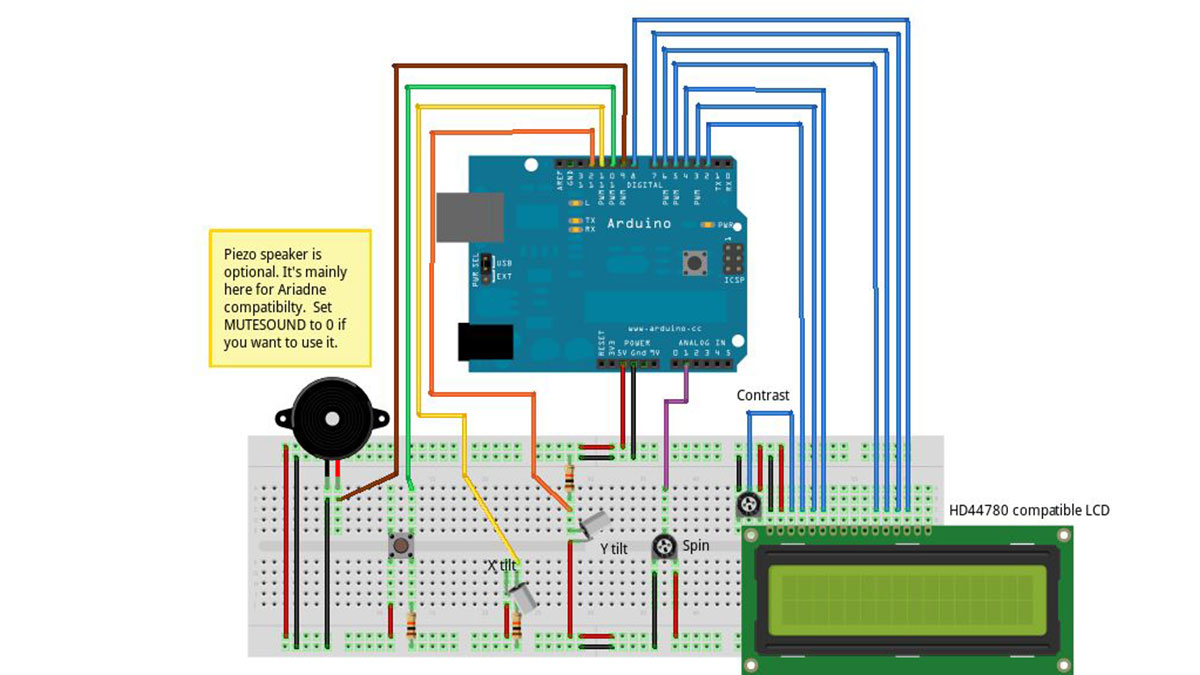
- 3 10K Ohm resistors (pull-up for the tilt switches and the buttons)
- 2 10k Ohm potentimeters (one for spin control and [an optional] one for LCD contrast)
- Optional piezo speaker
See breadboard diagram.
Software
The code is here.
The maze generation algorithm is the same as Ariadne’s (See explanation there).
If you connect the piezo speaker, you can mute it by setting MUTESOUND to 1.
Actually – this is the default 🙂
Why have the speaker and mute it? Glad you asked:
Like I’ve mentioned, you can also run Ariadne’s code on this box.
Ariadne only beeps when you hit a wall (i.e. you’ve made a mistake). This can be avoided.
Marble Disorder beeps whenever there’s a spin (i.e. when both tilt-switches allow the marble to move to 2 different cells, and the spin potentiometer determines which one).
This can’t be avoided – so you end up with a pretty noisy game. It does help play the game – but I’m not sure it’s worth the hassle of all those beeps.
Another option is to put a switch on the piezo speaker (something my Electronic Brick shield doesn’t allow).
Step 2: Construction
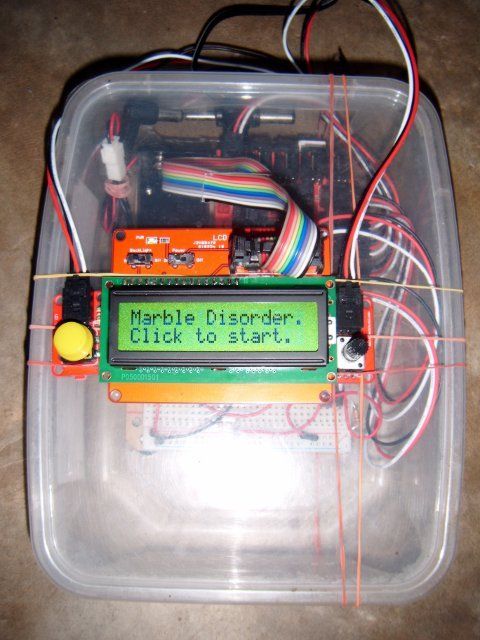
I’m the last person to teach anyone how to do stuff in the physical world, and anyway – you’ll most probably need to do it in a different way (I happened to have an Electronic Brick kit and a SeedStudio harness), but cutting a transparent Tupperware clone seems like a nice and easy way to do it.
Let me know (and show some photos) if you make your own box. I’m sure it would look nicer than mine 🙂
Enjoy,
@TheRealDod
Step 3: Playing the game
Note: the new version is a lot easier to play (so easy – it doesn’t even need instructions).
This step is kept here for historical purposes.
- An Arduino
- A Hitachi HD44780 compatible LCD display
- 2 tilt switches
For more detail: Marble Disorder – a marble maze simulator with tilt switches using Arduino
- What components are required for the hardware?
You need an Arduino, a Hitachi HD44780 compatible LCD display, 2 tilt switches, a pushbutton, 3 10K Ohm resistors, 2 10k Ohm potentiometers, and optionally a piezo speaker. - How does the game simulate the marble maze?
The system simulates the maze by sensing the box's orientation using 2 tilt switches. - Can I mute the sound in the game?
Yes, you can mute the piezo speaker by setting MUTESOUND to 1 in the code. - Does the new version require a spin knob?
No, the new version is more intuitive and does not require the spin knob. - What type of display works with this project?
A Hitachi HD44780 compatible LCD display works, such as a 16x2 or 20x4 model. - Is the project compatible with other games like Ariadne?
Yes, the Marble Disorder box is compatible with Ariadne, differing only in the tilt switches. - Why does the game beep when spinning?
The game beeps whenever there is a spin because both tilt switches allow movement to different cells, determined by the spin potentiometer. - How should the box be constructed?
Cutting a transparent Tupperware clone is suggested as a nice and easy way to build the box.
