
Summary of Interface Arduino and Color Sensor – RGB Sensor TCS230
This article explains how to interface an Arduino Uno with a TCS230 RGB color sensor. The sensor uses photodiodes and a light-to-frequency converter to generate square waves proportional to light intensity, which the Arduino reads as RGB values. By configuring S2 and S3 pins, users can filter Red, Blue, Clear, or Green light, while S0 and S1 adjust output frequency.
Parts used in the Interfacing Arduino and RGB Color Sensor TCS230:
- TCS230 color sensor (RGB Sensor)
- Arduino Uno
- Photodiodes
- Light to frequency converter
- LED lights
In this article, we are going to read the colors using the TCS230 color sensor (RGB Sensor) and Arduino Uno. The TCS 230 color sensor senses the color light by using the photodiodes. The sensor converts the readings from the photodiode into a square wave by using the light to frequency converter. The frequency of these waves is directly proportional to the light intensity. Then the Arduino reads these square waves and gives us the values of the RGB colors. So let’s begin our tutorial on Interfacing Arduino and RGB Color Sensor TCS230.
Pin out – TCS230 (RGB Color Sensor)
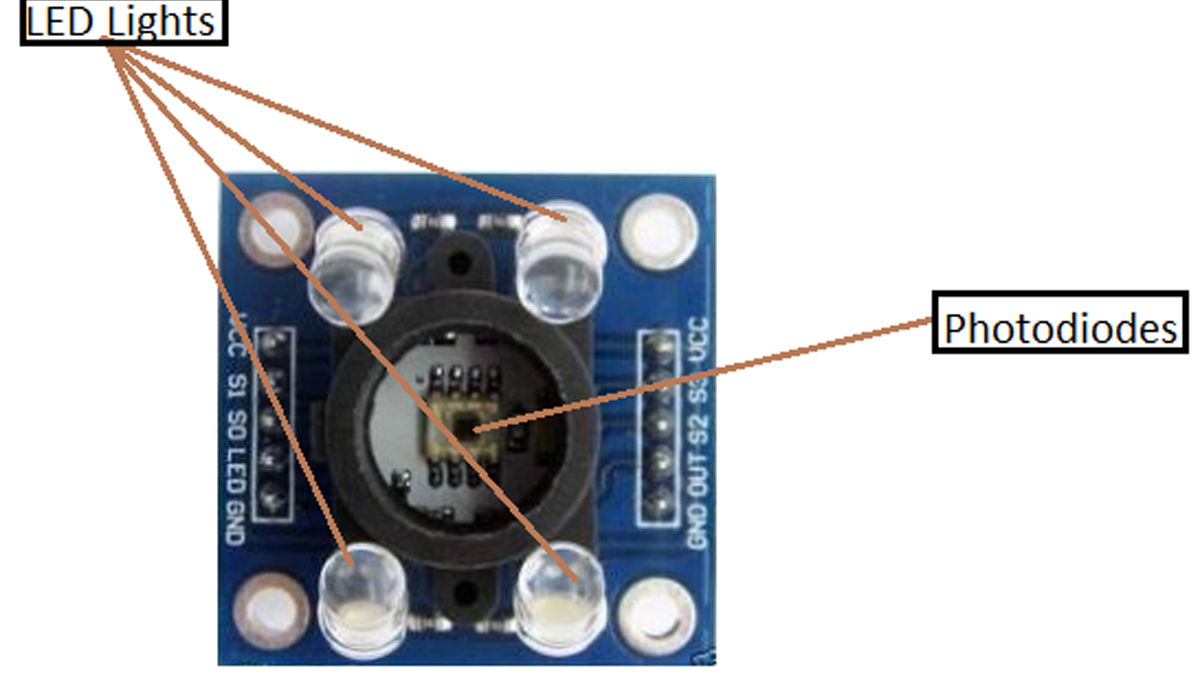
If you take a closer look at the sensor, you will see that it contains an array of photodiodes which are used to sense the color light. The sensor also consists of four LED lights.
The sensor has 10 pins; S0, S1 are for setting the frequency and S2, S3 are for reading the color values. The out pin is supposed to give the output to Arduino in the form of a square wave. The other pins are for powering the sensor.
Working of RGB Color Sensor
TCS230 color sensor consists of an 8X8 array of photodiodes. These photodiodes consist of three different color filters. 16 of them are red, 16 of them are green, 16 of them are blue and 16 of them are clear (No color). Every 16 photodiodes are connected in parallel. So, if we want to read colors, then we can read them by using the S2 and S3 pins. The pin combination for reading the RGB colors is as follows
| S2 | S3 | Color |
| LOW | LOW | Red |
| LOW | HIGH | Blue |
| HIGH | LOW | Clear |
| HIGH | HIGH | Green |
So with the help of pin combinations provided in the above table, we can read values of each color. First of all, we have to read the Red color by making both the S2 and S3 pin low. Then, we read the Green color by making both the pins high and finally, we read the Blue color by making the S2 pin low and S3 pin high. After that, we will map these values to 0-255 and show the color values on the serial monitor.
The sensor also has two more pins which are S0 and S1. These pins are used to set the frequency to 0%, 2%, 20% or 100%. The pin combination for setting the frequency using these pins is as follows
| S0 | S1 | Output Frequency |
| LOW | LOW | 0% |
| LOW | HIGH | 2% |
| HIGH | LOW | 20% |
| HIGH | HIGH | 100% |
In our code, the frequency is set at 20%. You can set the frequency to any other value (you desire), but the output values will change according to the set frequency and you will have to map the color values relative to the set frequency.
Read More: Interface Arduino and Color Sensor – RGB Sensor TCS230
- How does the TCS230 sensor sense color?
The sensor senses color light using an array of photodiodes and converts readings into square waves via a light to frequency converter. - What is the relationship between wave frequency and light?
The frequency of the square waves generated by the sensor is directly proportional to the light intensity. - Which pins are used to read specific color values?
S2 and S3 pins are used to read color values by selecting specific pin combinations for Red, Blue, Clear, or Green. - How do you configure the sensor to read Red color?
To read Red color, both the S2 and S3 pins must be set to LOW. - What is the function of the S0 and S1 pins?
S0 and S1 pins are used to set the output frequency to 0%, 2%, 20%, or 100%. - Does changing the frequency setting affect the code?
Yes, if the frequency is changed, the output values will change and color values must be mapped relative to the new frequency. - What frequency was used in the tutorial code?
The frequency was set at 20% in the code example provided. - How many photodiodes are inside the TCS230 sensor?
The sensor consists of an 8X8 array of photodiodes.
