
Summary of How’s the weather? TMP102 + Arduino
The TMP102 is a precise, low-power ambient temperature sensor capable of detecting 0.0625°C changes with ±0.5°C accuracy while consuming only 10µA. It outputs digital data via I2C rather than analog signals, offering superior precision over standard Arduino ADC readings. The article details connecting the sensor to an Arduino using the Wire library, explaining SDA/SCL pin locations for various boards and how to configure unique addresses by toggling the ADD0 pin.
Parts used in the TMP102 + Arduino Project:
- TMP102 Ambient Temperature Sensor
- SparkFun Breakout Board
- Arduino Microcontroller (Non-Mega or Mega)
- I2C Wire Library
The TMP102 is a very simple, yet accurate, ambient temperature sensor which is capable of detecting .0625ºC changes between -25 and +85°C, with an accuracy of 0.5°C. And the real kicker… It does all of this while only consuming 10µA (10 millionths of an amp). The thing is quite tiny, so SparkFun has put it on a breakout board to make things easier.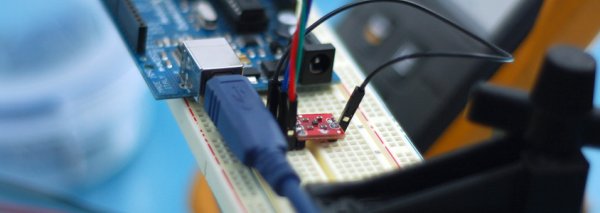
Naturally, you probably already ordered a few of these for your room-to-room sensor-network to prove to your landlord that the heat is dropping below the agreed temperature. Wait… That’s just me? You just want to know how to hook one up to your Arduino? Ok… I can help with that.
The TMP102 is an I2C device, so when we are done with it, it will actually tell you the temperature, not send an analog signal that you then need to interpret. But that also means it is a little harder (code-wise) than just using an ADC and reading an analog voltage. But, in return for the added complexity, It is also more accurate then any analog reading the Arduino is capable of. So, if you actually care what the ambient temperature is, and not just checking to see if the temperature has changed, this is your guy. I say ambient temperature because it would be a little hard to connect this to anything, and it doesn’t support a thermocouple.
For this, and all other I2C devices connected to your arduino, all you need to know is that I2C is a 2-wire serial connection, SDA (Data) and SCL (Clock) – On your Arduino (everything but the mega) SDA is on analog pin 4, and SCL is on analog pin 5. On an arduino mega, SDA is digital 20, and SCL is digital 21. Like most I2C devices, when communicating with one on an Arduino, we will be using the Wire library to do so.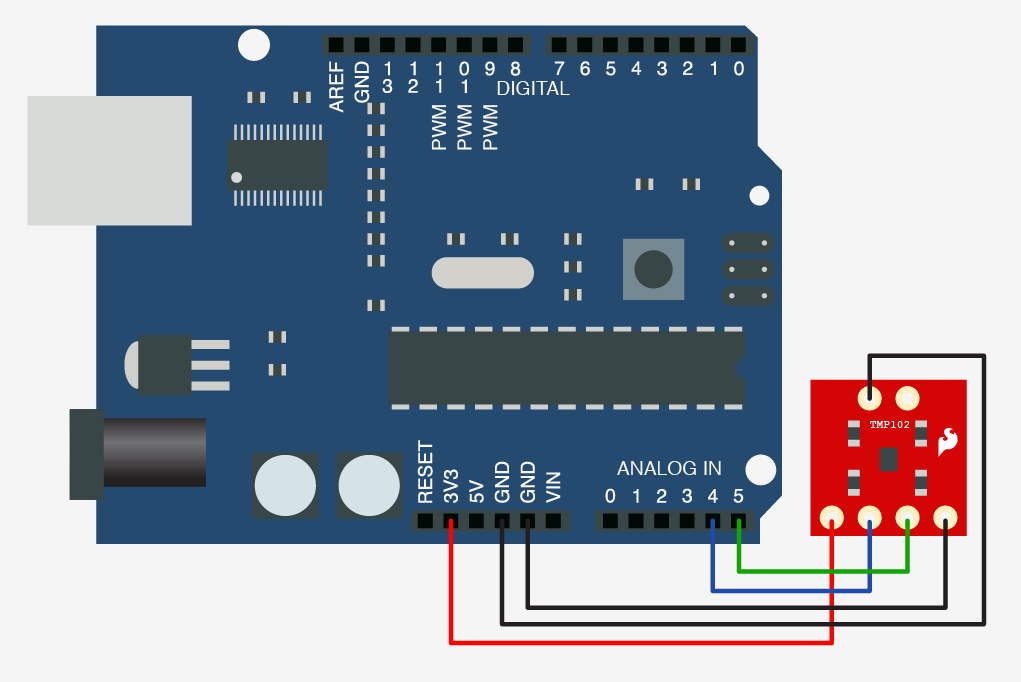
The sensor has an address pin (ADD0) that is used to change the address the sensor is located at. This is useful if you need more than one of these hooked up to one Arduino, you can still call them independently even on the same bus. We are grounding this pin so that the sensor will use the address of 72 (0x48 in hex). Connecting this pin to V+ (3.3v on the arduino) would set the address to 73 (0x49 in hex), and you would just need to change that address at the top of the code ( int tmp102Address = 0x49; ).
For more detail: How’s the weather? TMP102 + Arduino
- What is the power consumption of the TMP102?
The sensor consumes 10µA. - How does the TMP102 output temperature data?
It uses an I2C device to send digital data instead of an analog signal. - Which pins are used for SDA and SCL on non-Mega Arduinos?
SDA is on analog pin 4 and SCL is on analog pin 5. - Can you connect multiple TMP102 sensors to one Arduino?
Yes, by changing the address pin configuration to call them independently on the same bus. - What address does the sensor use when the ADD0 pin is grounded?
Grounding the pin sets the address to 72 (0x48 in hex). - How do you set the sensor address to 73?
Connect the ADD0 pin to V+ (3.3v) and update the code address variable. - Does the TMP102 support thermocouples?
No, it does not support a thermocouple. - Why is the TMP102 more accurate than an analog reading?
It provides better accuracy than any analog reading the Arduino is capable of.
