
Summary of HOW TO PROGRAM A REALLY CHEAP MICROCONTROLLER
This article highlights the CH552 microcontroller, a low-cost 8051-based chip featuring native USB support and an open-source toolchain. It details a project by [Aaron Christophel] demonstrating how to build a functional development board using minimal components. The guide covers wiring, programming via WCHISPTool, and utilizing the chip's USB capabilities to emulate HID devices like keyboards.
Parts used in the CH552 Development Board:
- CH552 microcontroller
- Perf board
- Resistor
- Caps (capacitors)
- USB A plug
There are rumors of a cheap chip that does USB natively, has an Open Source toolchain, and costs a quarter. These aren’t rumors: you can buy the CH552 microcontroller right now. Surprisingly, there aren’t many people picking up this cheap chip for their next project. If there’s no original projects using this chip, no one is going to use this chip. Catch 22, and all that.
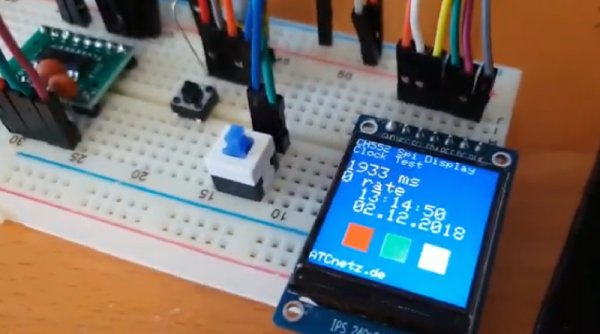
Like a generous god, [Aaron Christophel] has got your back with a working example of programming this cheap chip, and doing something useful with it. It blinks LEDs, it writes to an I2C display, and it does everything you would want from a microcontroller that costs a few dimes.
The CH552, and its friends the small CH551 all the way up to the CH559, contain an 8051 core, somewhere around 16 kB of flash, the high-end chips have a USB controller, there’s SPI, PWM, I2C, and it costs pennies. Unlike so many other chips out there, you can find SDKs and toolchains. You can program the chip over USB. Clearly, we’re looking at something really cool if someone writes an Arduino wrapper for it. We’re not there yet, but we’re close.
To program these chips, [Aaron] first had to wire up the microcontroller into a circuit. This was just a bit of perf board, a resistor, a few caps, and a USB A plug. That’s it, that’s all that’s needed. This is a fairly standard 8051 core, so writing the code is relatively easy. Uploading is done with the WCHISPTool software, with options available for your favorite flavor of *nix.
But it gets better. One of the big features of the CH552 is USB. That means no expensive or weird programmers, yes, but it also means the CH552 can emulate a USB HID device. The CH552 can become a USB keyboard. To demo this, [Aaron] programmed a CH552 board (DE, here’s the Google translatrix) loaded up with touch pads and LEDs to become a USB keyboard.
If you don’t feel like soldering up one of these yourself, there are some suppliers of CH554 dev boards, and the files for [Aaron]’s projects are available here. Check out the videos below, because this is the best tutorial yet on programming and using some very interesting chips that just appeared on the market.
Source: HOW TO PROGRAM A REALLY CHEAP MICROCONTROLLER
- What is the CH552 microcontroller?
The CH552 is a cheap microcontroller containing an 8051 core with around 16 kB of flash and native USB controller support. - Can you program the CH552 over USB?
Yes, the chip can be programmed directly over USB without needing expensive or weird programmers. - How do you upload code to the CH552?
Uploading is done using the WCHISPTool software, which offers options for various *nix flavors. - What can the CH552 emulate as a USB device?
The CH552 can emulate a USB HID device, such as becoming a USB keyboard. - What components are needed to wire up the microcontroller?
You need a bit of perf board, a resistor, a few caps, and a USB A plug. - Are there SDKs and toolchains available for this chip?
Unlike many other chips, you can find SDKs and toolchains for the CH552 series. - Does the CH552 have SPI and I2C capabilities?
Yes, the chip includes SPI, PWM, and I2C interfaces alongside its USB controller. - Where can you find files for Aaron's projects?
The files for Aaron's projects are available online as mentioned in the source text.
