
Summary of How to build a whole home energy monitor using Arduino
This article details building a whole-house energy monitor using Arduino, featuring real-time display, USB datalogging, and internet connectivity for graphing. The system measures voltage and current to calculate power metrics like kWh, RMS values, and frequency. Data is transmitted wirelessly via Xbee from the sensor unit to an Ethernet board, which hosts Flot-based web graphs.
Parts used in the Whole House Energy Monitor:
- Arduino (2 units)
- Voltage measurement with step down AC to AC adapter
- Current measurement with CT sensor
- Large green 7 segment display
- 6 mode chooser potentiometer
- Red/green LED indicator
- USB pen data logging VDIP1 board
- Xbee wireless link
- Ethernet shield
- Flot software
This page and linked pages detailed below document how to build whole house energy monitor that has a display for easy, quick access to current energy use information, usb datalogging for detailed long term data storage and Internet connectivity for online graphing.
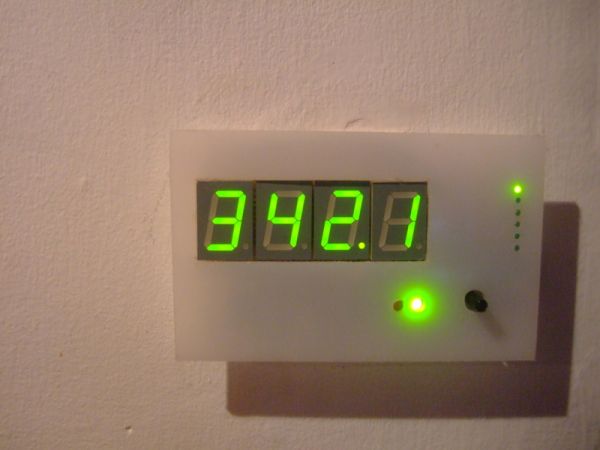
First a quick look at the installed setup:
The Display
The display unit consisting of 4 large green led 7 segments. On the right is a 6 mode – mode chooser so that you can select by turning the potentiometer (bottom – right) whether the display shows real power, apparent power, power factor, RMS Voltage, RMS Current, frequency or cumulative kWh used. The display is connected to the main unit by a cable that goes through the wall at the back of the display.
The Main unit
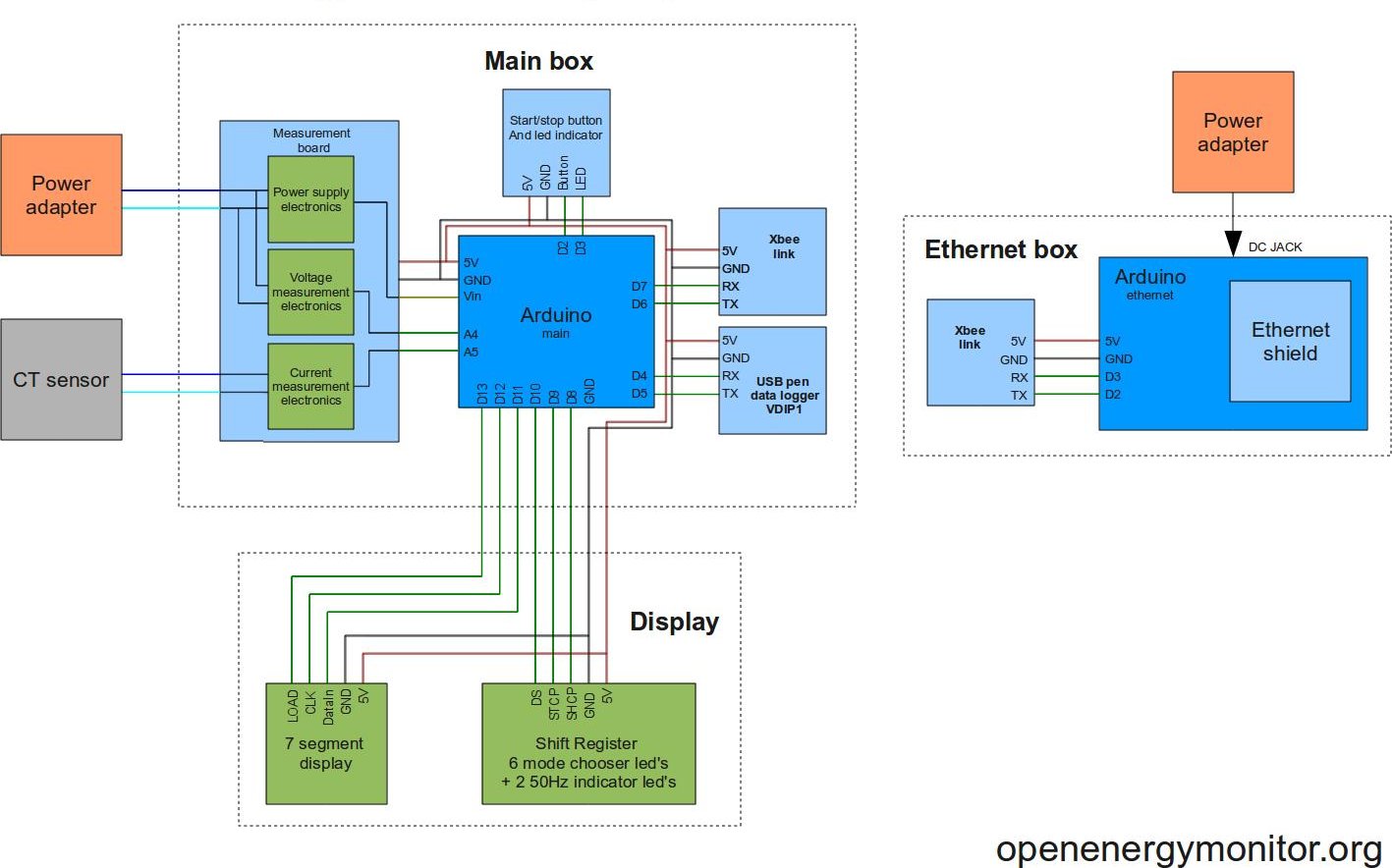
The main unit is the small box in the far left of pic below with the white CT sensor wire crossing the shelf over to the sensor clipped on to the main mains wire on the right. The main unit contains the Arduino, voltage and current measurement electronics, power electronics, usb pen datalogging and xbee wireless link.
The Ethernet unit
The ethernet unit is connected to the router, the small box on top of the larger box houses the wireless xbee link.
Web based graphing
Below is a screenshot of the web based graphing that can be seen live here.
Graphing is done using flot – a very nice piece of software.
For more pictures of the setup check out the picasa album here.
Main Features:
- Voltage measurement with step down AC to AC adapter
- Current measurement with CT sensor.
- Power for sensor board provided with same AC to AC adapter used for voltage measurement.
- Calculation of Real power, Apparent power, power factor, RMS voltage, RMS current, frequency, cumulative kWh.
- Display unit consisting of large green 7 segment display,
- 6 mode – mode chooser and red/green led indicator to indicate when grid is below and above 50Hz.
- USB pen data logging using VDIP1 board
- Xbee wireless link from sensor unit to the Ethernet unit.
- Ethernet board for logging and graphing on Internet.
- Flot based graphing on website.
Here’s the full part list, it contains links to suppliers (mainly farnell), part prices and alternative parts to try to bring the cost down.
Quick cost breakdown
Measurement Board: £12.68
Xbee link: £54.32
Xbee link cable: £0.57
DataLogger: £15.44
Display: £19.56
Display cable: £1.53
Ethernet shield: £29.00
2 Arduino’s: £41.16
Total: £174.25!!!
For more detail: How to build a whole home energy monitor using Arduino
- What components are used for voltage measurement?
A step down AC to AC adapter is used for voltage measurement. - How is current measured in this project?
Current measurement is performed using a CT sensor. - Does the display show cumulative energy usage?
Yes, the display shows cumulative kWh used among other modes. - Can I log data locally without internet?
Yes, the system uses a USB pen data logging VDIP1 board for detailed long term data storage. - How does the system connect to the internet for graphing?
An Ethernet board connects to the router to enable online graphing via Flot software. - What software is used for web based graphing?
Graphing is done using Flot, a piece of software mentioned in the article. - How many Arduinos are required for the main unit?
The cost breakdown indicates that 2 Arduinos are used in the project. - Is there a way to change what the display shows?
Yes, a 6 mode chooser allows selection of real power, apparent power, power factor, RMS Voltage, RMS Current, frequency, or cumulative kWh.
