
Summary of Energino: an Arduino-based energy consumption monitoring shield
Energino is an Arduino-based DC power meter and relay switch designed to monitor energy consumption of appliances like networking devices. It measures voltage (0-60V) and current (0-5A) with high sampling rates. When paired with an Ethernet shield, it offers REST and COSM interfaces for remote monitoring and control. The project involves assembling a custom PCB using specific sensors and components, followed by calibrating the ACS712 current sensor for accurate readings before uploading the Arduino sketch.
Parts used in the Energino Project:
- Energino PCB from Fritzing or a Proto Shield
- ACS712 Low Current Sensor Breakout
- Resistors 10K x2
- Resistor 1K
- Resistor 100K
- Diode 1N4001
- Transistor NPN 2N3904
- Screw terminals (2 Pin) x2
- Relay Omron G6E-134PL-ST-US
- Arduino Stackable Header - 8 Pin x3
- Arduino Stackable Header - 6 Pin x1
Energino is a plug-load meter that measures the amount of power consumed by whatever DC electrical appliance is plugged into its. It was originally designed to monitor the energy consumption of simple networking devices such as Ethernet switches and WiFi access points, but it can be used to monitor any DC appliance. Energino “sits” between the power supply and the actual device being monitored. Energino is also equipped with a mechanical relay allowing you to turn on/off whatever appliance that is plugged into it.
It has the following basic features:
* Supported load voltage: 0-60V
* Supported load current: 0-5A
* Sampling rate: up to 5000 Hz
* Sampling resolution (voltage): 60mV
* Sampling resolution (current): 30mA
Moreover, when used in combinations with an Ethernet shield it supports:
* push interface to COSM (formerly Pachube)
* REST interface for polling current energy consumption and for turning the attached device on/off
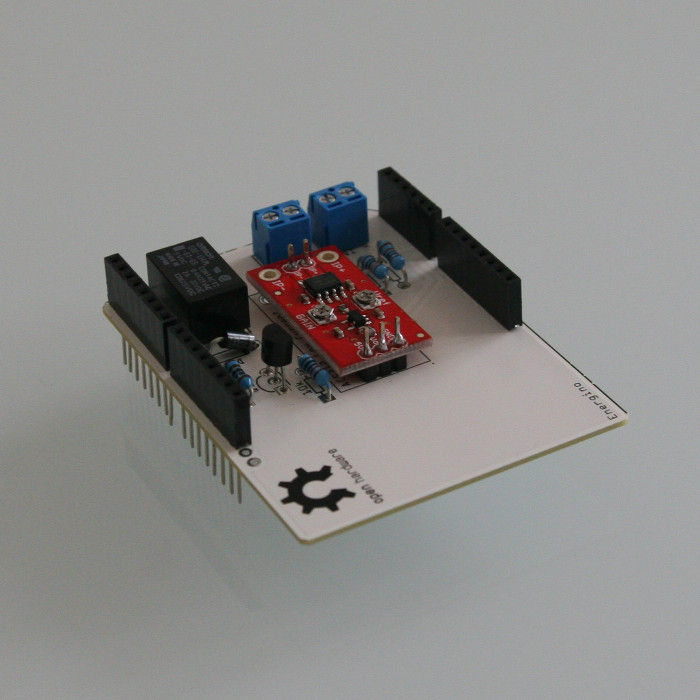
Step 1: Bill of materials
In order to assemble an Energino shield you will need:
Energino PCB from Fritzing or a Proto Shield
ACS712 Low Current Sensor Breakout
Resistors 10K x2
Resistor 1K
Resistor 100K
Diode 1N4001
Transistor NPN 2N3904
Screw terminals (2 Pin) x2
Relay Omron G6E-134PL-ST-US
Arduino Stackable Header – 8 Pin x3
Arduino Stackable Header – 6 Pin x1
Step 2: Assembly
Fritzing is an open-source an open source initiative for designers, artists, and hobists. Among other things Fritzing allows you to create a custom PCB layout and have it manufactured for you at a very honest cost. For example an Arduino shield costs 19 Euro. You can find more information in their official web site and you can order the PCB from the Fritzing Fab.
In the pictures you can see the Energino shield mounted on top of either an Arduino UNO or an Arduino UNO + Ethernet Shield.
Step 3: Calibrating the current sensor
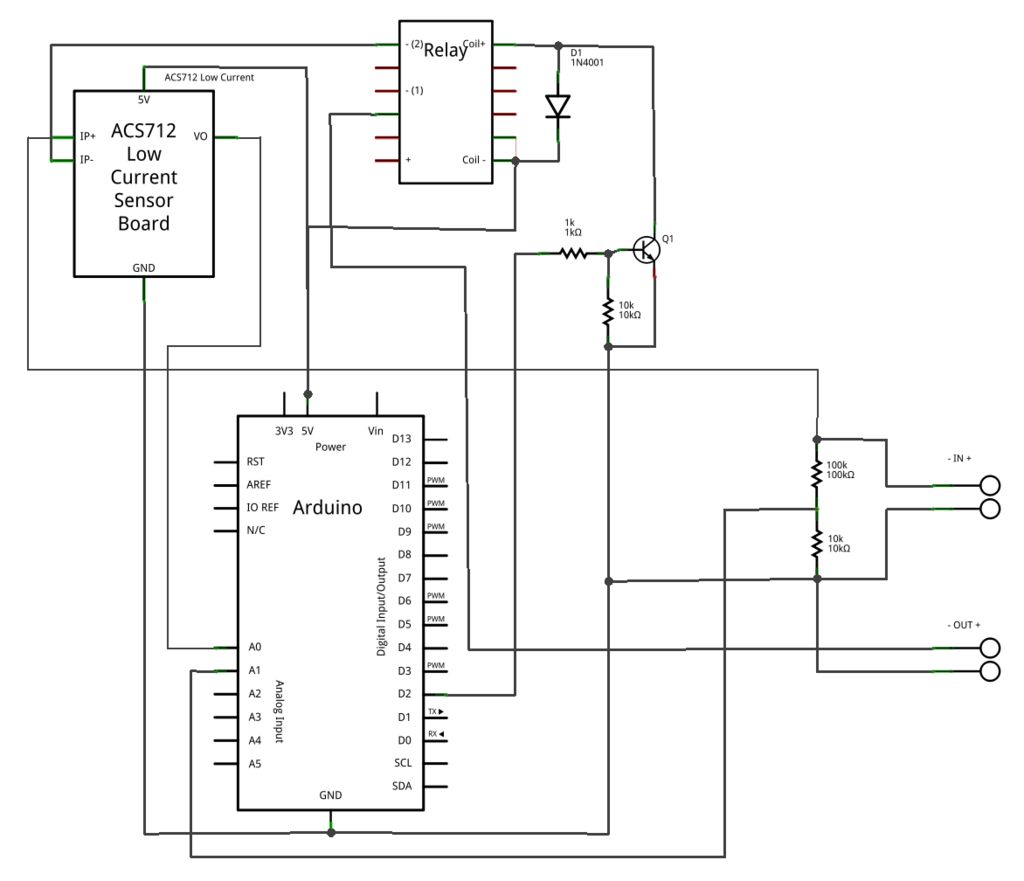
The ACS712 chip outputs an analog voltage that varies linearly with sensed current. The regular version can measure up to 5A of DC or AC current. In the Sparfun breakout board an opamp gain stage has been added for more sensitive current measurements. In particular by adjusting the gain of the embedded opamp (from 4.27 to 47) it is possible to measure very small currents.
In order to calibrate the current sensor you must configure the offset and the gain trimmers using a screw-driver and a digital voltmeter. This is done in two steps:
1) Configuring the offset. With no current on the sense lines, adjust the offset in order to read about 2.5V on the sensor output line.
2) Configuring the gain. With a known current input Iref (a 100mA limited supply works well for this), set the gain in such a way to read the desired value Vref on the output line. The sensitivity is then given by (Vref – 2.5) / Iref. For example, if with a reference current of 100mA the sensor output line reads 2.8V, it follows that the sensor sensitivity is 3 V/A.
Considering that the sensor output increased linearly with the sensed current and that the maximum value cannot exceed 5V, it follows that the gain must be set as a tradoff between resolution and maximum measurable current.
Download the Arduino sketch available here and open it using the Arduino SDK. Before uploading the code to the microcontroller remember to modify the OFFSET (in mV) and the SENSITIVITY (in mV/A) variables using the values above. In the screenshot the OFFSET is set to 2500mV while the SENSITIVITY is set to 850 mV/A
For more detail: Energino: an Arduino-based energy consumption monitoring shield
- What is the primary function of the Energino device?
Energino is a plug-load meter that measures power consumption of DC electrical appliances and includes a mechanical relay to turn them on or off. - How can I connect Energino to monitor energy data remotely?
By using it in combination with an Ethernet shield, it supports a push interface to COSM and a REST interface for polling consumption. - What are the supported load voltage and current ranges?
The device supports a load voltage of 0-60V and a load current of 0-5A. - How do I calibrate the offset on the current sensor?
You must adjust the offset trimmer with no current on the sense lines until the sensor output reads about 2.5V. - How is the gain configured during calibration?
With a known reference current input, set the gain trimmer to read a desired value on the output line to calculate sensitivity. - Can I use this project to monitor AC current?
Yes, the regular version of the ACS712 chip used in the project can measure up to 5A of DC or AC current. - What software is required to run the Energino script?
You need the Arduino SDK to download and upload the provided Arduino sketch to the microcontroller. - How can I obtain a professionally printed PCB for this project?
You can use the Fritzing project file to order a professionally printed PCB from the Fritzing Fab. - Does the ACS712 breakout board include additional circuitry for sensitivity?
Yes, the Sparfun breakout board includes an opamp gain stage added for more sensitive current measurements. - What happens if the sensor output exceeds 5V?
The maximum value cannot exceed 5V, so the gain must be set as a tradeoff between resolution and maximum measurable current.
