
Summary of An easy way to send your heartbeat to the Cloud using arduino
This article describes a low-cost, cloud-based heart rate tracker using an infrared ear sensor. The system measures pulse via blood flow absorption and calculates beats per minute (BPM). It integrates the sensor with an Arduino ADK board to transmit data to an Android phone via ADB, which then uploads the readings to Cosm. The setup is quick, taking under five minutes, and relies on a 9V battery for power while maintaining mobility through long cabling.
Parts used in the Cloud-Based Heart Rate Tracker:
- Infrared ear sensor
- Grove connector
- Arduino ADK board
- Android phone
- 9V battery
- Cosm platform
- Adb library
- Jpachube library
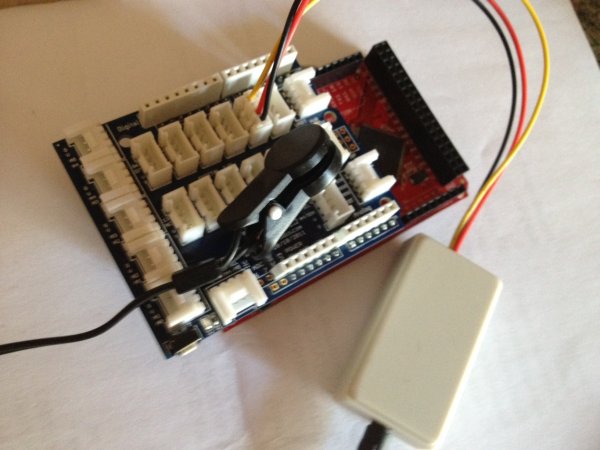
This cool (and very low price) sensor is attached on your ear and can detect your heart’s pulse through transmitting infrared light and checking the absorption variation caused by the blood flow on your ear lobe. The site of the products provides also the Arduino code for detecting the beats and calculating an average heart rate (in bpm – beats per minute). The sensor comes with a grove connector, so setting up and running the code took less than 5 mins! (thanks again @seeedstudio for providing me with a complete Grove kit).
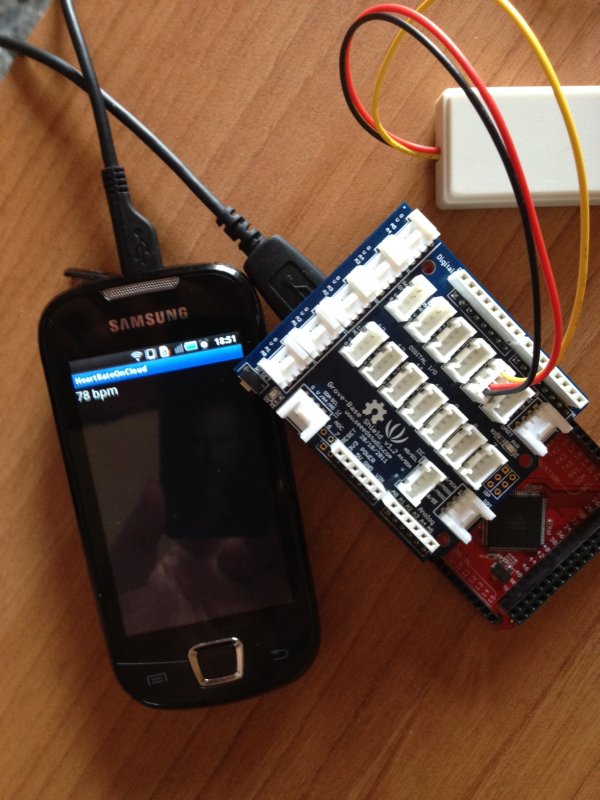 After playing with it a while I realized that I could make a cool Cloud-based heart rate tracker by simply using an ADK board and my Android phone. This way I could be completely mobile (given that the 9V battery that powers the ADK board can last!).
I modified the Arduino code to send the heart rate to the Android using the ADB and made also a simple Android app that takes the heart rate and sends it to Cosm (former Pachube) using the jpachube library.
Despite being very mobile (the cable is long enough to reach my pocket where both boards and mobile phone are) I am sure the graph-feed will stop being live quite soon (will either get bored, battery will die or will take it off to go to sleep…)
/************************* 2011 Seeedstudio *************************** File Name : Heart rate sensor.pde* Author : Seeedteam* Version : V1.0* Date : 30/12/2011* Description : This program can be used to measure heart rate,the lowest pulse in the program be set to 30.*************************************************************************///Modified by @BuildingIoT//for communication with Android#include <SPI.h>#include <Adb.h>// Adb connection.Connection * connection;// Elapsed time for ADC samplinglong lastTime;unsigned char pin = 13;unsigned char counter=0;unsigned int heart_rate=0;unsigned long temp[21];unsigned long sub=0;volatile unsigned char state = LOW;bool data_effect=true;const int max_heartpluse_duty=2000;//you can change it follow your system's request.2000 meams 2 seconds. System return error if the duty overtrip 2 second.void setup() {pinMode(pin, OUTPUT);Serial.begin(9600);//Serial.println("Please put on the ear clip.");delay(5000);//array_init();//Serial.println("Heart rate test begin.");attachInterrupt(0, interrupt, RISING);//set interrupt 0,digital port 2// Initialise the ADB subsystem.ADB::init();// Open an ADB stream to the phone's shell. Auto-reconnectconnection = ADB::addConnection("tcp:4567", true, adbEventHandler);}void loop() {digitalWrite(pin, state);}void sum()//calculate the heart rate{if(data_effect){heart_rate=1200000/(temp[20]-temp[0]);//60*20*1000/20_total_time//Serial.print("Heart_rate_is:\t");Serial.println(heart_rate);connection->write(2, (uint8_t*)&heart_rate);ADB::poll();}data_effect=1;//sign bit}void interrupt(){temp[counter]=millis();state = !state;//Serial.println(counter,DEC);//Serial.println(temp[counter]);switch(counter){
case(0):sub=temp[counter]-temp[20];//Serial.println(sub);break;default:sub=temp[counter]-temp[counter-1];//Serial.println(sub);break;}if(sub>max_heartpluse_duty)//set 2 seconds as max heart pluse duty{data_effect=0;//sign bitcounter=0;Serial.println("Heart rate measure error,test will restart!" );array_init();}if (counter==20&&data_effect){counter=0;sum();}else if(counter!=20&&data_effect)counter++;else{counter=0;data_effect=1;}}void array_init(){for(unsigned char i=0;i!=20;++i){temp[i]=0;}temp[20]=millis();}// Event handler for the shell connection.void adbEventHandler(Connection * connection, adb_eventType event, uint16_t length, uint8_t * data){}
For more detail: An easy way to send your heartbeat to the Cloud
- How does the sensor detect heart rate?
The sensor transmits infrared light and checks absorption variation caused by blood flow on the ear lobe. - Can I use this project without a computer?
Yes, you can make it mobile by using an ADK board and an Android phone. - What software libraries are required for communication?
The project uses the Adb library for Android communication and the jpachube library for sending data to Cosm. - How long does it take to set up the code?
Setting up and running the code takes less than 5 minutes thanks to the grove connector. - Does the system calculate average heart rate?
Yes, the Arduino code detects beats and calculates an average heart rate in bpm. - What happens if the duty cycle exceeds two seconds?
The system returns an error message stating the heart rate measure failed and restarts the test. - How is the data sent to the cloud?
The Android app takes the heart rate and sends it to Cosm using the jpachube library. - Why might the live graph feed stop working soon?
The feed may stop because the user gets bored, the battery dies, or they go to sleep.
