
Summary of Doorbell to Arduino ‘Interface’
This Instructable shows how to build a simple, low-cost doorbell-to-Arduino interface using a relay so the Arduino can be triggered by a doorbell or act as the bell. It describes required parts, wiring steps, and isolation with shrink tubing to protect connections. The relay coil connects to the bell wires, and three control wires (common, normally-open with pull-up resistor, and ground) are routed through a terminal block and secured.
Parts used in the Doorbell to Arduino Interface:
- Relay (example: FTR F1CA012V, 12V DPST)
- 100k Ohm resistor
- Small 3-port luster terminal
- Bell wire
- About 20 cm control wire cable (three wires)
- Shrink tubes
- Soldering tools (soldering iron, solder)
Hi Everybody
In my first Instructable I want to show you how to build an cheap and easy Doorbell to Arduino ‘Interface’ so you can let your Arduinoproject get triggered through it or simply use your Arduino as a bell.
Almost endless possibilities 😀
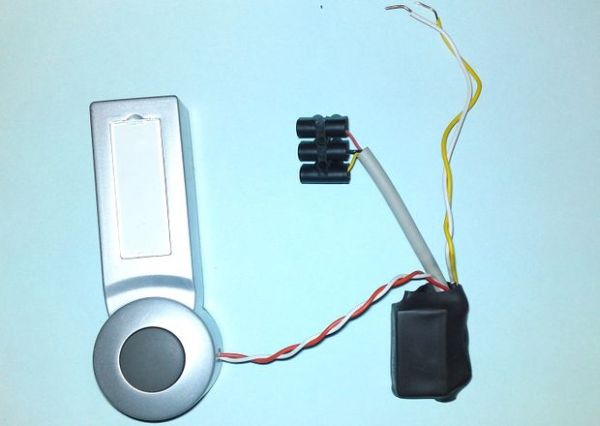
Step 1: What you need…
Here’s what you’ll need, its not that much…^^
First of all you need the ‘heart’ of the interface, the relay.
-My Doorbell has 12V DC so I used a FTR F1CA012V which is a ‘Double Pole Single Throw’-relay but you can use ‘Normally-open’ or ‘Change-over’-relays as well.
You also need:
1x 100k Ohm Resistor
1x small 3 port luster terminal
some bell wire
about 20cm control wire cable
shrink tubes to isolate the contacts and protect the ‘Interface’
soldering tools
Thats it!
Step 2: Lets build…
Ok, lets Build the Interface.
– solder the bell wire to the relay coil connections and isolate the contacts with shrink tube
– solder one single control wire (red) to the relay common terminal and isolate the contact with shrink tube
– prepare an other control wire (black), take the resistor and solder it to one end
– solder a third control wire (yellow) and the black wire with the pull up resistor to the relay ‘normally-open’ terminal, take some shrink tube and isolate the contact all over the resistor
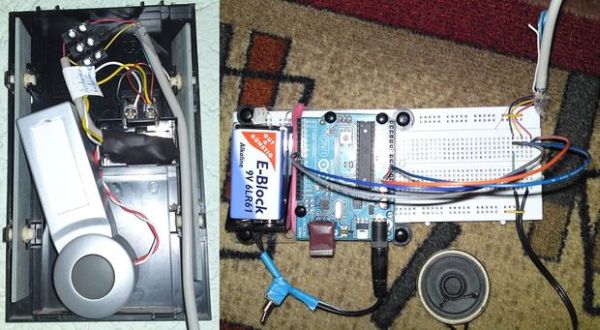
– cut off a ~10-14cm long piece from the control wire cable isolation, pull your 3 control wires through it and insert them into the luster terminal
– at last do a big piece shrink tube and shrink in the whole relay with the cables to protect them from getting broken
For more detail: Doorbell to Arduino ‘Interface’
- What is the main component needed for the Doorbell to Arduino Interface?
The main component is a relay, for example a FTR F1CA012V 12V relay used in the guide. - Can I use relays other than the example shown?
Yes, you can use normally-open or change-over relays as well. - What resistor value is used for the pull-up?
The guide specifies a 100k Ohm resistor for the pull-up. - How many control wires are needed?
Three control wires are used: one for common, one for normally-open with the resistor, and one with the resistor attached (ground/return). - How do you connect the bell wire to the interface?
Solder the bell wire to the relay coil connections and isolate the contacts with shrink tube. - How should the relay terminals be protected?
Isolate individual contacts with shrink tube and then encase the whole relay and cables in a large piece of shrink tube. - Is a terminal block required?
Yes, a small 3-port luster terminal is used to insert the three control wires after pulling them through the main cable insulation. - Can this interface make an Arduino trigger from the doorbell?
Yes, the interface lets your Arduino get triggered by the doorbell or allows the Arduino to be used as the bell.
