
Summary of DIY Breathalyzer Using Arduino UNO
This article outlines a low-cost DIY Breathalyzer project using an Arduino UNO and an MQ-3 sensor to estimate blood alcohol content from breath samples. The system utilizes an LCD for precise readings and an array of colored LEDs to indicate safety levels, ranging from safe (green) to critical (red). While the device provides useful estimates, it is noted that it does not precisely measure exact BAC values.
Parts used in the DIY Breathalyzer:
- Arduino Uno
- MQ-3 Alcohol Sensor
- 128×64 LCD (Liquid Crystal Display)
- 7 × 330 Ohm Resistor
- 7 × LEDs (1 Red, 2 Yellow, 3 Green and one other color)
- Jumpers Wires
- Breadboard
- Soldering Iron (optional)
- Solder Wire (optional)
Today I am going to discuss how to make a very simple DIY Breathalyzer using Arduino UNO and few external components. Ana Carolina designed this project as an instructable in instructables.com. This is a low-cost project and a useful one too. If you have no idea about what breathalyzer is, let me explain briefly: A breathalyzer is a device for estimating blood alcohol content (BAC) from a breath sample. Check the link given for more information.
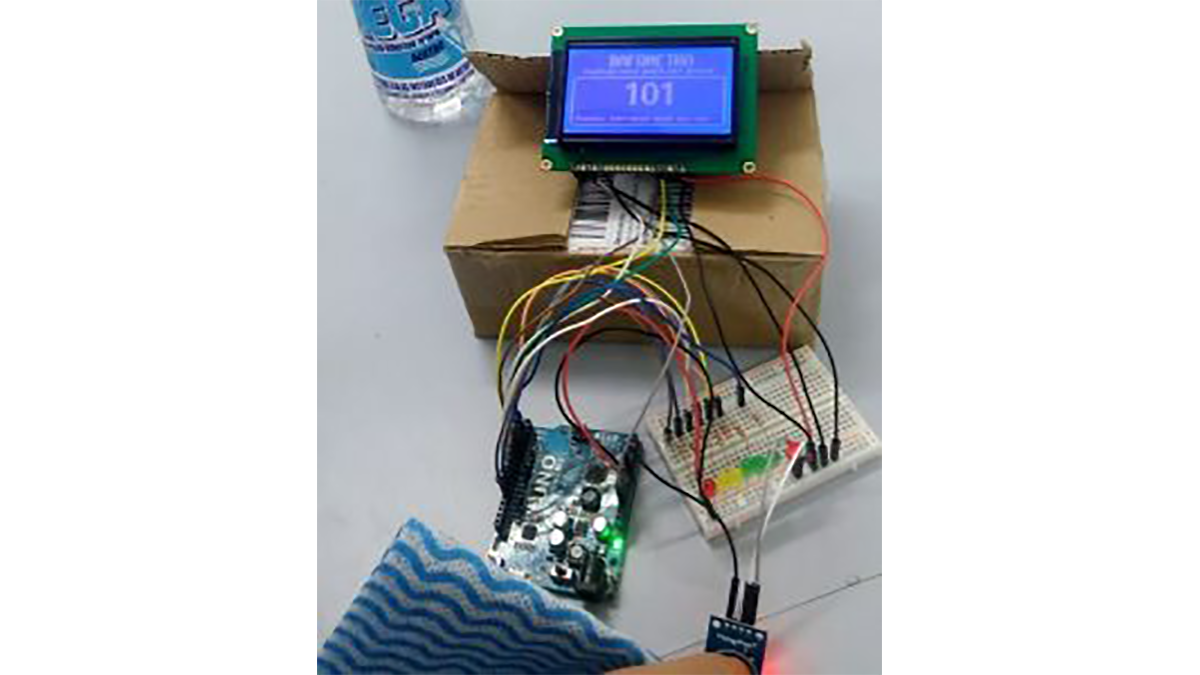
Requirements:
- Arduino Uno
- MQ-3 Alcohol Sensor
- 128×64 LCD (Liquid Crystal Display)
- 7 × 330 Ohm Resistor
- 7 × LEDs (1 Red, 2 Yellow, 3 Green and one other color)
- Jumpers Wires
- Breadboard
- Soldering Iron (optional)
- Solder Wire (optional)
Details:
This project is very simple. Here we are using an array of six LEDs and a 128×64 LCD to display the alcohol level. The presence of alcohol is sensed by an MQ-3 alcohol sensor and then analyzed by an Arduino board. We are using Arduino UNO in this project, but any model can do the job.
Three Green LEDs represent that alcohol level is OK and within the safe limit. Two Yellow LEDs are used to describe that safe limit is going to be reached, and you know it well why the Red LED is there. In fact, those LEDs are used just to give you a quick idea. If you want to know the exact value, the display is there for you.
You can tweak the program and re-calibrate the breathalyzer. But you must remember that breathalyzer doesn’t precisely measure your blood alcohol content, rather it estimates a value from the amount of alcohol in your breath.
Read more: DIY Breathalyzer Using Arduino UNO
- What is a breathalyzer?
A device for estimating blood alcohol content from a breath sample. - How does this project sense alcohol presence?
The MQ-3 alcohol sensor senses the presence of alcohol and sends data to the Arduino board. - Can I use a different Arduino model?
Yes, any Arduino model can do the job, though this project uses the Arduino UNO. - What do the three green LEDs represent?
Three Green LEDs represent that the alcohol level is OK and within the safe limit. - What is the function of the two yellow LEDs?
Two Yellow LEDs are used to describe that the safe limit is going to be reached. - Does this device precisely measure blood alcohol content?
No, the breathalyzer does not precisely measure blood alcohol content but rather estimates a value. - Can I tweak the program for this project?
Yes, you can tweak the program and re-calibrate the breathalyzer. - What component displays the exact alcohol value?
The 128×64 LCD display is used to show the exact value.
