
Summary of DIY Arduino Starter Kit Shield
This guide details building a DIY Arduino learning shield for educational purposes. The project enables users to read temperature and humidity via a DHT-22 sensor, measure distance with an HC-SR04 ultrasonic sensor, and display data on a Nokia 5110 LCD. It also integrates three LEDs, two buttons, a buzzer, a trimmer, and a photocell sensor onto a custom PCB board, providing a comprehensive toolkit for beginners to explore various sensors and outputs.
Parts used in the Arduino Learning Shield:
- DHT-22 Sensor
- Ultrasonic Sensor HC-SR04
- Photocell
- Nokia 5110 LCD
- 5mm LED (3x)
- 330 Ohm resistors (3x)
- 10 kOhm resistor
- Trimmer
- Buttons (2x)
- Buzzer
- Pin Header 1x8 Female
- Pin Header 1x4 Female (2x)
- Pin Header 1x40 Male
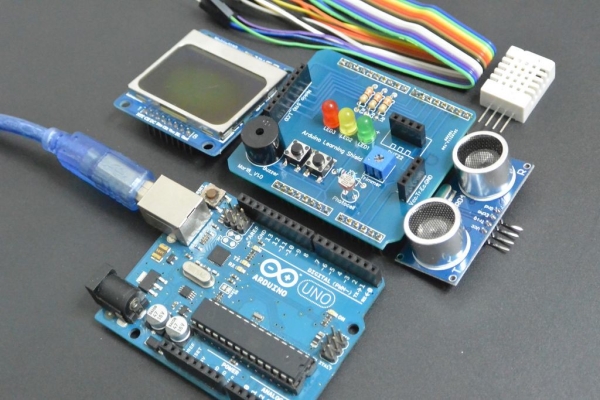
In this guide I will show you how to make your own Arduino learning shield. This learning shield can be useful at schools, universities and to everyone that want to start dealing with the Arduino. With this shield you will learn how to read the temperature and humidity from DHT-22 sensor, read an object distance by using the HC-SR04 ultrasonic sensor, print sensor values to the NOKIA 5110 LCD. On this PCB board you will also find three LEDs, two buttons, buzzer, trimmer and photocell sensor!
License:Attribution-NonCommercial-ShareAlike (Read More)
Project updates and more Arduino examples can be found here:
http://www.ardumotive.com/ardumotive-learning-shie…
Watch the video below:
Step 1: What You Will Need – Hardware
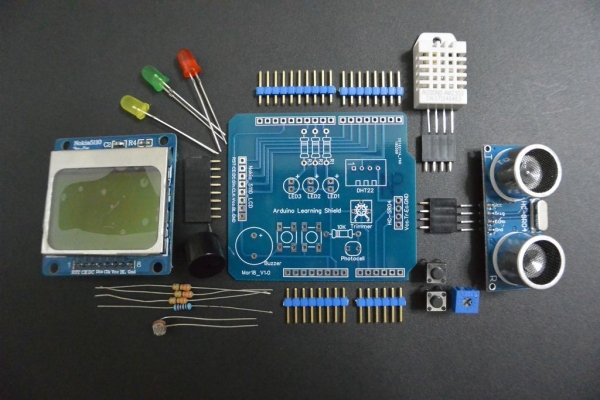
For this project you will need:
- DHT-22
- Ultrasonic Sensor HC-SR04
- Photocell
- Νokia 5110 LCD
- 5mm LED
- 3x 330 Ohm resistors
- 10 kOhm resistor
- Trimmer
- 2x buttons
- Buzzer
- Pin Header 1×8 Female
- 2x Pin Header 1×4 Female
- Pin Header 1×40 Male
Step 2: Connections – Pinout Reference
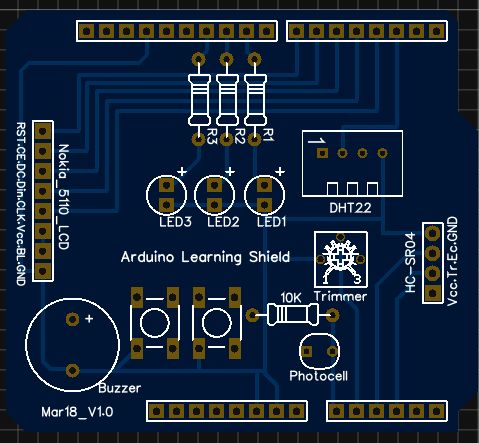
LED, DHT-22, Photocell and Trimmer
- Arduino UNO pin 9 –> LED1
- Arduino UNO pin 10 –> LED2
- Arduino UNO pin 11 –> LED3
- Arduino UNO pin 13 –> Buzzer
- Arduino UNO pin 8 –> Push Button1
- Arduino UNO pin 12 –> Push Button2
- Arduino UNO pin 2–> DHT-22 Sensor
- Arduino UNO pin A0 –> Photocell
- Arduino UNO pin A1 –> Trimmer ( Potentiometer )
Ultrasonic Sensor HC-SR04
- Arduino UNO pin A3 –> Triger
- Arduino UNO pin A2 –> Echo
Nokia 5110 LCD (Blue PCB)
- Arduino UNO pin 3 –> CLK
- Arduino UNO pin 4 –> Din
- Arduino UNO pin 5 –> DC
- Arduino UNO pin 6 –> CE
- Arduino UNO pin 7 –> RST
Watch video below
Step 3: That’s It
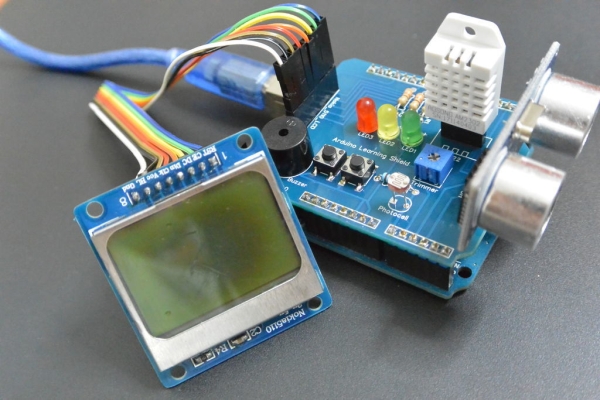
I hope you liked this, let me know in the comments below!!!
Read more: DIY Arduino Starter Kit Shield
- What components are included on the PCB board?
The board includes three LEDs, two buttons, a buzzer, a trimmer, and a photocell sensor. - How do I connect the DHT-22 sensor to the Arduino UNO?
Connect the DHT-22 sensor to Arduino UNO pin 2. - Which pins are used for the ultrasonic sensor trigger and echo?
The trigger connects to Arduino UNO pin A3 and the echo connects to pin A2. - Can this shield print sensor values to an LCD?
Yes, you can print sensor values to the NOKIA 5110 LCD. - What is the best way to connect the Nokia 5110 LCD CLK pin?
Connect the CLK pin of the Nokia 5110 LCD to Arduino UNO pin 3. - Does the project support reading humidity?
Yes, the shield allows you to read both temperature and humidity from the DHT-22 sensor. - How many resistors are required for the LEDs?
You need three 330 Ohm resistors for the three 5mm LEDs. - Where should the photocell be connected?
Connect the photocell to Arduino UNO pin A0.
