
Summary of Control your motors with L293D and Arduino
This article presents a walkthrough for controlling two motors in both directions using the L293D chip with an Arduino. It distinguishes between basic and advanced implementations, emphasizing proper voltage regulation. The basic setup uses a 5V regulator for specific pins, while the advanced version connects unregulated motor power directly to Pin 8 and includes capacitors for stability.
Parts used in the L293D Motor Control Project:
- L293D Chip
- Arduino
- 5V Voltage Regulator
- Batteries
- Capacitors
- Motors
After long research and trial and error, I have came up to a new walkthrough regarding this nice chip, the L293D.
Each project is one project and each one has its own unique power configurations, so you must be aware of the best battery choice and how to distribute voltage through your robot.
I strongly advice you to read the following articles:
Picking Batteries for your Robot
Once you’ve decided on batteries, how do you regulate the voltage
************************************************
L293D gives you the possibility to control two motors in both directions – datasheet
Step 1: Basic implementation
This is the most basic implementation of the chip.
As you can see, a 5V Voltage Regulator is between the battery and pins 1, 9, 16.
Pin 8 gets power before the VReg, if your motor needs for example 6V you should put 6V directly in this pin, all the other pins should not get more than 5V.
This will work with no problem at all, but if you want to do the right implementation take a look at the next example:
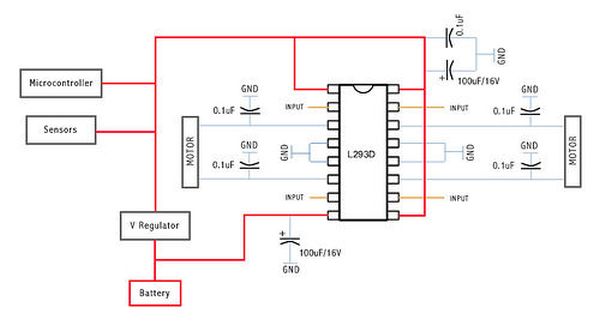
Step 2: Advanced implementation
This is the correct Implementation (with the capacitors), and note that pin 8 is feeded by unregulated voltage. This means that if your motors need more than 5V, you should power this pin with that amount of voltage, and the rest of the circuit with 5V.
For more detail: Control your motors with L293D and Arduino
- How does the L293D control motors?
The L293D allows you to control two motors in both directions. - What is the difference between basic and advanced implementation?
The advanced implementation includes capacitors and feeds Pin 8 with unregulated voltage. - Can I power Pin 8 with more than 5V?
Yes, if your motor needs more than 5V, you should put that amount directly into Pin 8. - Which pin receives regulated voltage in the basic setup?
Pins 1, 9, and 16 receive 5V from a voltage regulator between the battery and these pins. - Why should I read articles about picking batteries?
Each project has unique power configurations requiring awareness of the best battery choice and voltage distribution. - Does the advanced implementation require a voltage regulator for all pins?
No, only the circuit components other than Pin 8 should be powered with 5V while Pin 8 gets unregulated voltage. - What happens if I exceed 5V on non-Pin 8 terminals?
All other pins should not get more than 5V to ensure correct operation. - Is the basic implementation recommended for high voltage motors?
The article suggests the advanced implementation is the correct way to handle higher voltage requirements properly.
