
Summary of Catchin’ time using Arduino
Catchin' time is a modular interactive toy developed in an Ecodesign thesis that encourages children to move and play together. Modules contain LEDs, a buzzer, and a capacitive conductive-fabric sensor; touching or jumping on one turns off its LEDs and buzzer and wirelessly triggers LEDs on another module. Modules can be combined into a jump carpet or worn for running/tag games. The tutorial covers materials, module casing construction, LED sewing, and sensor assembly, and provides two module types: ModuleA (sender) and ModuleB (receiver).
Parts used in the Catchin' time:
- 1 Lilypad USB Atmega32U4 Board
- 1 micro USB connector
- 1 Lilypad Xbee Shield
- 1 Xbee 1mW Trace Antenna Series 1 (802.15.4)
- 1 serial USB UART converter
- 5 Female Header pins
- 1 mini USB connector
- 10 white Lilypad LEDs
- 1 Polymer Lithium Ion Battery 3.7V (1000mAh or 1400mAh)
- 1 Lipo Charger Basic – mini USB
- 1 Conductive Fabric – 30x33 cm Ripstop
- 1 Conductive Thread Bobbin – 10 m (Stainless Steel)
- Copper wires
- 1 resistor 220 ohm
- 1 resistor 2.2 Mohm
- 16 mm Speaker
- 2 or 4 felt pieces – 23x23 cm
- 2 strips of Anti-slip pad - 4x18cm
- Velcro (multiple small rectangles and strips)
- Grey shock absorber pad – 20x20x1cm
- Blue shock absorber pad – 20x20x0.3cm
- 2 small plastic cups (electronics cover)
- Thermal paper for iron – 23x23 cm
- 2 pieces of canvas - 20x20cm
- PVC clear wrap - 25x56cm
- 2 kid singlets or waistcoats
- Scissors and cutter
- Leather Hole Punch
- Pyrograph
- Soldering iron
- Fabric and plastic glue
- Sewing kit
- Iron
- Sewing machine
- Alligator clips
- Electrical tape
This tutorial will show you how to build an interactive toy for children. This toy wants to give a boost to children to move and play with friends at home or in a park, instead of watching TV and playing videogames.
Catchin’ time is a project developed during our thesis in Ecodesign at the Polytechnic of Turin. This modular toy can be used for jumping (when you connect the elements together to create a carpet) or for running (if you wear it on your back, e.g. Tag or other traditional children’s games).
How does it work? Each element has white LEDs, a little buzzer to generate a sound and a capacitive sensor made of conductive fabric. When children jump on it or hit it with hands to turn off LEDs, buzzer rings and a wireless signal is transmitted which activates LEDs on another element!
Playing at home The carpet is made by the union of several modules where the child can jump responding to a light pulse. Our tutorial allows the creation of two modules: ModuleA, used to send data and ModuleB, used to receive data.
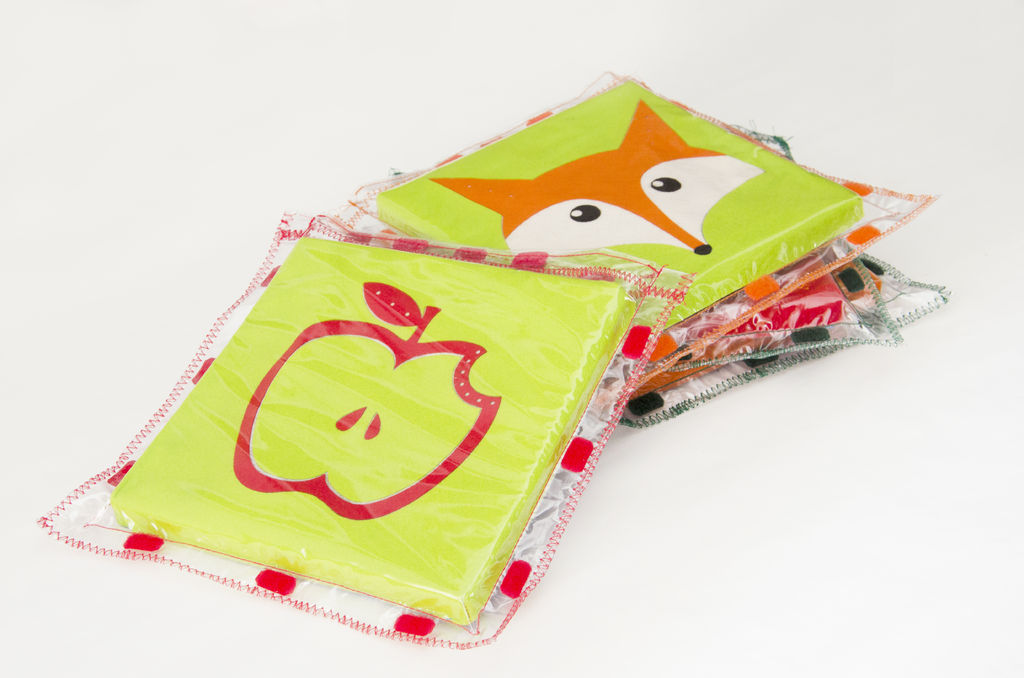
Playing outside Single modules can be worn by children and allow them to play traditional games in a technological way. When the child is picked up by his friends, the module on his back beeps and LEDs turn off, until he is touched again by a teammate.
It is possible to create many different games starting from our modules, you have only to make the toy, use your imagination and create new sketches!
Do you prefer Italian instructions? Follow us on Facebook 🙂
Step 1: SUPPLIES
To realize each element you need:
Electronics
– 1 Lilypad USB Atmega32U4 Board (Sparkfun Electronics – Robot Italy)
– 1 micro USB connector (NB. You can use your smartphone’s cable)
– 1 Lilypad Xbee Shield (Sparkfun Electronics – Robot Italy)
– 1 Xbee 1mW Trace Antenna Series 1 (802.15.4) (Sparkfun Electronics – Robot Italy)
– 1 serial USB UART converter (like this FuturaShop)
– 5 Female Header pins (Sparkfun Electronics – Robot Italy)
– 1 mini USB connector (NB. You can use your camera’s cable)
– 10 white Lilypad LEDs (Sparkfun Electronics – Robot Italy)
– 1 Polymer Lithium Ion Battery 3.7V (1000mAh Sparkfun Electronics – 1400mAh Robot Italy)
– 1 Lipo Charger Basic – mini USB
– 1 Conductive Fabric – 30×33 cm Ripstop (Sparkfun Electronics – Robot Italy)
– 1 Conductive Thread Bobbin – 10 m (Stainless Steel) (Sparkfun Electronics – Robot Italy)
– Copper wires
– 1 resistor 220 ohm
– 1 resistor 2.2 Mohm
– 16 mm Speaker (Robot Italy)
Materials (you can use materials and tools you have at home, or you can buy them in a DIY store)
– 2 or 4 felt pieces – 23×23 cm (colours and numbers of pieces depend on chosen pattern)
– 2 strips of Anti-slip pad – 4x18cm
– Velcro
– Grey shock adsorber pad – 20x20x1cm
– Blue shock adsorber pad – 20x20x0,3cm
– 2 small plastic cups to protect electronics
– Thermal paper for iron – 23×23 cm
– 2 pieces of canvas – 20x20cm
– PVC clear wrap – 25x56cm
– 2 kid singlets or waistcoats
Tools
– Scissors and cutter
– Leather Hole Punch (for belts)
– Pyrograph
– Soldering iron
– Fabric and plastic glue
– Sewing kit
– Iron
– Sewing machine
– Alligator clips
– Electrical tape
Step 2: PREPARE THE MODULE
– Take a paper sheet and cut out the mask of the grey pad of the module (link Mask)
– Use the mask to cut the grey pad with a cutter.
– Take two rigid plastic boxes (we used the packaging of chewing gum but it would be better to use a more rigid shell). Cut the boxes as tall as the thickness of the grey pad, these boxes will be used as cover for electronics. The circular cuts in the grey pad could have different diameters, depending on the chosen coverage.
– Engrave the grey pad with a pyrograph to obtain the necessary space for the 16mm speaker.
– Select the desired felt pattern (link fairy tale pattern – link pets patterns), draw it on a piece of felt (23×23 cm) and cut it out. Pierce the felt in the position you want to insert the LEDs with a belt punch. Mark this holes on a 20x20cm canvas, in this way you know where to sew the LEDs.
– Compose the pattern on the reverse side, lay down the thermal paper (the shiny side of the paper facing the felt), cover it with a sheet of baking paper (to prevent the fabric from sticking to the iron) and do the ironing.
– When the felt is cooled, you have to sew the corners of the felt in order to create a cover for the module (that measures 20x20x1,5cm).
– Take the PVC clear wrap, cut it in 2 parts in order to obtain 2 rectangles 25x28cm, fold one end of the long side of 2cm and sew it with a zigzag, to obtain a resistant board. Reinforce also the other rectangle, join the two sheets sewing them with straight stitching on the three free sides and finish with a zigzag on the same sides. The obtained case should be able to contain 20x20cm module.
– Turn the obtained package on the back and glue two strips of anti slip pad (4x18cm) and two strips of Velcro (to hang the module on the back of the child).
NB. Use a glue suitable for plastics
– In order to join the modules together, you have to cut out 8 Velcro rectangles 2x1cm: then paste 6 of them along the perimeter of the envelope and the remaining 2 inside the reinforced edge (to close the module).
(link Velcro).
NB. Use a glue suitable for plastics
Take 2 singlets (or 2 waistcoats) you have at home, and glue 2 strips of Velcro on the back, so that children can hang the modules.
Step 3: PREPARE ELECTRONICS
LED
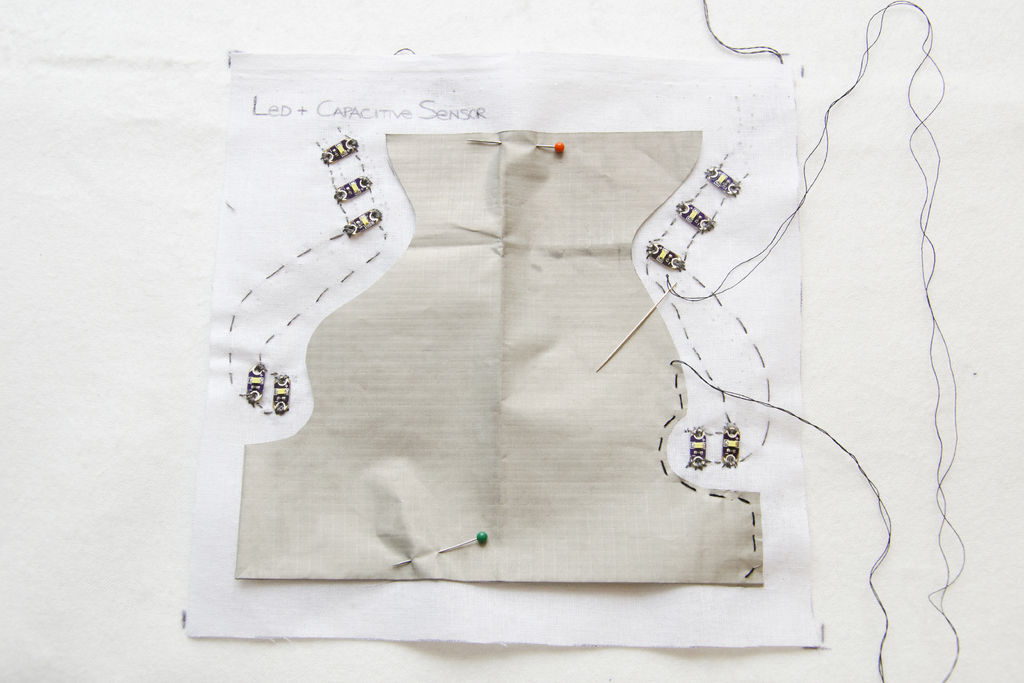
– Take the canvas with the positions of LEDs, fix them with the glue and sew them in series with conductive thread; you have to leave a long thread at the end of the seam. Check with the Blink sketch (basic example of Arduino sketches) if LEDs are properly connected.
Capacitive Sensor
– Take the conductive fabric, cut it out so that it doesn’t touch the threads of LEDs and sew its hems on the canvas with NO conductive thread. Sew the centre of the conductive fabric with the conductive thread to allow the passage of the electricity.
For more detail: Catchin’ time using Arduino
- What is Catchin' time?
It is a modular interactive toy with LEDs, a buzzer, and a capacitive sensor that encourages children to move and play together. - How do the modules interact?
When a module is touched or jumped on, its LEDs turn off, the buzzer rings, and a wireless signal activates LEDs on another module. - Can modules be used both indoors and outdoors?
Yes; modules can form a carpet for indoor jumping or be worn outdoors for games like Tag. - What electronics are required for each element?
Each element needs a Lilypad USB Atmega32U4, Lilypad Xbee Shield, Xbee antenna, serial USB UART converter, LEDs, battery, Lipo charger, conductive fabric, conductive thread, speaker, resistors, and associated connectors. - How are LEDs connected in the module?
LEDs are fixed on canvas and sewn in series with conductive thread, leaving a long thread at the end for connections. - How is the capacitive sensor made?
The conductive fabric is cut so it does not touch LED threads, its hems are sewn on the canvas with nonconductive thread, and its center is sewn with conductive thread to allow electricity pass. - What materials are used to make the module casing?
The casing uses felt, canvas, thermal paper, PVC clear wrap, anti-slip pads, Velcro, shock absorber pads, and small plastic boxes for electronics. - How are modules attached to a child?
Two singlets or waistcoats have Velcro strips glued on the back so children can hang the modules. - Does the tutorial provide different module roles?
Yes; the tutorial allows creation of ModuleA for sending data and ModuleB for receiving data. - Are there instructions for checking LED connections?
Yes; you can check LEDs with the Blink sketch, a basic Arduino example.
