
Summary of BUILD YOUR OWN TWO-FACTOR AUTHENTICATOR WITH GOOD USB
This article introduces "Good USB," a DIY two-factor authentication (2FA) device created by [Josh] to replace vulnerable SMS-based systems. It leverages Atmega32U4-based hardware like the Arduino Leonardo or BadUSB to emulate a keyboard, automatically typing 2FA codes into login fields via a companion app. While functional and open-source on GitHub, the project is noted as a work-in-progress with potential security vulnerabilities.
Parts used in the Good USB:
- Arduino Leonardo
- SS Micro
- BadUSB device
- Atmega32U4-based device
- Companion app
Two-factor authentication is becoming the norm for many applications and services, and security concerns around phone porting hacks are leading to a phaseout of SMS-based systems. Amidst that backdrop, [Josh] developed his own authentication device by the name of Good USB.
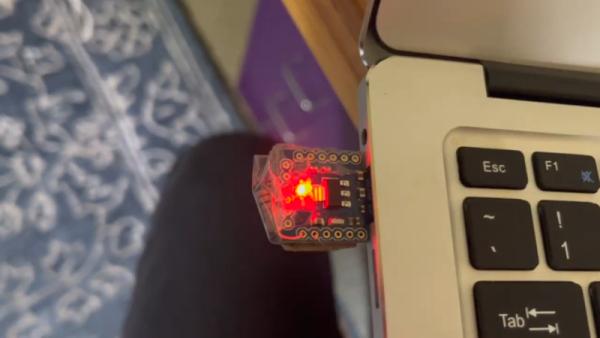
The device can be built using a Arduino Leonardo, SS Micro, or even a BadUSB device. It’s the latter which [Josh] most liked, and since the nefarious device is being repurposed for good, it led to the name Good USB. Basically any Atmega32U4-based device will work, as the key functionality is the ability to emulate a USB keyboard to a host PC.
Using the device is just as simple. With the Good USB plugged in, one simply needs to click a button in the companion app to generate a code for the given account you’re logging in to. Pressing the button on the device then types in the code for you. Alternatively, if your device has no button, it can be set up to simply type the code two seconds after you select an account in the companion app.
The code is on Github for those wishing to make their own. Caveat for the cautious: it’s still a work in progress, and there may be security holes in the current implementation.
If you’re interested in the nuts and bolts of how 2FA works, we’ve looked into that in detail. Video after the break.
Source: BUILD YOUR OWN TWO-FACTOR AUTHENTICATOR WITH GOOD USB
- What is the primary purpose of the Good USB device?
The device generates and types in two-factor authentication codes for user accounts. - Can an Arduino Leonardo be used to build this device?
Yes, the device can be built using an Arduino Leonardo. - How does the device input the authentication code?
The device emulates a USB keyboard to type the code into the host PC. - Does the device require a physical button to function?
No, if there is no button, it can be set to type the code two seconds after selecting an account in the app. - Where can the source code for the project be found?
The code is available on Github for those wishing to make their own. - Is the current implementation considered fully secure?
No, it is still a work in progress and may have security holes. - What specific microcontroller architecture is required for the device?
Any Atmega32U4-based device will work due to its ability to emulate a USB keyboard. - Why was the name Good USB chosen for this project?
The name reflects the repurposing of the nefarious BadUSB device for good.
