
Summary of Build an inexpensive handheld Arduino color console
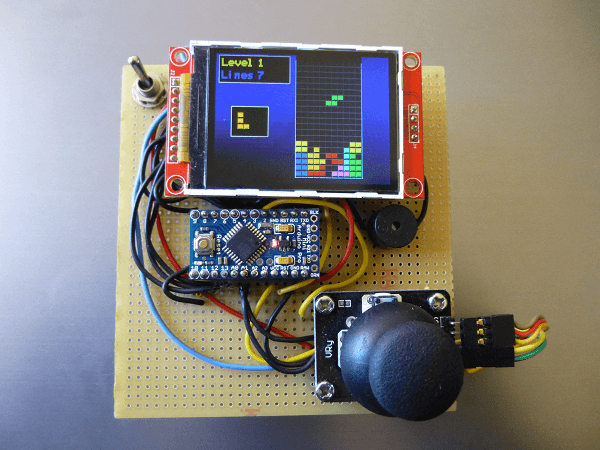
This article details building a portable Arduino console capable of playing classic games like Tetris and Breakout. The project utilizes an Arduino Pro Mini 3.3V paired with a 2.2" TFT display, a 3-axis joystick for movement and firing, and a buzzer for sound effects. Additional components include power management via AA batteries, a switch, and basic circuit elements like capacitors and headers to assemble the handheld device.
Parts used in the Portable Arduino Console:
- Arduino Pro Mini 3.3V 8 MHz
- 2.2" TFT 240x320 SPI
- 3-axis joystick
- Buzzer
- Power switch
- 4 AA Battery holder
- 4x LR6/AA (rechargeable) battery
- Female and Male headers
- Perforated board/breadboard/PCB
- Wire
- 0.1µF capacitor
If you love classic games like Tetris and Breakout you can now build a portable Arduino console and play anywhere you are.
Required components
Arduino Pro Mini 3.3V 8 MHz
At only 8MHz the Arduino Pro Mini 3.3v is slow by today’s standards but fast enough for most classic games.
Other Arduinos or compatibles can be used in its place. If an 5v Arduino like the Uno is used you must use a Level shifter from 5v to 3.3v or you’ll risk frying the TFT.
2.2″ TFT 240×320 SPI
This high quality 2.2″ TFT screen has an integrated ILI9341 controller and we will be connecting to it using Hardware SPI.
While the screen is sold as an 240×320 pixels TFT, we’re going to use it at 320×240 pixels, rotated using a simple hardware configuration switch, making it more suitable for video games.
The size is perfect for a small handheld videogame and fast enough for most classic video game titles.
The TFT screen features an SDCART reader but for now we’ll not be using it.
3-axis joystick
A joystick with 3 axis is used to control de videogame, horizontal and vertical plus fire.
The first two controls connect to the Arduino using 2 ADC pins and the fire button a regular digital pin.
Buzzer
Sound FX is an important component of Videogames. A small buzzer is present to provide sound feedback to the player. It can be used to play music and sound effects.
Other components
- Power switch
- 4 AA Battery holder
- 4x LR6/AA (rechargeable) battery
- Female and Male headers
- Perforated board/breadboard/PCB
- Wire
- 0.1µF capacitor
For More Details: Build an inexpensive handheld Arduino color console
- Can other Arduinos be used instead of the Pro Mini?
Yes, other Arduinos or compatibles can be used, but if a 5V Arduino like the Uno is chosen, a level shifter from 5V to 3.3V is required to avoid frying the TFT. - How should the TFT screen be oriented for video games?
The screen is rotated to 320x240 pixels using a simple hardware configuration switch to make it more suitable for video games. - How does the joystick connect to the Arduino?
The first two controls connect to the Arduino using 2 ADC pins while the fire button connects to a regular digital pin. - What is the purpose of the buzzer in this project?
The buzzer provides sound feedback to the player and can be used to play music and sound effects. - Does the TFT screen support an SDCART reader?
Yes, the TFT screen features an SDCART reader, though the article notes it will not be used for now. - What type of batteries are recommended for the console?
The project requires 4x LR6/AA rechargeable batteries housed in a 4 AA Battery holder. - Is the Arduino Pro Mini fast enough for these games?
Although slow by today's standards at 8MHz, it is fast enough for most classic games.
