
Summary of Build A Fake TV Security Light Using Arduino
This article describes a DIY "Fake TV" security project designed to deter burglars by simulating a lit, active television using low-power RGB LEDs and a microcontroller. While commercial clones exist for around $12, the author details a cost-effective build using a Digispark board and neopixel LEDs, consuming only 5W compared to a real TV's high energy usage. The project takes about an hour to complete and uses standard USB power adapters.
Parts used in the Fake TV Security Light:
- Neopixel RGB LEDs
- Digispark microcontroller
- Female micro USB to female USB A type socket adaptor
- USB mobile charger
Update: Looks like somebody had this idea before me and made a product out of it. Just Google Fake TV. In fact, you can also buy a clone of this from AliExpress – again, just search for ‘fake tv’ in AliExpress. The Chinese versions can be had for about $12 in your hand and that includes a power supply (no doubt of somewhat dubious quality and safety standards). So what follows is a fun project, but it’s easier and possibly cheaper to buy direct from China.
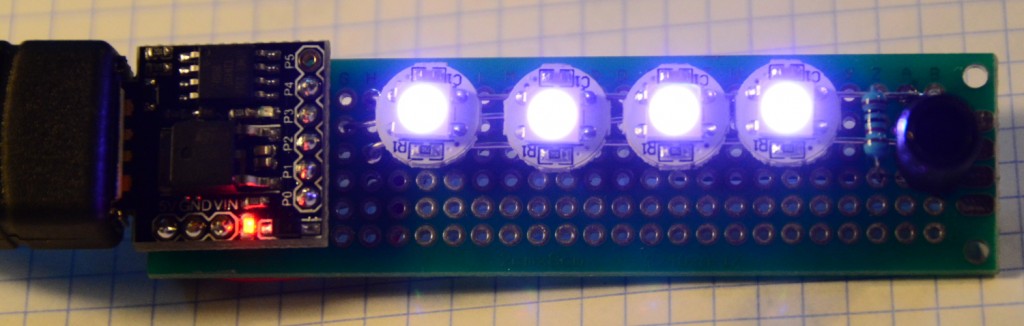
The idea of leaving a light on at home while you’re out is to give the burglar an uneasy feeling that somebody’s at home and it might be worth trying the next house along instead. A TV on at night plays a constantly-changing light-show against your window which really does say I’m at home and I’m awake. Of course, you could leave a real TV on but that’s an eco-disaster since TV’s consume 50W at best and hundreds at worst. Plus you might not want to be burning your TV in for days on end if you’re not at home.
Why not use some of these neopixel RGB LED’s and a microcontroller to simulate the same effect? With just a few Eurodollars, an hour of build time and a power budget of 5W absolute maximum, it sounds like a winner.
I used a Digispark for this project since the system is neither demanding in terms of processing nor I/O connectivity. Digspark’s have a USB connector for power input from one of those bazillion USB mobile chargers you now possess. I found a female micro USB to female USB A type socket adaptor on AliExpress (that cost about the same as the Digispark).
For More Details: Build A Fake TV Security Light Using Arduino
- How does a fake TV deter burglars?
A constantly-changing light show against the window suggests someone is home and awake. - What is the maximum power budget for this project?
The project has a power budget of 5W absolute maximum. - Can I buy a clone of this project?
Yes, you can buy a clone from AliExpress by searching for fake TV. - What microcontroller did the author use?
The author used a Digispark because the system is not demanding in terms of processing or I/O connectivity. - How much does a Chinese version cost?
Chinese versions can be had for about $12 and include a power supply. - Why is using a real TV considered an eco-disaster?
Real TVs consume 50W at best and hundreds at worst, making them inefficient for long-term use. - How do you power the Digispark in this project?
The Digispark receives power input via its USB connector from a USB mobile charger. - How long does it take to build this project?
The build time is approximately one hour.
