
Summary of BLACKBOARD BECOMES TIDY PEN PLOTTER
This article describes a DIY large-scale pen plotter built by [tuenhidiy] using an old blackboard as the base. The system utilizes stepper motors, a RAMPS 1.4 controller, and an Arduino Mega 2560 to drive toothed belts that move a pen holder. A servo motor handles pen retraction, while Makelangelo firmware manages the motion control, enabling reliable plotting of large graphics on A1 paper.
Parts used in the Blackboard Pen Plotter:
- Old blackboard
- Stepper motors
- RAMPS 1.4 controller
- Arduino Mega 2560
- Toothed belts
- Counter-weights
- Pen holder
- Permanent marker
- Servo motor
- Makelangelo firmware
Printers are all well and good, but they’re generally limited to smaller paper sizes and use expensive ink. If you instead want to produce art on a larger scale, a plotter can be a great way to go. [tuenhidiy] built a tidy example using an old blackboard as a base.
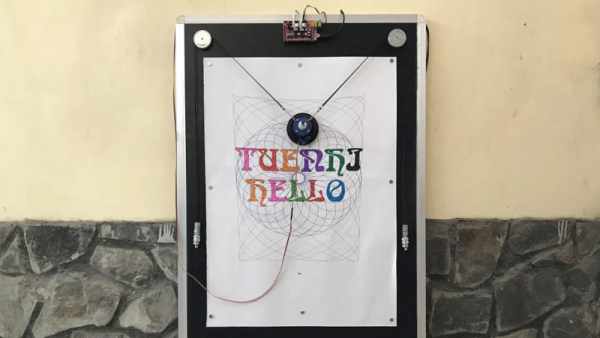
These days, such a build is quite easily approachable, thanks to the broad DIY CNC and 3D printing communities. The plotter consists of a pair of stepper motors, driven by an off-the-shelf RAMPS 1.4 controller and an Arduino Mega 2560. The motors are mounted at the top corners of the blackboard, and move the pen holder via a pair of toothed belts, counter-weighted for stability. The pen holder itself mounts a simple permanent marker, and uses a servo to push the holder away from the paper for retraction, rather than moving the pen itself. Control of the system is via the Makelangelo firmware, an open-source effort capable of driving a wide variety of CNC motion systems.
The final result is a simple plotter using readily available parts that can reliably plot large graphics on a piece of A1 paper. We’re particularly impressed by the clean, continuous lines it produces – testament to a sound mechanical design.
We see plenty of plotters around these parts; even rotary types that can draw on curves. Video after the break.
Source: BLACKBOARD BECOMES TIDY PEN PLOTTER
- What is the main advantage of using a plotter over a standard printer?
A plotter allows for producing art on a larger scale compared to printers limited to smaller paper sizes. - How are the motors mounted in this build?
The motors are mounted at the top corners of the blackboard. - What mechanism moves the pen holder?
A pair of toothed belts counter-weighted for stability moves the pen holder. - How does the system handle pen retraction?
A servo pushes the pen holder away from the paper instead of moving the pen itself. - Which firmware controls the system?
The system is controlled via Makelangelo firmware. - What size paper can this plotter reliably handle?
The plotter can reliably plot large graphics on a piece of A1 paper. - Why are the lines produced described as clean and continuous?
The clean lines are a testament to the sound mechanical design of the project. - What community resources make this build approachable?
Broad DIY CNC and 3D printing communities make such builds easily approachable today.
