
Summary of An Arduino Compatible Using CP2102
This article details building an Arduino-compatible USB interface using the Silicon Labs CP2102 chip as a cost-effective alternative to the standard FT232RL. While the CP2102 lacks bit-bang support and configurable GPIO for LEDs, it requires minimal extra components and operates adequately at 1Mbps. The design is compatible with the ATmega328p and Arduino IDE, utilizing a QFN-28 package that can be soldered onto a perf-board without special tools.
Parts used in the Arduino Compatible Using CP2102:
- Silicon Labs CP2102 USB to UART chip
- ATmega328p microcontroller
- FTDI FT232RL (for comparison)
- Perf-board
Standard Arduino boards use FTDI’s FT232RL to interface with computer’s USB port. Since FT232R is just a USB to UART converter, it is possible to build an Arduino compatible USB interface using other USB to UART chips.
One such alternative is Silicon Labs‘ CP2102. I particularly like this USB to UART transceiver because very few extra components are required for it to work. As an added benefit, this chip is also cheaper than the ubiquitous FT232R. Of course, there are also a few trade offs. First of all, CP2102 does not provide a bit bang interface (the X3 pins on the Arduino board on the other hand can be used for bit bang operations, but the X3 pins are not soldered with header pins by default and thus for the average users no bit bang support should not be an issue). Secondly, CP2102 does not have the configurable general purpose I/O pins to drive the TX/RX LEDs. There are other minor differences as well (for instance the maximum transmission speed for FT232R is 3Mbps while CP2102 tops at 1Mbps. Both chips are more than adequate for the maximum 115,200 baud rate supported in Arduino environment), but they do not affect the performance in our application of interfacing with Arduino.
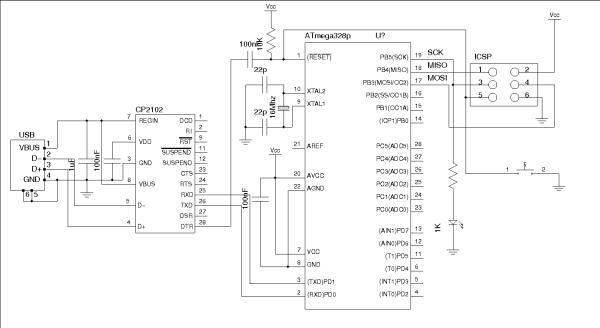
Here is the schematics for using CP2102 with ATmega328p (the circuit below is compatible with the Arduino IDE):
if you compare the above circuit with the official Arduino Duemilanove board you will see that the interfacing portions (RXD, TXD and TDR) are virtually identical.
Since CP2102 comes only in QFN-28 packaging, some people might find it slightly harder to deal with than TSSOP. Using the prototyping method I mentioned a few months back though, it is fairly straightforward to use the chip on a standard perf-board nevertheless. No special tools or stencils are needed. The following picture shows the USB to UART converter portion of the Arduino, which can be used to replace the FT232 break out board. I chose to break out the converter so that I could use it in other projects that require serial connections.
For more detail: An Arduino Compatible Using CP2102
- Why choose the CP2102 over the FT232RL?
The CP2102 is cheaper than the FT232R and requires very few extra components to work. - Does the CP2102 support bit bang operations?
No, the CP2102 does not provide a bit bang interface like the X3 pins on standard Arduino boards. - Can the CP2102 drive TX/RX LEDs?
No, the CP2102 does not have configurable general purpose I/O pins to drive the LEDs. - What is the maximum transmission speed of the CP2102?
The CP2102 tops at 1Mbps, which is adequate for the 115,200 baud rate supported in the Arduino environment. - Is the CP2102 circuit compatible with the Arduino IDE?
Yes, the circuit using the CP2102 with ATmega328p is compatible with the Arduino IDE. - How difficult is it to solder the CP2102 chip?
Although it comes in QFN-28 packaging, it can be straightforwardly used on a standard perf-board without special tools or stencils. - Can this converter be used in other projects?
Yes, breaking out the converter allows it to be used in other projects that require serial connections.
