
Summary of Arduino Basics: RCtime using arduino
The article explains the RCtime function for Arduino, which measures capacitor charging time to emulate analog-to-digital conversion. This method is useful when analog pins are full or higher resolution is needed, though the response is non-linear. It can also monitor voltage, current, and capacitance.
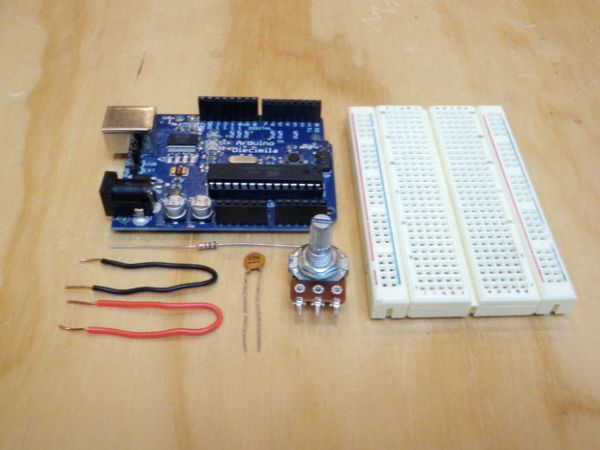
Parts used in the RCtime Arduino Project:
- An Arduino
- A breadboard
- A resistor (220 ohm to 1K)
- A capacitor (0.1uF or 1uF electrolytic)
- A potentiometer (or any other resistive sensor)
- Wire
RCtime is a function for the Arduino that finds its roots in Basic-based micro controller programming languages (such as the Basic Stamp). This function basically counts the amount of time it takes to charge a capacitor through a resistor and returns a digital value. In some sense, it is a simple hack for analog to digital conversion. The general purpose of such a circuit would be to read analog sensors when all of the analog pins on the board are occupied or, more commonly, when you need a higher resolution than the puny A/D pins on the Arduino currently have to offer. Although, keep in mind that unlike the built in analog pins, the response of RCtime is not linear.
Aside from reading analog sensors, you can do a number of other swell things like monitor voltage, current and capacitance. I’m not going to go over them here, but you can read more about them on this page.
Step 1: Go get stuff
To do this you will need:
An Arduino
A breadboard
A resistor (220 ohm to 1K)
A capacitor (0.1uF)*
A potentiometer (or any other resistive sensor)
Wire and whatnot
*note that changing the capacitor will change the resolution of the circuit. To increase the resolution, you simply need to increase the size of the capacitor. Try using a 1uF electrolytic capacitor and compare the difference (remember that is is polarized and the + side should connect to the power source).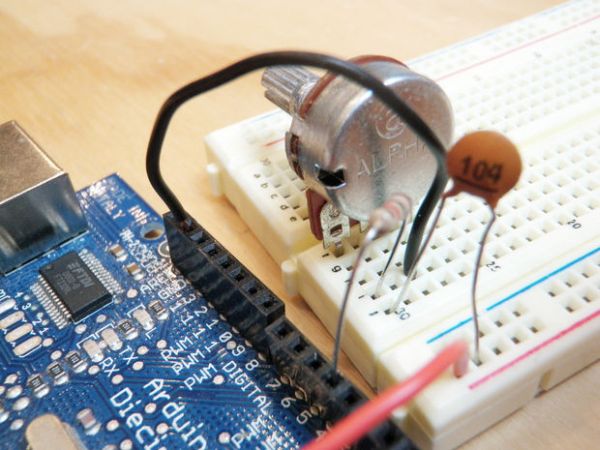
The resolution can also be changed, but less significantly, by changing the resistor value. Just make sure to keep it in the range of 220 ohm to 1K.
For more detail: Arduino Basics: RCtime
- What is the primary purpose of the RCtime function?
The function counts the time it takes to charge a capacitor through a resistor to return a digital value. - When should you use RCtime instead of built-in analog pins?
You should use it when all analog pins are occupied or when you need higher resolution than the standard A/D pins offer. - Does the RCtime function provide a linear response like built-in analog pins?
No, unlike built-in analog pins, the response of RCtime is not linear. - How can you increase the resolution of the circuit?
To increase resolution, you simply need to increase the size of the capacitor, such as using a 1uF electrolytic capacitor. - Can you change the resolution by altering the resistor value?
Yes, the resolution can be changed less significantly by changing the resistor value within the range of 220 ohm to 1K. - What happens if you use a 1uF electrolytic capacitor instead of 0.1uF?
Using a larger capacitor changes the resolution of the circuit, allowing for comparison of differences. - What other things can you do with this circuit besides reading analog sensors?
You can monitor voltage, current, and capacitance using this setup. - Which side of the electrolytic capacitor should connect to the power source?
The positive (+) side of the polarized capacitor should connect to the power source.
