
Summary of Arduino Based LED Chaser using Rotary Encoder
This article explains how to interface a rotary encoder with an Arduino Uno. It details the encoder's function in detecting angular movement and direction through pulse signals on pins A and B. The text describes the five-terminal setup and how edge detection on these pins determines rotation direction and position based on shaft movement degrees.
Parts used in the Rotary Encoder Interface Project:
- Arduino Uno
- Rotary Encoder Module
- ATMEGA Controller
In this project we are going to interface a ROTARY ENCODER with ARDUINO. ARDUINO UNO is an ATMEGA controller based development board designed for electronic engineers and hobbyists. In ARDUINO we have 20 I/O pins, so we can program 20 pins of UNO to be used as either input or output.
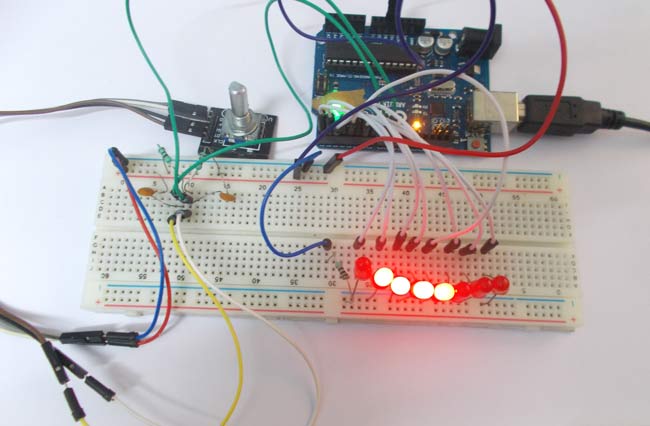
A ROTARY ENCODER is used to know the position of movement and angular movement of a motor or axis. It’s a three terminal device usually, with power and ground pins there are total 5 terminals. A ROTARY ENCODER module is shown below.
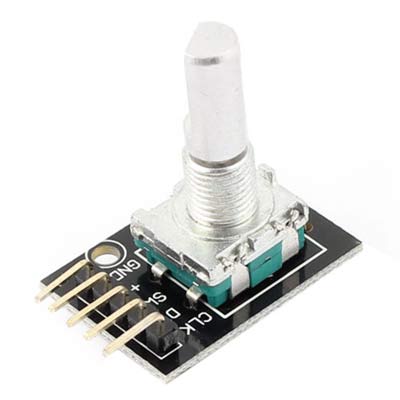
The pins of a rotary encoder are:
- Ground
- Positive connected to +5V
- Output signal A pin
- Output signal B pin
- Clock pin or common pin
The ENCODER provides pulses representing the change in the shaft position for the systems to understand. Consider a ROTARY ENCODER is powered up and the shaft is moved.
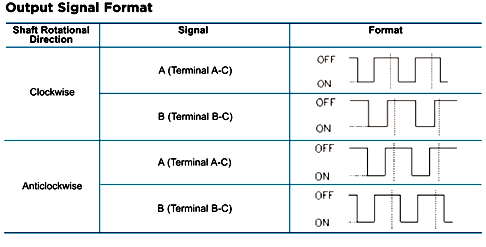
As shown in above table, consider the shaft is moved clock wise. With this there will be Falling Edge at the A terminal then at B terminal.
Consider the shaft is moved Anti clock wise. With this there will be Falling Edge at the B terminal then at A terminal.
This edge will occur once for 360/20 = 18 degrees (This is for a Encoder with 20 position, this changes from type to type, higher the count greater the accuracy).
With both above conditions, we can get direction and degree of rotation. Thus we get required parameters for getting the position of a shaft.
Read More: Arduino Based LED Chaser using Rotary Encoder
- What is the purpose of a rotary encoder?
It is used to know the position of movement and angular movement of a motor or axis. - How many I/O pins does the Arduino Uno have?
The Arduino Uno has 20 I/O pins that can be programmed as either input or output. - How many terminals does a standard rotary encoder have?
A rotary encoder usually has five terminals including power, ground, and signal pins. - Which pins provide the output signals?
The Output signal A pin and Output signal B pin provide the pulses representing shaft position changes. - How is clockwise movement detected?
Clockwise movement causes a falling edge at terminal A followed by a falling edge at terminal B. - How is anti-clockwise movement detected?
Anti-clockwise movement causes a falling edge at terminal B followed by a falling edge at terminal A. - What determines the degree of rotation per pulse?
The degree depends on the encoder type, such as 18 degrees for a 20-position encoder calculated from 360 divided by 20. - Can the accuracy of the encoder change?
Yes, higher counts in the encoder type result in greater accuracy.
