
Summary of Arduino-based AVR High Voltage Programmer
This article describes an Arduino-based High Voltage Parallel Programmer (HVFuse) for recovering AVRs with RESET disabled by fuse settings. It outlines workflow: upload HVFuse sketch, connect a shield and +12V, insert the target AVR, press a button, and restore fuses. The shield schematic and corrected wiring notes are provided, and kits/PCB progress and product updates are mentioned. Only LFUSE and HFUSE setting are implemented in the sketch, though full HV programming could be added.
Parts used in the Arduino-based AVR High Voltage Programmer (HVFuse):
- An Arduino NG, Diecimila, or compatible
- A piece of perfboard cut to size
- Header pins for the Arduino interface
- An LED to indicate when it is ok to insert/remove the AVR
- A 2N3903 or similar NPN transistor (2N2222, etc.)
- (20) 1k resistors
- A pushbutton switch (go button)
- A 28-pin socket for the target AVR
- +12VDC supply connected to shield terminals
Update 01/02/09: A PCB version of this circuit is in the design stages – some preliminary information is here.
Update 03/11/09: Kits based on this design are now for sale!
Update 12/14/10: The original AVR HV Rescue Shield kit has been replaced by the new and improved HV Rescue Shield 2. Visit the HV Rescue Shield 2 product page for information about the new kit!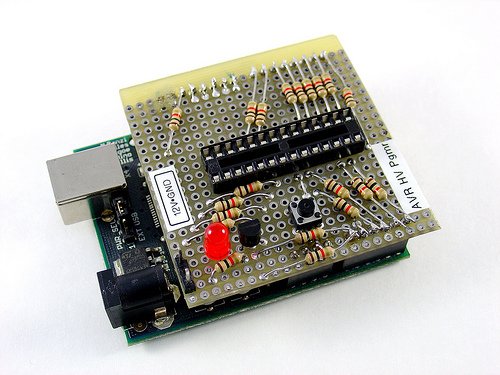
As I mentioned earlier this week, I recently “lost” an ATmega168 due to flashing the configuration fuses to disable the RESET pin, without realizing that this makes the device impossible to reflash with SPI. This is particularly frustrating because the device is still 100% functional, just completely deaf to ordinary serial programmers. The only way to recover the device is using what Atmel calls “High Voltage Parallel Programming Mode” which very few programmers support, most importantly, not the USBtinyISP I otherwise love.
Fortunately, my trusty Arduino came to the rescue – I created an Arduino-based AVR programmer that uses the high voltage programming mode and can fix pesky fuses like RSTDISBL.
The Arduino has just enough IO to implement the entire HV protocol plus a “go” button. So far I have only implemented setting LFUSE and HFUSE in software, but there is no reason why the code couldn’t be extended to support chip erase and programming the entire flash as well.
Overview:
The fuse programming process is simple:
- Upload the HVFuse sketch to the Arduino, available for download here: HVFuse.pde
- Install the shield and apply +12VDC to the terminals on the left
- Wait for the red LED to turn on (if it isn’t already)
- Install the ATmega to be repaired
- Push the button
- As soon as the LED turns back on, the AVR is fixed and ready to be put back into service!
 Schematic:
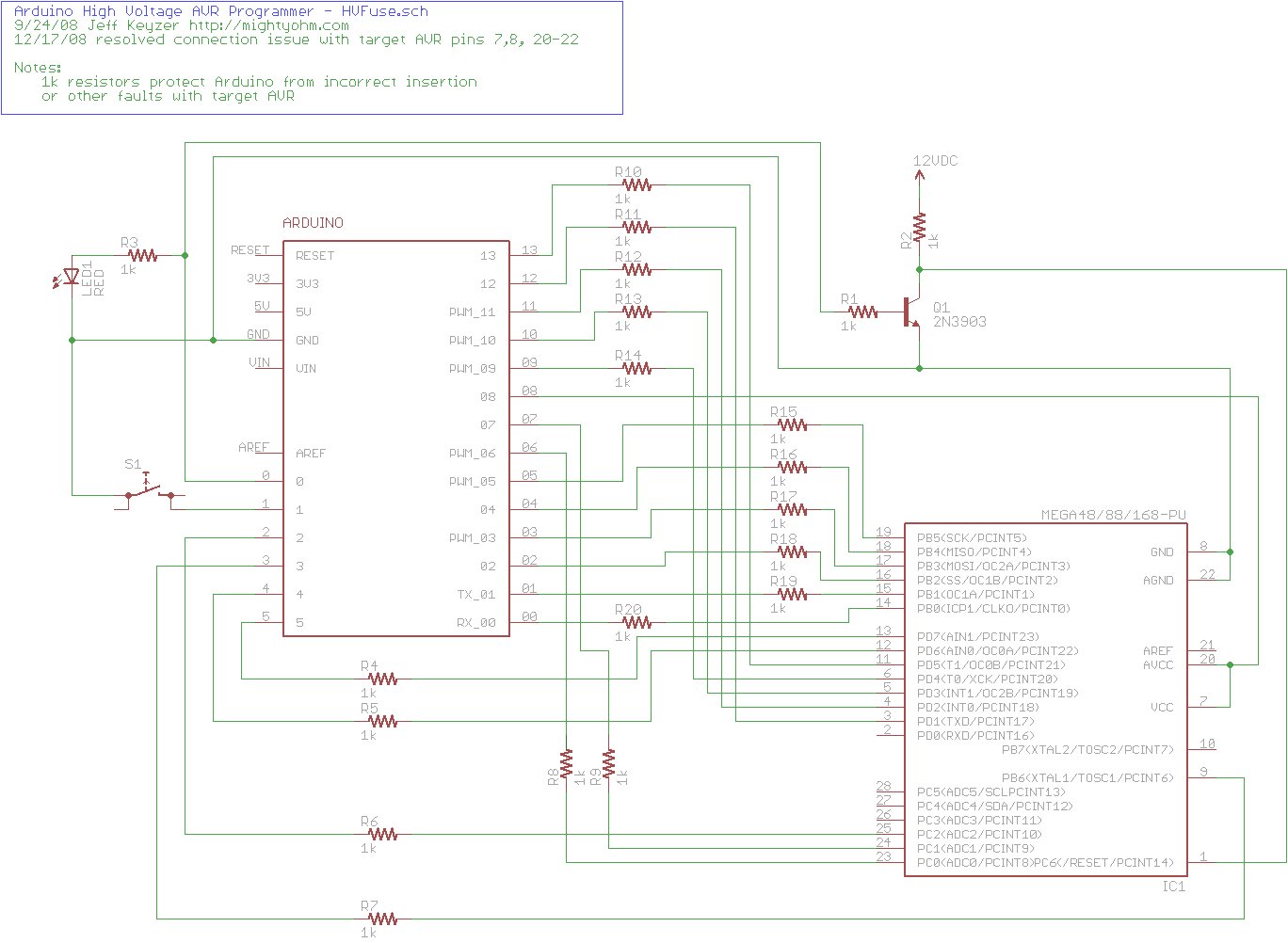
Here is an Eagle schematic of the HV Programming shield (click to enlarge):
Update 12/17/08: An observant reader pointed out that there were three errors in the way GND/AGND, AREF and VCC/AVCC were connected on the target AVR in the original schematic. The errors have been fixed and the updated schematic is below. Apologies for any confusion this caused.
Parts list:
- An Arduino NG, Diecimila, or compatible
- A piece of perfboard cut to size
- Header pins for the Arduino interface (note I had to drill some of the holes to get the headers to fit the nonstandard pin spacing for digital lines 8-13.
- An LED which indicates when it is ok to insert/remove the AVR
- A 2N3903 or similar NPN transistor (2N2222, etc.)
- (20) 1k resistors – these protect the Arduino from short circuits in case something goes wrong
- A pushbutton switch – this is the ‘go’ button
- A 28-pin socket for the target AVR
Source: Arduino-based AVR High Voltage Programmer
- What problem does the HVFuse Arduino programmer solve?
It recovers AVRs that have had RESET disabled by fuse settings and cannot be reflashed by ordinary SPI programmers. - How do you use the HVFuse programmer to fix a bricked AVR?
Upload the HVFuse sketch to the Arduino, attach the shield and +12V, wait for the LED, insert the AVR, press the button, and when the LED comes back on the AVR is fixed. - Which fuses does the provided HVFuse sketch modify?
The sketch implements setting LFUSE and HFUSE in software. - Can the HVFuse sketch be extended to perform full chip erase and flash programming?
Yes, the article states there is no reason the code could not be extended to support chip erase and programming the entire flash. - What hardware is required to build the HV programming shield?
An Arduino, perfboard, header pins, LED, NPN transistor (e.g., 2N3903), twenty 1k resistors, a pushbutton, a 28-pin socket, and a +12V supply. - Why are 1k resistors used in the shield design?
They protect the Arduino from short circuits in case something goes wrong. - Is a specific Arduino model required?
The article lists Arduino NG, Diecimila, or a compatible board as suitable. - Are there schematic corrections mentioned for the shield?
Yes, a reader pointed out errors in GND/AGND, AREF and VCC/AVCC connections which were corrected in an updated schematic. - Is there an available sketch to run on the Arduino?
Yes, the HVFuse.pde sketch is available for download as mentioned in the article. - Are kits or PCBs available based on this design?
Updates note that a PCB was in design, kits based on the design became for sale, and an improved HV Rescue Shield 2 replaced the original kit.
