
Summary of ANAVI Macro Pad 8 key programmable keypad
The ANAVI Macro Pad 8 is an open-source, mini 8-key programmable keypad powered by Quantum Mechanical Keyboard (QMK) firmware. It allows users to create macros and shortcuts without coding, suiting industries like video editing, gaming, and engineering. Available as a soldering kit or pre-assembled version, it features a Microchip ATmega32U4 microcontroller, enabling compatibility with Arduino IDE for further development. Configuration is done via a web browser using the QMK Configurator.
Parts used in the ANAVI Macro Pad 8:
- 8 programmable keys
- Quantum Mechanical Keyboard (QMK) open source firmware
- Microchip ATmega32U4 microcontroller
- RESET button
- Soldering components (for kit version)
- Pre-assembled unit (for no-solder version)
The ANAVI Macro Pad 8 is an open source, mini 8-key programmable keypad. Each key can be reprogrammed to activate a macro or even a dedicated shortcut, all without any coding experience says its creators. Thn aks to the keypad being powered by the advanced, but easy-to-use Quantum Mechanical Keyboard (QMK) open source firmware.
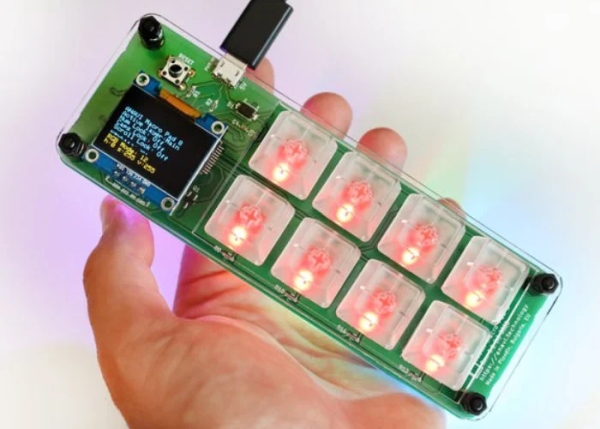
“ANAVI Macro Pad 8 can be customized to fit multiple use cases across various industries: video or audio editing, video conferencing software, entertainment broadcasting, product and graphic design, gaming, engineering, programming, etc. It boosts your daily productivity by providing amazing level of control with gorgeous light effects on your fingertips!”
Pledges are available from $36 offering a kit that requires a little soldering, although for $44 a no soldering version is available and both are expected to ship sometime during January 2021. Free shipping throughout the United States is available and worldwide shipping is priced at just $12.
“Getting started with and assembled ANAVI Macro Pad 8 is easy. Just connect it to your Linux, Windows, or macOS computer, and use a browser to configure and load your kewswitch macro or shortcut settings.
ANAVI Macro Pad 8 relies on the Quantum Mechanical Keyboard (QMK) firmware, To configure and modify the keyboard layouts you can use QMK Configurator, an online graphical user interface that generates QMK firmware hex files directly in a web browser or use the source code. Press the RESET button on ANAVI Macro Pad 8 to enter flash mode and upload the new firmware.
Furthermore, ANAVI Macro Pad 8 is powered by a Microchip ATmega32U4 microcontroller, so it is possible to use as an Arduino Leonardo-compatible development board and upload Arduino sketches through Arduino IDE or PlatformIO.”
Source: ANAVI Macro Pad 8 key programmable keypad
- How do I configure the macro settings?
Connect the device to a computer and use a browser with the QMK Configurator to generate firmware hex files. - Can I use this keypad without coding experience?
Yes, each key can be reprogrammed to activate a macro or shortcut without any coding experience. - What operating systems are supported?
The device connects to Linux, Windows, or macOS computers. - Does the project require soldering?
You can choose a $36 kit requiring soldering or a $44 no-soldering version. - Can this device be used as an Arduino board?
Yes, the Microchip ATmega32U4 microcontroller allows it to function as an Arduino Leonardo-compatible development board. - How do I upload new firmware?
Press the RESET button on the device to enter flash mode and upload the new firmware. - What tools can I use to write Arduino sketches?
You can use Arduino IDE or PlatformIO to upload sketches. - When was the expected shipping date?
Both versions were expected to ship sometime during January 2021.
