
Summary of Analog Read Voltage using Arduino
This article demonstrates how to read analog input from a potentiometer on an Arduino, convert the raw values (0–1023) into voltage readings, and display the results via the serial monitor. The circuit connects the potentiometer's outer pins to ground and 5 volts, with the middle pin linked to an analog input. The `analogRead()` function captures voltage changes as digital values proportional to the applied voltage.
Parts used in Analog Read Voltage using Arduino:
- Arduino Board
- Potentiometer (variable resistor)
- Three connecting wires
This example shows you how to read an analog input on Pin 0, convert the values from analogRead() into voltage, and print it out to the serial monitor.
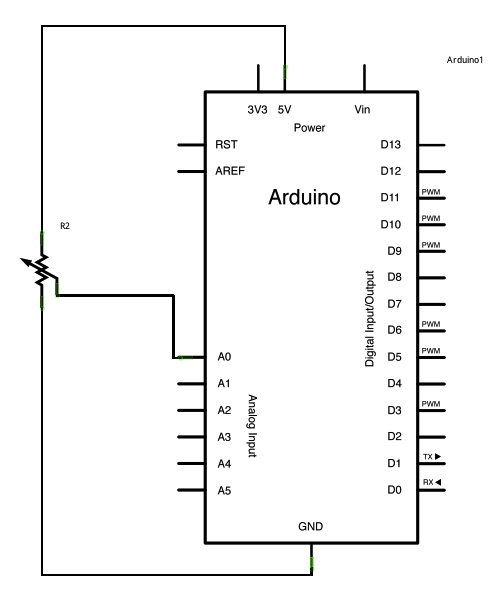
Circuit:
image developed using Fritzing. For more circuit examples, see the Fritzing project page
Connect the three wires from the potentiometer to your Arduino board. The first goes to ground from one of the outer pins of the potentiometer. The second goes from 5 volts to the other outer pin of the potentiometer. The third goes from analog input 2 to the middle pin of the potentiometer.
By turning the shaft of the potentiometer, you change the amount of resistance on either side of the wiper which is connected to the center pin of the potentiometer. This changes the voltage at the center pin. When the resistance between the center and the side connected to 5 volts is close to zero (and the resistance on the other side is close to 10 kilohms), the voltage at the center pin nears 5 volts. When the resistances are reversed, the voltage at the center pin nears 0 volts, or ground. This voltage is the analog voltage that you’re reading as an input.
The Arduino has a circuit inside called an analog-to-digital converter that reads this changing voltage and converts it to a number between 0 and 1023. When the shaft is turned all the way in one direction, there are 0 volts going to the pin, and the input value is 0. When the shaft is turned all the way in the opposite direction, there are 5 volts going to the pin and the input value is 1023. In between, analogRead() returns a number between 0 and 1023 that is proportional to the amount of voltage being applied to the pin.
Schematic:
Code:
In the program below, the very first thing that you do will in the setup function is to begin serial communications, at 9600 bits of data per second, between your Arduino and your computer with the line:
Serial.begin(9600);
Hardware Required
- Arduino Board
- a variable resistor, like a potentiometer
For more detail: Analog Read Voltage using Arduino
- How do you connect the potentiometer to the Arduino?
Connect one outer pin to ground, the other outer pin to 5 volts, and the center pin to an analog input. - What is the range of values returned by analogRead()?
The function returns a number between 0 and 1023. - Does turning the potentiometer shaft change the voltage at the center pin?
Yes, turning the shaft changes the resistance on either side of the wiper, altering the voltage at the center pin. - What happens when the shaft is turned all the way in one direction?
When turned fully in one direction, there are 0 volts going to the pin and the input value is 0. - What happens when the shaft is turned all the way in the opposite direction?
When turned fully in the opposite direction, there are 5 volts going to the pin and the input value is 1023. - How do you start serial communications in the code?
You use the line Serial.begin(9600) in the setup function to begin communication at 9600 bits per second. - What internal circuit does the Arduino use to read voltage?
The Arduino uses an analog-to-digital converter inside its circuit to read changing voltages. - Can you print the converted voltage values to the computer?
Yes, the article shows how to print the values out to the serial monitor.
