
Summary of ADDING REMOTE CONTROL TO AN OLD STEREO
This article details how [Nick] retrofitted an old Yamaha K-220 cassette deck with remote control capabilities. Since the unit supports computer-controlled tape transport, he interfaced an ATmega328P microcontroller with the original circuitry to simulate button presses via digital I/O pins. An IR receiver was added and programmed using Arduino libraries to allow operation from across the room using a standard stereo remote, though a web app alternative is also mentioned for future upgrades.
Parts used in the Old Stereo Remote Retrofit:
- Yamaha K-220 cassette deck
- ATmega328P microcontroller
- Infrared (IR) receiver
- Arduino libraries
- Standard stereo remote control
Sometimes, the best hifi gear is the gear you’ve already got. This is particularly the case in the cassette world, as high quality decks are long out of production. [Nick] liked his current rig, but wanted to be able to use it with a remote from across the room. Naturally, he set to hacking the feature in.
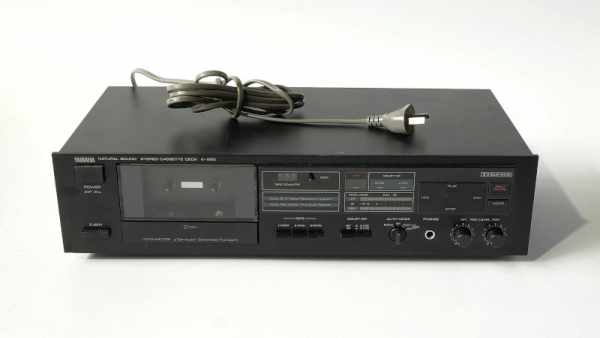
The cassette deck in question, a Yamaha K-220, was old enough to lack a remote, but thankfully new enough to use a computer-controlled tape transport. This meant that the basic features of play, stop, rewind and fast forward can all be controlled with simple digital buttons rather than mechanical ones. This made it easy to interface an ATmega328P to the stereo’s original circuitry. Digital IO pins are hooked up to the buttons, held as high-impedance inputs most of the time, only toggling to ground when necessary to trigger a button press. It was then a simple job to hook up an IR receiver to the chip and program it with some Arduino libraries to work with a typical stereo remote control [Nick] had laying around.
It’s a tidy build, and with more cool cassette releases coming out every year, we’re sure [Nick]’s going to put some miles on the setup. If you find IR too cumbersome though, you can go a step further and replace it with a web app instead. If you’ve been tinkering with similar things in your own workshop, be sure to drop us a line!
Source: ADDING REMOTE CONTROL TO AN OLD STEREO
- Why did [Nick] modify his cassette deck?
To use it with a remote from across the room. - What feature of the Yamaha K-220 made this project possible?
It uses a computer-controlled tape transport allowing basic features to be controlled with simple digital buttons. - How are the digital IO pins connected to the stereo's buttons?
Pins are held as high-impedance inputs most of the time and only toggle to ground to trigger a button press. - What component allows the user to control the deck wirelessly?
An IR receiver hooked up to the chip. - What software tools were used to program the system?
Arduino libraries were used to work with a typical stereo remote control. - What is the alternative to using an IR receiver mentioned in the text?
Replacing the IR setup with a web app. - Are high-quality cassette decks still being produced?
No, high quality decks are long out of production.
