
Summary of A Voice Shield for Arduino Board
This project develops an Arduino voice shield centered on the ISD1790PY chip to enable voice recording, playback, and text-to-speech for applications like home automation and security alarms. The shield features automatic gain control, volume adjustment, sound effects, and memory management via physical buttons, allowing users to create custom voice alerts or interactive bots with minimal integration effort.
Parts used in the Arduino Voice Shield:
- R1: 1 kohm
- C1: 100 nF 63 VL
- LD1: LED 3 mm red
- U1: ISD1790PY
- P1: Microswitch
- MIC: Mic D10 mm
- Jack 3,5 mm CS (2 pz.)
The objective of this project is to build an Arduino voice shield to empower thousands of voice related applications! All this mostly thanks to an integrated ISD1790PY chip.
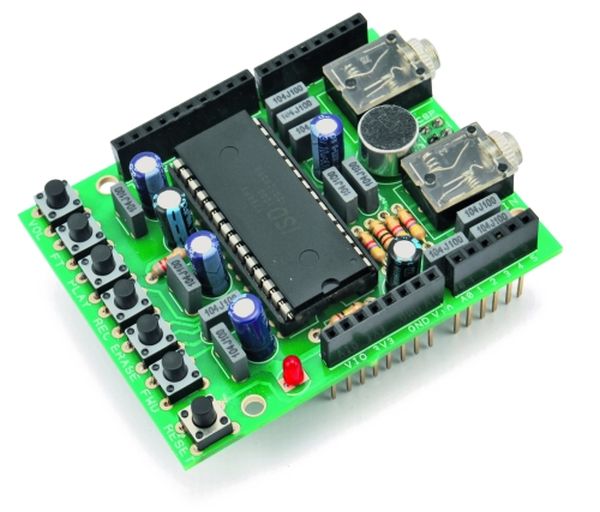
This particular voice/TTS feature can be useful to integrate voice messages in alarm systems, to implement generic I/O controls in home automation or even in home security applications: something like playing an alert when a person or a vehicle approaches any given protected area. The use cases are many and limited only by your imagination!
You could even create your own Lucy Liu Bot 
The Arduino integration is made simple thanks to a special library which is responsible for managing the ISD voice chip.
The Diagram
While this shield can operate stand-alone, it can be better managed through and SPI interface: by connecting this with Arduino it can take control of the speech synthesis.
The ISD1790PY sports a microphone input with automatic gain control (AGC), an output for 8 ohms speaker and another analog output that can be configured to drive an external amplifier. Volume control features as well as anti-aliasing and smoothing filter are provided and the vAlert (voiceAlert) function is used to indicate a new message is available in memory
ISD1790PY provides aso four sound effects to confirm operations such as start recording, stop recording, delete, forward and memory reset, along with vAlert, the effects are played from the AUD / AUX output.
The speaker output is amplified by a built-in power bridge stage, whose power is separated from those of both the analog section (microphone input with AGC, analog not amplified output) and digital section (sampler, memory) and is taken from the Vccp and Vssp1/Vssp2 pins.
Regarding the control buttons:
- P1 adjusts the listening volume during playback
- P2 lets you listen to the audio directly applied to ANIN
- PLAY and REC control respectively the playback and recording
- ERASE clears the memory
- FWD allows – if memory contains several messages – to jump from one to another (in this case, pressing P5 deletes only following messages: in other words, if we have recorded 5 messages and we press FWD to move to the third one, by pressing ERASE we’ll delete the memory area from that point until the beginning of the fourth message, which means the third track)
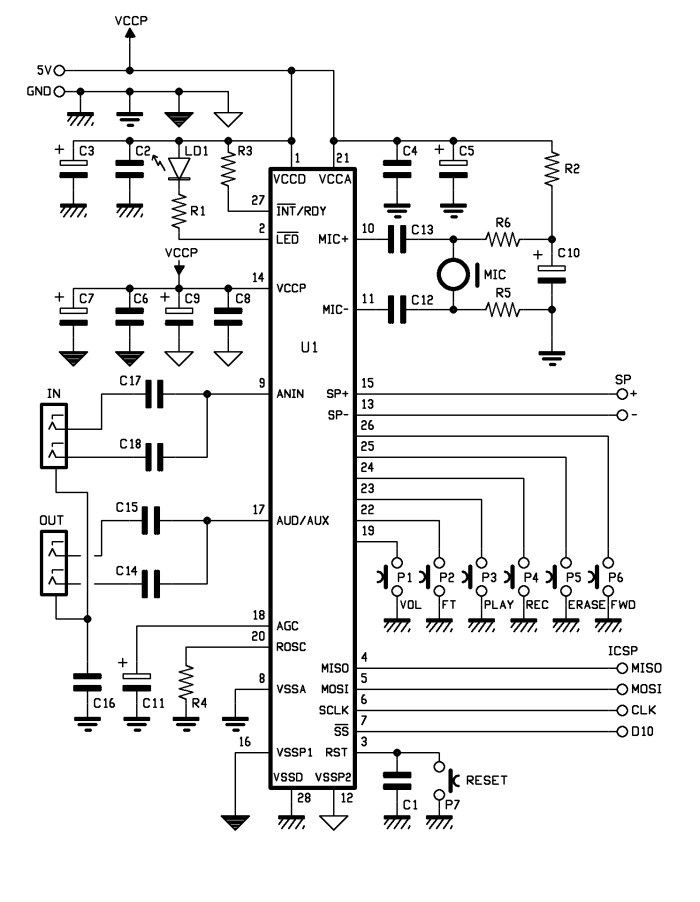
The same applies to PLAY and REC: both are valid for the memory slot where you are located at the time they are pressed.
C1: 100 nF 63 VL
LD1: LED 3 mm red
U1: ISD1790PY
P1: Microswitch
MIC: Mic D10 mm
– Jack 3,5 mm CS (2 pz.)
For more detail: A Voice Shield for Arduino Board
- What is the main objective of this project?
The objective is to build an Arduino voice shield to empower thousands of voice related applications using an integrated ISD1790PY chip. - How can this voice feature be useful in home automation?
It can be used to integrate voice messages in alarm systems, implement generic I/O controls, or play alerts when a person or vehicle approaches a protected area. - Does the ISD1790PY include automatic gain control?
Yes, the ISD1790PY sports a microphone input with automatic gain control (AGC). - Can the speaker output be driven by an external amplifier?
Yes, the chip provides another analog output that can be configured to drive an external amplifier. - What function does button P1 serve during operation?
P1 adjusts the listening volume during playback. - How does the ERASE button handle multiple recorded messages?
If you jump to a specific message using FWD and then press ERASE, it deletes the memory area from that point until the beginning of the next message. - Are PLAY and REC operations valid for all memory slots?
No, both are valid only for the memory slot where you are located at the time they are pressed. - How many sound effects does the ISD1790PY provide?
The chip provides four sound effects to confirm operations such as start recording, stop recording, delete, forward, and memory reset.
