
Summary of A Simple Arduino LED Example in Proteus
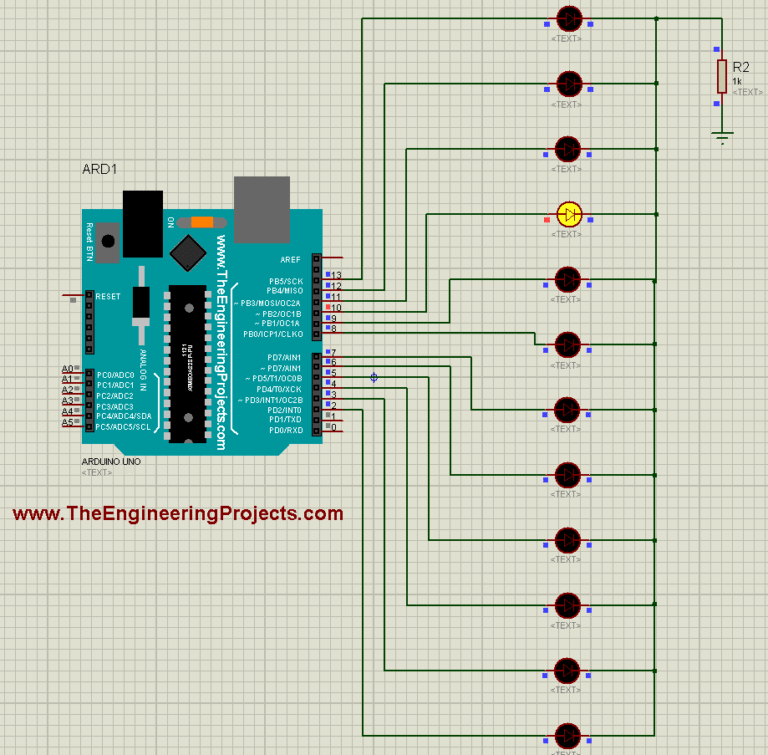
This article guides users through creating simple Arduino LED simulations in Proteus ISIS. It begins with a basic single-LED blink on Pin 13 using the standard Blink sketch. The tutorial then progresses to a multi-LED project, connecting twelve LEDs to digital pins 2 through 13 and providing code to light them sequentially with one-second delays.
Parts used in the Simple Arduino LED Example:
- Arduino UNO
- Proteus ISIS Simulation Software
- LEDs (Single unit for first example, Twelve units for second example)
- Digital Pins (Pin 13; Pins 2 through 13)
Hello friends, I hope all are fine and having fun with your projects. Today, I am going to share a very Simple Arduino LED Example in Proteus ISIS. I have designed a very basic example in Proteus in which I am going to blink single LED first using Arduino and then I am going to blink multiple LEDs in Proteus.
When you start working on Arduino then Arduino LED example is the first example which you must try because its the easiest one. Moreover, we all know that we have a small LED connected to pin # 13 on each Arduino so you can also check your Arduino as well that whether its working or not. So, let’s get started with Simple Arduino LED Example in Proteus ISIS:
A Simple Arduino LED Example in Proteus
- You can download, all the simulation files and codes for Arduino LED examples used in this tutorial, by clicking the below button:
First of all, design a simple circuit of Arduino LED in Proteus ISIS as shown in below figure:
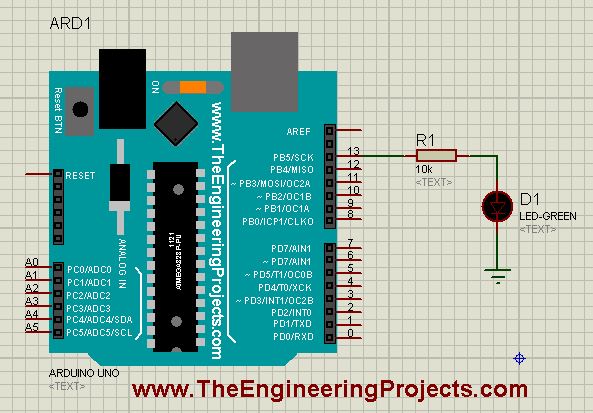
- Now as you can see in the above figure that I have used an LED on Pin # 13 of Arduino UNO.
- So, now upload the below sketch in your Arduino, its the Blink Example from Arduino, which works perfect for this Arduino LED Example:
|
1
2
3
4
5
6
7
8
9
10
11
|
void setup() {
pinMode(13, OUTPUT);
}
// the loop function runs over and over again forever
void loop() {
digitalWrite(13, HIGH); // turn the LED on (HIGH is the voltage level)
delay(1000); // wait for a second
digitalWrite(13, LOW); // turn the LED off by making the voltage LOW
delay(1000); // wait for a second
}
|
- Once the hex file is uploaded in the Arduino then run your Arduino LED Proteus Simulation and if everything goes fine then your LED will start blinking as shown in below figure:
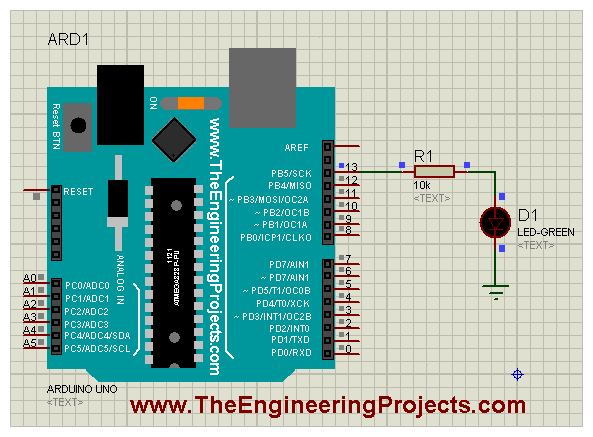
- Now you can see in the above figure that our LED at Pin # 13 started blinking.
- If you read the above code of Arduino LED exmaple then its quite simple, first of all I just make the Pin # 13 output and then I have made it HIGH and LOW with a delay of 1000 msec.
- You might wanna read How to use digitalRead in Arduino that will give you a better idea of How to deal with any digital pin.
- So, now let’s add more LEDs on other digital Pins of Arduino.
- So, design a simulation as shown in the below figure:
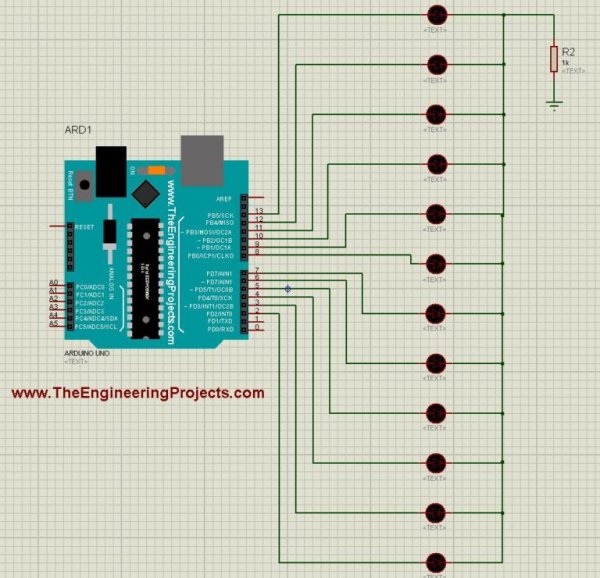
- Now compile the below code in your Arduino software and Get your Arduino Hex file:
|
1
2
3
4
5
6
7
8
9
10
11
12
13
14
15
16
17
18
19
20
21
22
23
24
25
26
27
28
29
30
31
32
33
34
35
36
37
38
39
40
41
42
43
44
45
46
47
48
49
50
51
52
53
54
55
56
57
58
59
60
61
62
63
64
65
66
67
68
69
70
71
72
73
74
75
76
77
78
79
80
81
82
83
84
85
86
87
88
89
90
91
92
93
94
95
96
97
98
99
100
101
102
103
104
105
106
107
108
109
110
111
112
113
114
115
116
117
118
119
120
121
122
123
124
125
126
127
128
129
130
131
132
133
134
135
136
137
138
139
140
141
142
143
144
145
146
147
148
149
150
151
152
153
154
155
156
157
158
159
160
161
162
163
164
165
166
167
168
169
170
171
172
173
174
175
176
177
178
179
180
181
182
183
184
185
186
187
188
189
190
191
192
193
194
195
196
197
198
199
|
int Led1 = 13;
int Led2 = 12;
int Led3 = 11;
int Led4 = 10;
int Led5 = 9;
int Led6 = 8;
int Led7 = 7;
int Led8 = 6;
int Led9 = 5;
int Leda = 4;
int Ledb = 3;
int Ledc = 2;
void setup()
{
pinMode(Led1, OUTPUT);
pinMode(Led2, OUTPUT);
pinMode(Led3, OUTPUT);
pinMode(Led4, OUTPUT);
pinMode(Led5, OUTPUT);
pinMode(Led6, OUTPUT);
pinMode(Led7, OUTPUT);
pinMode(Led8, OUTPUT);
pinMode(Led9, OUTPUT);
pinMode(Leda, OUTPUT);
pinMode(Ledb, OUTPUT);
pinMode(Ledc, OUTPUT);
}
void loop()
{
digitalWrite(Led1, HIGH);
digitalWrite(Led2, LOW);
digitalWrite(Led3, LOW);
digitalWrite(Led4, LOW);
digitalWrite(Led5, LOW);
digitalWrite(Led6, LOW);
digitalWrite(Led7, LOW);
digitalWrite(Led8, LOW);
digitalWrite(Led9, LOW);
digitalWrite(Leda, LOW);
digitalWrite(Ledb, LOW);
digitalWrite(Ledc, LOW);
delay(1000);
digitalWrite(Led1, LOW);
digitalWrite(Led2, HIGH);
digitalWrite(Led3, LOW);
digitalWrite(Led4, LOW);
digitalWrite(Led5, LOW);
digitalWrite(Led6, LOW);
digitalWrite(Led7, LOW);
digitalWrite(Led8, LOW);
digitalWrite(Led9, LOW);
digitalWrite(Leda, LOW);
digitalWrite(Ledb, LOW);
digitalWrite(Ledc, LOW);
delay(1000);
digitalWrite(Led1, LOW);
digitalWrite(Led2, LOW);
digitalWrite(Led3, HIGH);
digitalWrite(Led4, LOW);
digitalWrite(Led5, LOW);
digitalWrite(Led6, LOW);
digitalWrite(Led7, LOW);
digitalWrite(Led8, LOW);
digitalWrite(Led9, LOW);
digitalWrite(Leda, LOW);
digitalWrite(Ledb, LOW);
digitalWrite(Ledc, LOW);
delay(1000);
digitalWrite(Led1, LOW);
digitalWrite(Led2, LOW);
digitalWrite(Led3, LOW);
digitalWrite(Led4, HIGH);
digitalWrite(Led5, LOW);
digitalWrite(Led6, LOW);
digitalWrite(Led7, LOW);
digitalWrite(Led8, LOW);
digitalWrite(Led9, LOW);
digitalWrite(Leda, LOW);
digitalWrite(Ledb, LOW);
digitalWrite(Ledc, LOW);
delay(1000);
digitalWrite(Led1, LOW);
digitalWrite(Led2, LOW);
digitalWrite(Led3, LOW);
digitalWrite(Led4, LOW);
digitalWrite(Led5, HIGH);
digitalWrite(Led6, LOW);
digitalWrite(Led7, LOW);
digitalWrite(Led8, LOW);
digitalWrite(Led9, LOW);
digitalWrite(Leda, LOW);
digitalWrite(Ledb, LOW);
digitalWrite(Ledc, LOW);
delay(1000);
digitalWrite(Led1, LOW);
digitalWrite(Led2, LOW);
digitalWrite(Led3, LOW);
digitalWrite(Led4, LOW);
digitalWrite(Led5, LOW);
digitalWrite(Led6, HIGH);
digitalWrite(Led7, LOW);
digitalWrite(Led8, LOW);
digitalWrite(Led9, LOW);
digitalWrite(Leda, LOW);
digitalWrite(Ledb, LOW);
digitalWrite(Ledc, LOW);
delay(1000);
digitalWrite(Led1, LOW);
digitalWrite(Led2, LOW);
digitalWrite(Led3, LOW);
digitalWrite(Led4, LOW);
digitalWrite(Led5, LOW);
digitalWrite(Led6, LOW);
digitalWrite(Led7, HIGH);
digitalWrite(Led8, LOW);
digitalWrite(Led9, LOW);
digitalWrite(Leda, LOW);
digitalWrite(Ledb, LOW);
digitalWrite(Ledc, LOW);
delay(1000);
digitalWrite(Led1, LOW);
digitalWrite(Led2, LOW);
digitalWrite(Led3, LOW);
digitalWrite(Led4, LOW);
digitalWrite(Led5, LOW);
digitalWrite(Led6, LOW);
digitalWrite(Led7, LOW);
digitalWrite(Led8, HIGH);
digitalWrite(Led9, LOW);
digitalWrite(Leda, LOW);
digitalWrite(Ledb, LOW);
digitalWrite(Ledc, LOW);
delay(1000);
digitalWrite(Led1, LOW);
digitalWrite(Led2, LOW);
digitalWrite(Led3, LOW);
digitalWrite(Led4, LOW);
digitalWrite(Led5, LOW);
digitalWrite(Led6, LOW);
digitalWrite(Led7, LOW);
digitalWrite(Led8, LOW);
digitalWrite(Led9, HIGH);
digitalWrite(Leda, LOW);
digitalWrite(Ledb, LOW);
digitalWrite(Ledc, LOW);
delay(1000);
digitalWrite(Led1, LOW);
digitalWrite(Led2, LOW);
digitalWrite(Led3, LOW);
digitalWrite(Led4, LOW);
digitalWrite(Led5, LOW);
digitalWrite(Led6, LOW);
digitalWrite(Led7, LOW);
digitalWrite(Led8, LOW);
digitalWrite(Led9, LOW);
digitalWrite(Leda, HIGH);
digitalWrite(Ledb, LOW);
digitalWrite(Ledc, LOW);
delay(1000);
digitalWrite(Led1, LOW);
digitalWrite(Led2, LOW);
digitalWrite(Led3, LOW);
digitalWrite(Led4, LOW);
digitalWrite(Led5, LOW);
digitalWrite(Led6, LOW);
digitalWrite(Led7, LOW);
digitalWrite(Led8, LOW);
digitalWrite(Led9, LOW);
digitalWrite(Leda, LOW);
digitalWrite(Ledb, HIGH);
digitalWrite(Ledc, LOW);
delay(1000);
digitalWrite(Led1, LOW);
digitalWrite(Led2, LOW);
digitalWrite(Led3, LOW);
digitalWrite(Led4, LOW);
digitalWrite(Led5, LOW);
digitalWrite(Led6, LOW);
digitalWrite(Led7, LOW);
digitalWrite(Led8, LOW);
digitalWrite(Led9, LOW);
digitalWrite(Leda, LOW);
digitalWrite(Ledb, LOW);
digitalWrite(Ledc, HIGH);
delay(1000);
}
|
- Upload this hex file in your Proteus Arduino and then run your simulation.
- If everything goes fine then you will get all your LEDs blinking.
- I have shown a glimpse of its working in below figure:
- So, download the files and run your simulation and test it out.
- If you check the code then it seems quite lengthy but its very simple.
- I am just keeping one LED on and others OFF.
- Now, let me tell you one thing, this is the the best way of coding but for starters you should first try it out.
- In the coming lecture, I will teach you How to write Arduino Code Efficiently like I don’t wanna add 100 lines just for such small work.
- So, hopefully tomorrow I will teach you How to write small but efficient Arduino codes and will add the link here.
So, that’s all for today. I hope you have enjoyed today’s Arduino LED Example and are gonna test it. So, see you in next tutorial. Take care !!! ?
- Why is the Arduino LED example recommended for beginners?
It is considered the easiest starting point for working with Arduino. - Which pin on the Arduino UNO has a built-in small LED?
Pin # 13 has a small LED connected to it. - What delay time is used in the blinking code examples?
A delay of 1000 milliseconds is used between states. - How many LEDs are connected in the second simulation example?
Twelve LEDs are connected to digital pins 2 through 13. - What voltage level turns an LED on in the provided code?
The HIGH voltage level turns the LED on. - Does the multi-LED code turn all lights on simultaneously?
No, it keeps one LED on while keeping others off at any given time. - What does the author plan to teach in the next lecture?
The author plans to teach how to write efficient Arduino code without excessive lines.
