
Summary of Pixel Drop Ceiling using Arduino
This article details the creation of a "Pixel Drop Ceiling," an Arduino-powered, Bluetooth-controlled RGB lighting system installed in a living room to replace damaged ceiling tiles. The project uses translucent tiles and WS2801 LEDs to create a dynamic, music-responsive display that can be customized via computer software without re-uploading code.
Parts used in the Pixel Drop Ceiling:
- Stratford Translucent Ceiling Tiles
- Black Paint
- Arduino Uno R3
- Arduino Proto Board
- HC-06 Bluetooth Transceiver
- 30mm WS2801 LED's
- 12V 5A Power source
- 2k resistor
- 1k resistor
- 2.1mm Power Jack
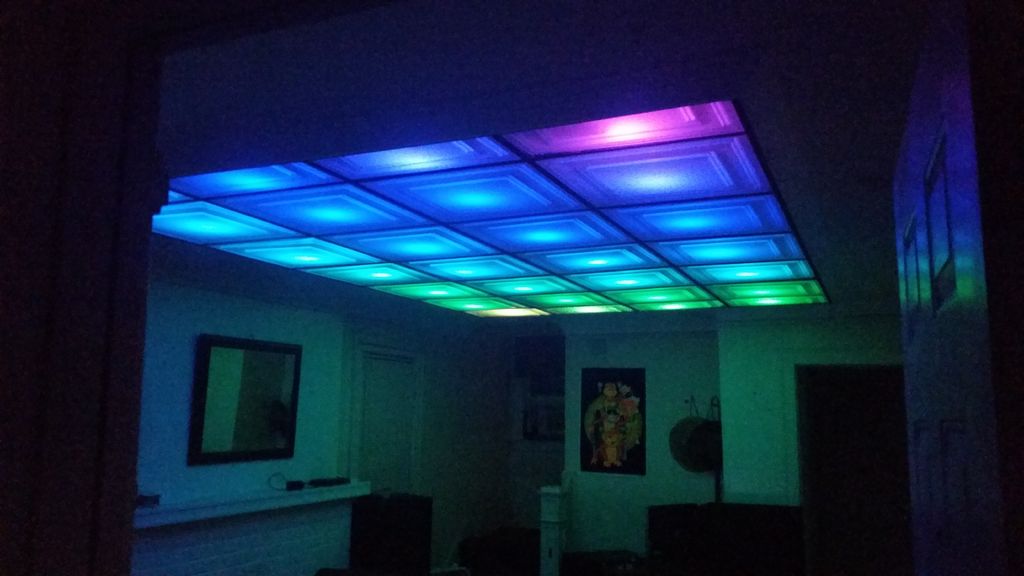
In our living room we have a small patch of drop ceiling right in the middle of the room, basically a giant piece of duct tape to cover up bad carpentry. It was constantly getting water damage from what looks like a giant hole in the ceiling above the drop tiles. After roughly a year of living in the house I decided to take action. The Pixel Drop Ceiling was born.
The Pixel Drop Ceiling is a Bluetooth, Arduino powered, Computer controlled, RGB, Drop Ceiling. The perks of being controlled by the computer are that the whole system is music controlled and its easy to change and create your own patterns with little software know-how. You can then change these patterns on the fly without having to upload new software to the Arduino, allowing you to create your own “show” in essence.
Step 1: Materials
- Stratford Translucent Ceiling Tiles
- Black Paint
- Arduino Uno R3
- Arduino Proto Board
- HC-06 Bluetooth Transceiver
- 30mm WS2801 LED’s
- 12V 5A Power source
- 2k resistor
- 1k resistor
- 2.1mm Power Jack
When choosing Ceiling Tiles you don’t have to go with the Stratford that’s simply what I chose, just make sure that no matter what design of tile you get that you buy the translucent tiles, NOT the white tiles. The Translucent tiles are made purposely to put lighting fixtures above and they look amazing when you do so.
Step 2: The Circuit
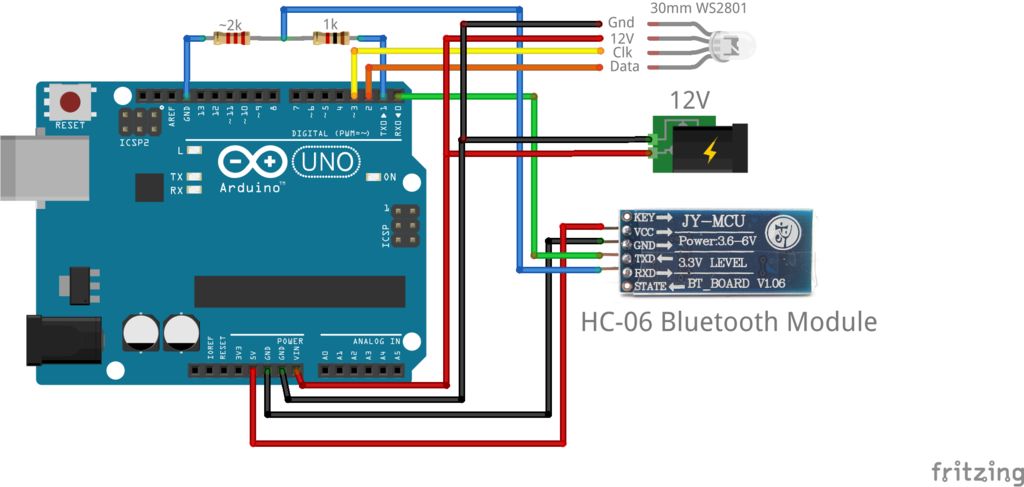
The circuity is fairly simple, just make sure that you power the LED’s externally using the 12V power source and you power the HC-06 using the 5V pin on the Arduino. The circuit is exactly the same as my previous Instructable the Bluetooth RGB Shelf Lighting, the only difference between the two is the firmware on the Arduino itself which I will explain in the next step. When wiring to the LED’s its normally a good idea to make some sort of easy disconnect, you can see what I used in the pictures above.
Step 3: Ceiling Assembly
These ceiling tiles are very flexible so it makes for a very easy installation. For the half sized tiles on each side of the drop ceiling we simply held down the tiles with a straight edge and cut it with scissors, the lip around the edge gives you a little bit of tolerance for any mess up. As for the wires ran to the ceiling for the LED’s I was “lucky” and had a giant hole in my ceiling that conveniently led straight to my room up stairs. The original drop ceiling grid was white but painting it black gave it much more of a “Grid” look, which in turn made for better looking separation between pixels.
In order to mount the WS2801’s I took the easy way out and simply used double sided mounting tape to stick them to the ceiling along with duct tape to hold up the wires, I wasn’t too worried about harming the existing ceiling, because of the already present “Giant hole”. When you mount them too the ceiling put them in some time of serpentine pattern. The matrix software will then compensate for what pattern you have them in and change the patterns as needed.
Step 4: Arduino Software
The software for the Arduino is quite simple, it receives incoming pixel data and lights the LED’s accordingly. The guys over at SolderLab were kind enough to offer their sketch for the Uno and Mega Arduino boards. This sketch works with the Glediator and J!nx LED Matrix software, I will explain more in the next step. When using the Arduino Uno software at 500,000 BAUD you are limited to controlling 512 LED’s, if you were to go with the Mega version the firmware is run at 1,000,000 BAUD allowing you to handle roughly 1024 LED’s. Links to both the Uno and Mega Sketches are below.
SolderLab’s Sketches (You will have to change the BAUD as shown below if you use these!)
- Arduino Uno WS2801
- Arduino Mega WS2801
- Attached is my modified code w/ BAUD changes
In order to use this software with Bluetooth integration a little work is required. The HC-06 cannot run at 500,000 BAUD, to fix this you need to modify the default BAUD rate on the Bluetooth transceiver as well as in the Arduino code. We’ll mess with the defaults on the HC-06 in the next step. I’ve already made the necessary changes to Arduino code posted below, in case you don’t want to use Bluetooth serial or your starting fresh with Glediator’s sketch what you need to do is change this:
~~~~~~~~~~~~~~~~~~~~~~~~~~
//UART Initialization
UCSR0A |= (1<<U2X0);
UCSR0B |= (1<<RXEN0) | (1<<TXEN0) | (1<<RXCIE0);
UCSR0C |= (1<<UCSZ01) | (1<<UCSZ00);
UBRR0H = 0;
// UBRR0L = 3; //Baud Rate 0.5 MBit --> 0% Error at 16MHz :-) <strong> <--Comment Out This Line</strong>
UBRR0L = 16; <strong><----- Add in this one</strong>
~~~~~~~~~~~~~~~~~~~~~~~~
What this does is it drops the incoming BAUD rate from 500,000 to 115,200, the max BAUD rate of the HC-06. Make sure that you change the header to your number of pixels as well, as seen below:
#define Num_Pixels 28
Compile and upload!
 WS2801_Ceiling.rar
- Why must I choose translucent tiles instead of white ones?
Translucent tiles are made purposely to put lighting fixtures above them and look amazing when lit. - How does the computer control benefit the system?
The whole system is music controlled and allows you to change patterns on the fly without uploading new software. - What is the recommended power setup for the LEDs?
You should power the LED's externally using the 12V power source while powering the HC-06 using the 5V pin on the Arduino. - How many LEDs can the Arduino Uno handle compared to the Mega?
The Uno is limited to controlling 512 LED's at 500,000 BAUD, while the Mega handles roughly 1024 LED's at 1,000,000 BAUD. - Can the HC-06 Bluetooth transceiver run at 500,000 BAUD?
No, the HC-06 cannot run at 500,000 BAUD; its max BAUD rate is 115,200. - What modification is needed in the Arduino code for Bluetooth integration?
You must comment out the line setting the Baud Rate to 0.5 MBit and add the line setting it to 16 to drop the rate to 115,200. - How should the WS2801 LEDs be mounted to the ceiling?
They should be stuck to the ceiling using double sided mounting tape in some sort of serpentine pattern. - Does the matrix software compensate for the LED placement pattern?
Yes, the matrix software will then compensate for what pattern you have them in and change the patterns as needed.
