
Summary of A YAMAHA DX7 ON A USB DONGLE
This article details a project where [Kevin] creates a portable Yamaha DX7 synthesizer emulator using a Raspberry Pi Zero series. By running MiniDEXED software on the Pi and utilizing USB Gadget mode via an adapter board, the device functions as a single or eight-channel synth plugged directly into a computer. While primarily a demonstration of the Pi's capabilities rather than a practical tool for DAW users, it successfully replicates the iconic FM synthesis sound in a compact form factor.
Parts used in the Portable Yamaha DX7 Dongle:
- Raspberry Pi Zero
- Raspberry Pi Zero W
- Raspberry Pi Zero 2W
- MiniDEXED DX7 emulator software
- Dongle adapter board
- Pimoroni Audio Shim
The Yamaha DX7 was released in 1983, with its FM synthesis engine completely revolutionizing the electronic music world at the time. It didn’t come cheap, and still doesn’t today, but we are blessed with emulators that can give us the same sound on a budget. In that vein, [Kevin] decided to whip up a Yamaha DX7 you can carry around in a little USB dongle.
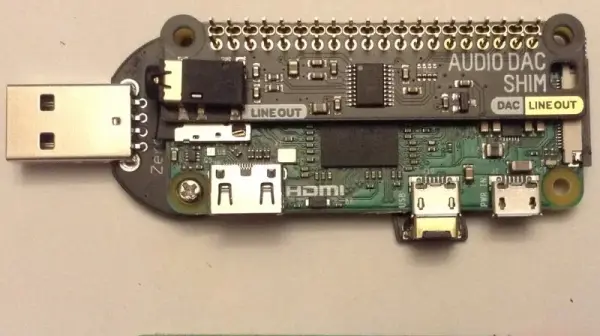
The build centers around the use of a Raspberry Pi Zero, Zero W, or Zero 2W configured to run the MiniDEXED DX7 emulator. The Pi is then set up with a dongle adapter board that allows it to run in USB Gadget mode. The Zero line of Raspberry Pis are perfect for this use, as they draw less current and so can, under the right conditions, run off a computer’s USB port. The Pi receives MIDI commands over the USB interface, and outputs sound via a Pimoroni Audio Shim. Effectively, the result is a single-channel DX7 synth that plugs in via USB; or eight channels if you use the more powerful Zero 2W.
[Kevin] readily admits that there probably isn’t much use for a DX7 dongle, given that you could just load a DX7 emulator in your DAW of choice instead. Regardless, it’s a fun build, and one that ably demonstrates the USB Gadget mode of operation for the Raspberry Pi. Video after the break.Source: A YAMAHA DX7 ON A USB DONGLE
- What hardware is used to build the DX7 dongle?
The build centers around a Raspberry Pi Zero, Zero W, or Zero 2W. - Can the Raspberry Pi run off a computer's USB port?
Yes, the Zero line draws less current and can run off a computer USB port under the right conditions. - How does the device receive MIDI commands?
The Pi receives MIDI commands over the USB interface. - How many channels of sound can the Zero 2W output?
Using the more powerful Zero 2W allows for eight channels of sound. - What component is used to output sound from the Pi?
A Pimoroni Audio Shim is used to output sound. - Why might someone choose this build over a DAW emulator?
It serves as a fun build that demonstrates the USB Gadget mode operation, even if it has limited practical use compared to DAWs. - Does the Raspberry Pi Zero 2W offer more capability than the standard Zero?
Yes, the Zero 2W is more powerful and supports eight channels instead of just one. - What specific software runs on the Raspberry Pi for this project?
The MiniDEXED DX7 emulator is configured to run on the Pi.
