
Summary of MODERN SOFTWARE BRINGS BACK THE TIMEX DATALINK
Apple did not invent the smartwatch; Timex Datalink (1994) could sync appointments via CRT light pulses. Synthead reverse-engineered the protocol and recreated the Notebook Adapter using timex-datalink-arduino so a Teensy LC or Raspberry Pi Pico LED can emulate the original blinking adapter. They also made timex_datalink_client, a Ruby library to generate uploadable Datalink data from text config files, enabling syncing without Windows 3.1 or original hardware/software.
Parts used in the Timex Datalink revival:
- Timex Datalink watch (original target device)
- Teensy LC (microcontroller)
- Raspberry Pi Pico (alternative microcontroller)
- Onboard LED of the microcontroller
- timex-datalink-arduino project software
- timex_datalink_client Ruby library
- Plain-text configuration files containing appointment data
- Computer to run the client and provide data (originally Windows 3.1 for Timex software)
As much as some people on the Internet might like to think — no, Apple did not come up with the idea of the smart watch. Even if you ignore the calculator watches that we imagine a full 60% of Hackaday readers wore at one time or another in their lives, the Timex Datalink was already syncing with computers and pulling down the user’s list of appointments back in 1994 by decoding the pulses of light produced by a CRT monitor. Hey, it sounded like a good idea at the time.
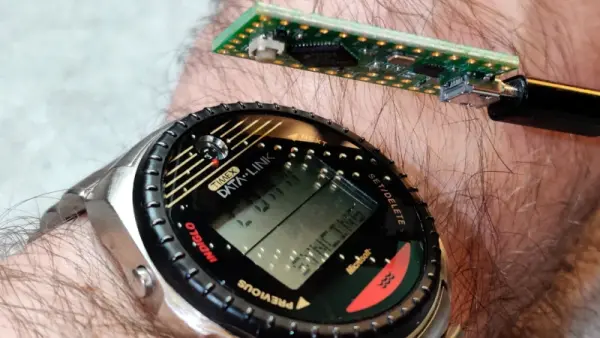
Unfortunately, this idea hasn’t aged well. The technique doesn’t work on more modern displays, and naturally the companion software to generate the flashing patterns was written for Windows 3.1. But thanks to the reverse engineering efforts of [Synthead], you can now sync any version of the Timex Datalink to your computer using nothing more complex than the onboard LED of the Teensy LC or Raspberry Pi Pico.
There’s actually several different projects working together to make this happen. In place of a CRT, there was an official “Timex Datalink Notebook Adapter” back in the day that was designed to be used on laptops and featured a single blinking LED. That’s what [Synthead] has recreated with timex-datalink-arduino, allowing a microcontroller to stand in for this gadget and featuring 100% backwards compatibility with the original Datalink software.
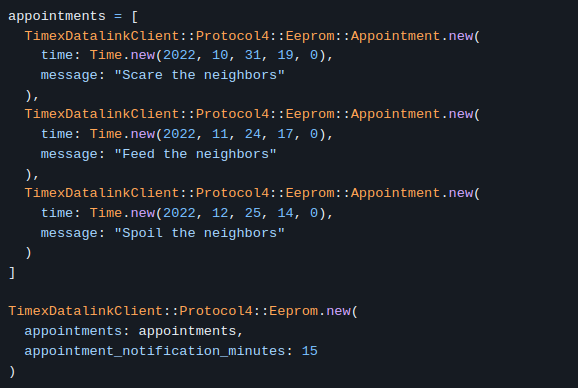
But since you’re probably not rocking Windows 3.1 anymore, having access to that software is far from a given. That’s why [Synthead] also created timex_datalink_client, which is a Ruby library that lets you generate data fit for upload into the Timex Datalink. At the time of this writing there doesn’t seem to be a friendly user interface (graphical or otherwise) for this software, but it’s easy enough to feed data into it using plain-text configuration files.
Helpfully [Synthead] provides screenshots of information loaded into the original software, followed by a config file example that accomplishes the same thing. It looks like writing some glue code that pulls your schedule from whatever service you fancy and formats it for the Datalink client should be relatively simple.
We’ve previously seen projects that got the Timex Datalink synced without the need for a CRT, but they still required the original software. To our knowledge, this is the first complete implementation of the Datalink protocol that doesn’t rely on any original hardware or software. Expect eBay prices to go up accordingly.
Source: MODERN SOFTWARE BRINGS BACK THE TIMEX DATALINK
- Can the Timex Datalink be synced without the original CRT method?
Yes; Synthead recreated the Notebook Adapter so a microcontroller LED can emulate the original blinking adapter. - What microcontrollers are used to emulate the Notebook Adapter?
Teensy LC and Raspberry Pi Pico are used to emulate the adapter via their onboard LED. - Do I need the original Timex software to prepare data for the watch?
No; timex_datalink_client, a Ruby library, can generate uploadable Datalink data from text config files. - Is the new implementation compatible with original Datalink protocol?
Yes; timex-datalink-arduino offers 100% backwards compatibility with the original Datalink software behavior. - Does the timex_datalink_client include a graphical user interface?
No; at the time of writing there does not appear to be a user-friendly GUI, but it accepts plain-text configuration files. - Can I automate pulling my schedule into the Datalink client?
Yes; the article says writing glue code to pull schedules from services and format them for the client should be relatively simple. - Did previous projects require original software or hardware?
Yes; earlier projects synced without a CRT but still required the original Timex software. - Is this the first full implementation independent of original hardware and software?
According to the article, this is the first complete implementation of the Datalink protocol that does not rely on any original hardware or software.
