
Summary of DIY ARDUINO DUE TEA5767 FM RADIO
This article describes a modern DIY FM radio project by [mircemk] that combines retro signal-gathering magic with contemporary components. The build features an Arduino Due as the central controller, managing an OLED display and rotary encoder for user interaction. It utilizes specific audio modules to drive both headphones and a built-in speaker, all housed in a custom PVC enclosure styled with adhesive tape. This project demonstrates how pre-built modules and open-source code can be effectively combined to create functional, skill-building electronics.
Parts used in the DIY Arduino Due TEA5767 FM Radio:
- Arduino Due
- TEA5767 module
- SH1106 128×64 pixel OLED display
- Rotary encoder
- LM4811 headphone amplifier
- PAM8403 Class D audio amplifier
- PVC panels (enclosure)
- Colored adhesive tape
Older hackers will remember that a crystal set radio receiver was often one of the first projects attempted. Times have changed, but there’s still something magical about gathering invisible signals from the air and listening to the radio on a homemade receiver. [mircemk] has brought the idea right up to date by building an FM radio with an OLED display, controlled with a rotary encoder.
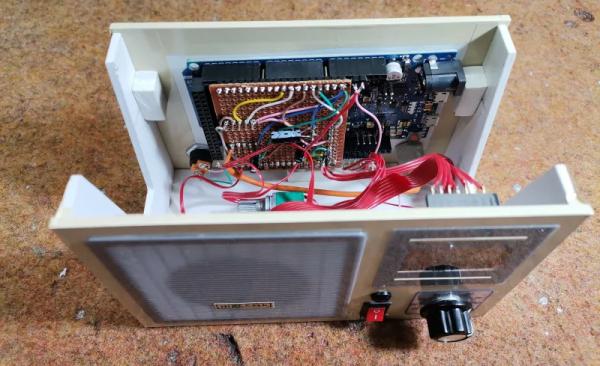
The design is fairly straightforward, based as it is on another project that [mircemk] found on another site, but the build looks very slick and would take pride of place on any hacker’s workbench. An Arduino Due forms the heart of the project, controlling a TEA5767 module, an SH1106 128×64 pixel OLED display and a rotary encoder. The sound signal is passed through an LM4811 headphone amplifier for private listening, and a PAM8403 Class D audio amplifier for the built-in loudspeaker. The enclosure is made from PVC panels, and accented with colored adhesive tape for style.
It’s easier than ever before to quickly put together projects like this by connecting pre-built modules and downloading code from the Internet, but that doesn’t mean it’s not a worthwhile way to improve your skills and make some useful devices like this one. There are so many resources available to us these days and standing on the shoulders of giants has always been a great way to see farther.
We’ve shown some other radio projects using Arduinos and the TEA5767 IC in the past, such as this one on a tidy custom PCB, and this one built into an old radio case.
Source: DIY ARDUINO DUE TEA5767 FM RADIO
-
What forms the heart of this FM radio project?
An Arduino Due forms the heart of the project. -
How is the radio controlled by the user?
The device is controlled with a rotary encoder. -
Which component handles the sound signal for private listening?
The LM4811 headphone amplifier passes the sound signal for private listening. -
What amplifier is used for the built-in loudspeaker?
A PAM8403 Class D audio amplifier is used for the built-in loudspeaker. -
What type of display is included in the build?
The project includes an SH1106 128×64 pixel OLED display. -
What material is used to make the enclosure?
The enclosure is made from PVC panels. -
How is the enclosure accented for style?
The enclosure is accented with colored adhesive tape. -
Is it easier to put together projects like this using pre-built modules?
Yes, it is easier to quickly put together projects by connecting pre-built modules.
