
Summary of MACINTOSH CLASSIC II WITH E-INK DISPLAY
This article describes a project reviving a vintage Macintosh Classic II by replacing its original monochrome screen with a modern e-ink display driven by a Raspberry Pi. The device runs a replica System 7 environment and displays photos while retaining the original shell. To maintain compatibility, an Arduino was added to support the Apple Desktop Bus, allowing users to operate the machine with authentic period-correct peripherals like the mouse and keyboard.
Parts used in the Macintosh Classic II E-Ink Project:
- Macintosh Classic II shell
- E-ink display
- Raspberry Pi
- Arduino
- Apple Desktop Bus interface
- Original Apple mouse
- Original Apple keyboard
As various antique computers age, it becomes increasingly hard to operate them as hardware begins to physically fail. Keeping these systems up and running often requires scavenging parts from other machines which are only becoming harder to find as time goes on. But if you throw out the requirement of using only era-appropriate components, there are some interesting ways to revive older devices with a few touches of modern tech, like this Mac Classic with a unique display.
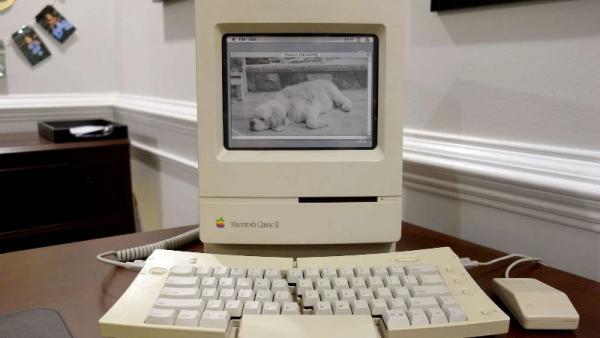
The Macintosh Classic II was the successor to the first Macintosh computer Apple sold that had a price tag under $1000. As such, there were some lower specs for this machine such as the monochrome 512×342 display. This one has been retrofitted with an e-ink display which actually gives it some of the same grayscale aesthetic as the original. The e-ink display is driven by a Raspberry Pi which displays a replica System 7 environment and a set of photos.
While the only part of the computer that’s original is the shell at this point, the project’s creator [Dave] also built in support for the Apple Desktop Bus through an Arduino so the original Apple mouse and keyboard can be used. While it’s largely an illusion of a working Mac Classic, we still appreciate the aesthetic.
If you’re more of a classic Apple purist, though, take a look at this SE/30 which uses almost entirely original parts with the exception of a Raspberry Pi to allow it to communicate with the modern Internet.
Source: MACINTOSH CLASSIC II WITH E-INK DISPLAY
- How does the modified Macintosh Classic II function?
The system uses a Raspberry Pi to drive an e-ink display that shows a replica System 7 environment and photos. - What type of display is used in this retrofitted computer?
An e-ink display is installed which provides a grayscale aesthetic similar to the original monochrome screen. - Can original peripherals be used with the new setup?
Yes, an Arduino supports the Apple Desktop Bus so the original Apple mouse and keyboard can be used. - What is the primary purpose of the Raspberry Pi in this build?
The Raspberry Pi drives the e-ink display and runs the software environment for the project. - Does the project use only era-appropriate components?
No, the project replaces internal components with modern tech like a Raspberry Pi and e-ink display while keeping the original shell. - What specific operating system environment is displayed on the screen?
The screen displays a replica of the System 7 environment. - Why might someone choose this modification over using original parts?
It offers a way to revive aging devices when hardware fails or original parts become too hard to find. - What content is shown on the e-ink display besides the OS?
The display also shows a set of photos.
