
Summary of Wireless Doorbell Receiver
This project describes a wireless doorbell receiver that decodes 433 MHz RF messages from a matching transmitter, then plays a two-tone ding-dong sound and blinks an LED five times. It is built around a PIC12F617 microcontroller (JAL firmware), uses a small audio amplifier to drive an 8 Ω speaker, and is mains-powered via a 5 V step-down converter. The receiver decodes repeated messages and uses timers for RF bit decoding and sound generation.
Parts used in the Wireless Doorbell Receiver:
- Piece of breadboard
- PIC12F617 microcontroller
- Electrolytic capacitor 47uF/16V
- Ceramic capacitors 2 × 100nF
- Ceramic capacitor 1 × 680nF
- 433 MHz ASK RF receiver
- Resistor 33k
- Resistors 2 × 1k
- Resistors 2 × 220 Ohm
- Diodes 2 × 1N4148
- Transistors BC639 and BC640
- LEDs: 1 Red, 1 Amber
- Loudspeaker 8 Ohm
- Plastic housing with mains connector
- 5 Volt power supply (step down converter)
- Fuse holder and 100mA slow fuse
- Switch
This project describes the second part of the following two projects:
- A wireless doorbell transmitter as described in the Wireless Doorbell Transmitter Instructable. This Instructable also gives some introduction to these projects.
- A wireless doorbell receiver described in this Instructable.
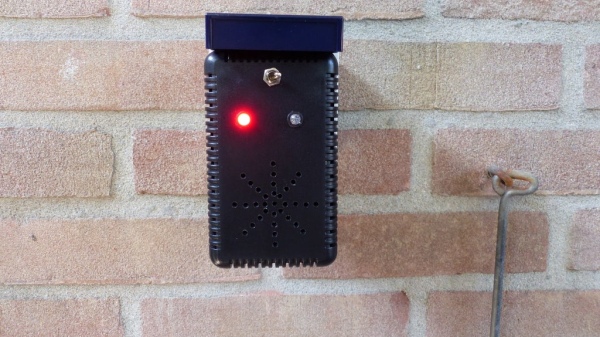
The wireless doorbell receiver will make a sound and will blink a LED 5 times after it has received a valid message from the wireless doorbell transmitter. The sound produced by this receiver sounds like ding-dong although but you can call it ‘8-bit audio’ because of its simplicity.
The device is powered by the 230 Volt AC mains using a 5 Volt step down converter that generates the 5 Volt DC voltage. Although it could have been designed to work on a battery, I did not need that. It should be possible to power it with three 1.5 AA batteries since both the receiver and the microcontroller should work well on 4.5 Volt or even 3.6 Volt in case of rechargeable batteries.
Also here I built this project around my favorite micro controller the PIC but you can also use an Arduino.
Step 1: Required Components
You need tohave the following components for this project:
- A piece of breadboard
- PIC microcontroller 12F617, see win-source
- Electrolytic capacitor 47uF/16V
- Ceramic capacitors: 2 * 100nF, 1 * 680 nF
- 433 MHz ASK RF Receiver
- Resistors: 1 * 33k, 2 * 1k, 2 * 220 Ohm
- 2 * diode 1N4148, see win-source
- Transistors: BC639, BC640
- LEDs: 1 Red, 1 Amber
- 1 loudspeaker 8 Ohm
- A plastic housing
- For mains power (not shown on the schematic diagram):
- 5 Volt power supply
- Fuse holder + fuse 100mA Slow
- Switch
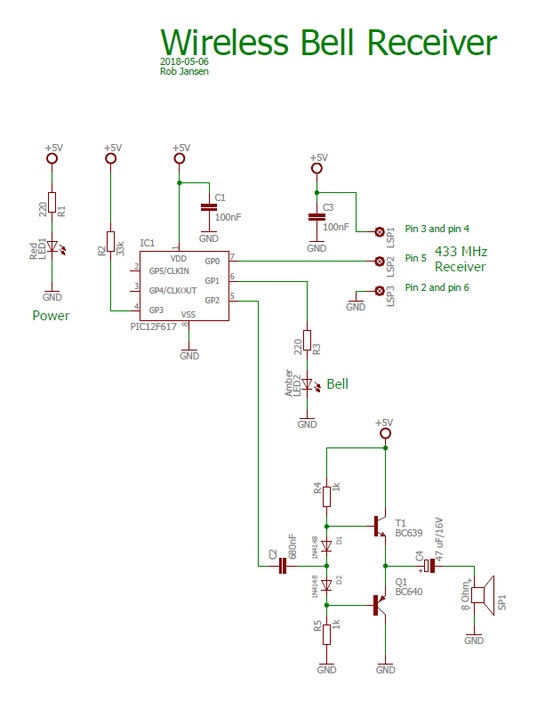
See the schematic diagram on how to connect the components.
Step 2: Designing and Bulding the Electronics
All control is performed by the PIC12F617 in software. As mentioned earlier I designed this project so that it is powered by the mains using a step down converter. In this case be very careful not to touch the 230 V!
A simple amplifier is used to drive the 8 Ohm loudspeaker.
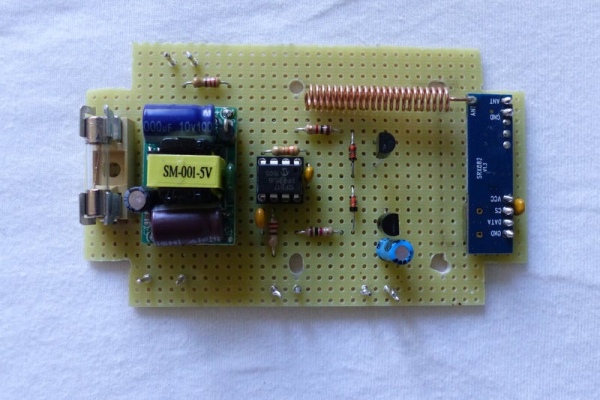
Building the circuit can easily be done on a small breadboard with suitable housing. In the pictures you can see the circuit as I built it on the breadboard including the final result when put in a plastic housing. This housing has a connector that can be directly plugged into the mains.
Step 3: The Sofware and Final Operation
As already mentioned, the software is written for a PIC12F617. It is written in JAL. In this project the PIC runs on an internal clock frequency of 8 MHz.
The software does the following:
- Decode the received message via the RF link. Since the wireless doorbell transmitter will repeat the same message 3 times, the receiver will only use one of the messages by checking the sequence number of the message. Timer 2 is used by the Virtual Library to decode the received RF messages with a bit rate of 1000 bits/s.
- When a valid message is received, generate a ding-dong sound with the frequencies 1667 Hz and 1111 Hz and blink the LED 5 times. Timer 1 is used to generate the ding-dong sound.
In the video you can see and hear the wireless doorbell receiver in action.
The JAL source file and the Intel Hex file are attached. If you are interested in using the PIC microcontroller with JAL – a Pascal like programming language – please visit the JAL download site
Have fun building your own project and looking forward to your reactions.
Source: Wireless Doorbell Receiver
- What does the receiver do when it gets a valid message?
It generates a ding-dong sound using two frequencies and blinks an LED five times. - Which microcontroller is used in this project?
The project uses a PIC12F617 microcontroller. - What RF frequency and type does the receiver use?
The receiver uses a 433 MHz ASK RF receiver module. - How is the device powered?
It is powered from 230 V AC mains via a 5 V step down converter; a fuse and switch are used. - Can the project be powered by batteries?
The article says it could be powered by three 1.5 V AA cells as the receiver and microcontroller work on 4.5 V or lower. - What programming language and clock speed are used for the PIC firmware?
The firmware is written in JAL and the PIC runs on an internal 8 MHz clock. - How are RF messages decoded?
Timer 2 and a Virtual Library decode messages at 1000 bits/s and the receiver uses the sequence number to pick one of repeated messages. - Which timers are used for decoding and sound generation?
Timer 2 is used for RF decoding and Timer 1 is used to generate the ding-dong sound. - What are the sound frequencies used for ding-dong?
The two frequencies are 1667 Hz and 1111 Hz. - Is an amplifier required for the speaker?
Yes, a simple amplifier is used to drive the 8 Ohm loudspeaker.
