
Summary of Internet of Things Cloud Scheduler introduced for Arduino
The Arduino Cloud platform has introduced a new IoT Cloud Scheduler, allowing users to automate projects with precise timing and duration controls. This feature enables triggering actions every 15 minutes or for extended periods like 8 hours without complex coding. Users can manage multiple schedulers via a simple dashboard widget, set local time zones automatically, and visualize schedules on any device. Ideal for automating lights, watering plants, or seasonal decorations, this tool simplifies IoT automation through an intuitive interface accessible from mobile or desktop.
Parts used in the Arduino IoT Cloud Scheduler:
- Arduino Cloud Dashboard
- Scheduler Widget
- Time Zone Variable
- Mobile Dashboard Interface
- Desktop Dashboard Interface
- Automation Actions
- Event Triggers
Developers, hobbyists and Internet of Things enthusiasts may be interested in a new IoT Cloud Scheduler that has been added to the Arduino Cloud platform, offering an easy way to add new automation controls to your projects. The Cloud Scheduler takes the form of a new type of variable that consists of a couple of elements that when combined provide an incredibly useful combination. Enabling you to trigger processes at a specific time for a predetermined duration.
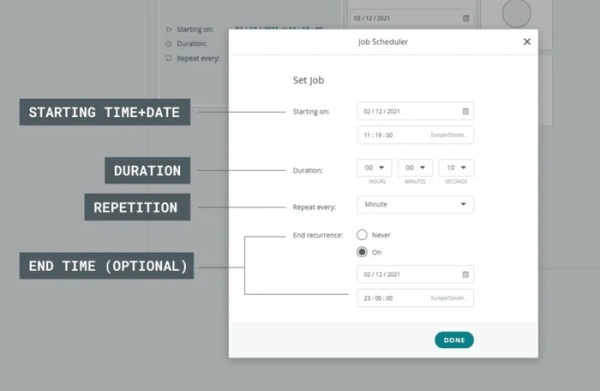
The Internet of Things Cloud Scheduler is capable of automating almost anything however many times you require and can be triggered every 15 minutes and remain on the 12 seconds, or could be triggered for 8 hours everyday as an example. The official Arduino team explain a little more about the new IoT Cloud Scheduler.
Arduino IoT Cloud Scheduler
“You don’t need much imagination to figure out the usefulness of automatic timers, but let’s ponder a couple of examples nonetheless. Over on our Docs page for the Cloud Scheduler you can see some excellent use cases. Automating your lights, for instance, or watering a plant at regular intervals. Considering it’s available right now, why not set your Christmas light to automatic with the Cloud Scheduler? Actions and events that can jump into action without the need for any manual input at just the right moment.”
“It’s incredibly flexible, and the whole thing is handled through a simple widget on your Arduino Cloud dashboard. This offers a huge advantage. You can utilize these actions without needing to figure out the complex code to achieve it. To make sure it’s working correctly no matter where you are, one of the variable types allows you to retrieve (and set) your local time zone. Essential for a schedule that’s triggered at a specific time of day. It also means you don’t need to manually work out your location’s relationship to UTC.”
“And don’t overlook that you can set up multiple schedulers to work together. Whether they’re doing different things at different times, or following on from each other to create a series of connected actions. It’s all handled through the widgets with dates, times and durations all visible directly on your dashboards. That includes mobile dashboards too, as the Cloud Scheduler is now available for all devices.”
Source: Internet of Things Cloud Scheduler introduced for Arduino
- What is the primary function of the Arduino IoT Cloud Scheduler?
It allows users to trigger processes at a specific time for a predetermined duration. - How often can the scheduler be triggered?
The scheduler can be triggered as frequently as every 15 minutes or less frequently depending on user needs. - Does the system require manual code writing to work?
No, it is handled through a simple widget on the dashboard without needing complex code. - How does the system handle different time zones?
A variable type exists to retrieve and set your local time zone automatically. - Can multiple schedulers work together?
Yes, you can set up multiple schedulers to perform different tasks or follow one another. - Is the scheduler available on mobile devices?
Yes, the Cloud Scheduler is available for all devices including mobile dashboards. - What are some examples of use cases mentioned?
Examples include automating lights, watering plants, and setting Christmas lights to automatic. - Where can users see dates, times, and durations?
All schedule details are visible directly on the dashboards.
