
Summary of Arduino Sketch Read Accelerometer
This article provides an Arduino sketch to read data from a 3-axis analog accelerometer, specifically the ADXL335. The code initializes serial communication at 9600 baud, reads raw voltage values from analog pins A0, A1, and A2, and then applies calibration offsets and scaling factors to convert these readings into Earth gravity units. The processed data is printed to the Serial Monitor every 50 milliseconds.
Parts used in the Read Analog Accelerometer Project:
- Arduino Board
- ADXL335 3-axis analog accelerometer
- Analog input pins (A0, A1, A2)
This sketch is used by Exercise: Read Analog Accelerometer.
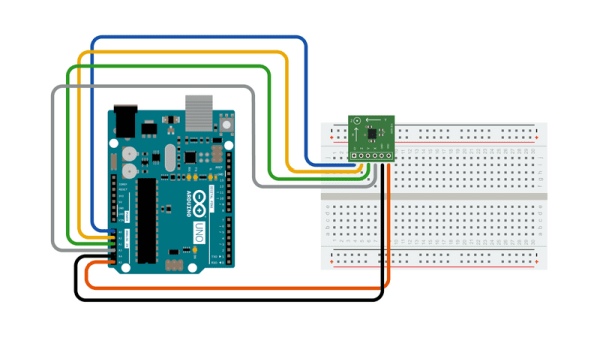
Full Source Code
The full code is all in one file ReadAccelerometer.ino.
// ReadAccelerometer - read a 3-axis analog accelerometer and display the results to the serial port
//
// Copyright (c) 2016, Garth Zeglin.  All rights reserved. Licensed under the
// terms of the BSD 3-clause license as included in LICENSE.
//
// This program assumes that:
//
//  1. A three-axis analog accelerometer such as an ADXL335 is attached to A0,
//     A1, and A2.  Note: this sensor has buffered voltage outputs and can
//     simply connect directly to the analog input pins.
//
//  2. The serial console on the Arduino IDE is set to 9600 baud communications speed.
//
// ================================================================================
// Configure the hardware once after booting up.  This runs once after pressing
// reset or powering up the board.

void setup()
{
  // Initialize the serial UART at 9600 bits per second.
  Serial.begin(9600);
}

// ================================================================================
// Run one iteration of the main event loop.  The Arduino system will call this
// function over and over forever.
void loop()
{
  // Read the accelerations as uncalibrated values.
  int x_raw = analogRead(0);
  int y_raw = analogRead(1);
  int z_raw = analogRead(2);

  // The following will rescale the values to be approximately in Earth gravity units.
  const int OFFSET = 335;
  const float SCALE = 0.013;

  float x = (x_raw - OFFSET) * SCALE;
  float y = (y_raw - OFFSET) * SCALE;
  float z = (z_raw - OFFSET) * SCALE;

  // Print the raw outputs.
  Serial.print("Raw: X: ");
  Serial.print(x_raw);
  Serial.print(" Y: ");
  Serial.print(y_raw);
  Serial.print(" Z: ");
  Serial.print(z_raw);

  // Print the calibrated outputs.
  Serial.print("  Calib: X: ");
  Serial.print(x);
  Serial.print(" Y: ");
  Serial.print(y);
  Serial.print(" Z: ");
  Serial.println(z);   // println appends an end-of-line character

  // Delay for a short interval to create a periodic sampling rate.
  delay(50);
}
Source: Arduino Sketch ReadAccelerometer
- How is the serial communication configured?
The serial console on the Arduino IDE must be set to 9600 baud communications speed. - Which pins are used for the accelerometer connections?
The sensor connects directly to analog input pins A0, A1, and A2. - What is the sampling rate interval?
The system uses a delay of 50 milliseconds between iterations. - How are raw values converted to gravity units?
The code subtracts an offset of 335 and multiplies by a scale factor of 0.013. - Does the sensor require external buffering components?
No, the ADXL335 has buffered voltage outputs that connect directly to the analog pins. - Where is the output data displayed?
The results are displayed to the serial port via the Serial Monitor. - What function runs continuously after booting up?
The loop function runs over and over forever to iterate through the event loop. - What is the name of the source file?
The full code is contained in a single file named ReadAccelerometer.ino.
