
Summary of THE IEEE BUILDS A SMART WATCH
Building your own smartwatch is now accessible via kits like Watchy, an open-source project using an ESP32 and E-ink display for about $50. This article details a user's experience assembling and programming the device, highlighting initial software compatibility issues resolved by using a Raspberry Pi, and demonstrating its low-power design where most logic runs in the setup function.
Parts used in the Watchy Project:
- ESP32 microcontroller
- E-ink display (1.5 inches)
- Real time clock
- Vibration motor
- Accelerometer
- Four buttons
- 200 mAh lithium polymer battery
- MicroUSB charger
It used to be that building your own watch was either a big project or it meant that you didn’t really care about how something looked on your wrist. But now with modern parts and construction techniques, a good-looking smart watch isn’t out of reach of the home shop. But if you don’t want to totally do it yourself, you can turn to a kit and that’s what [Stephen Cass] did. Writing in IEEE Spectrum, he took a kit called a Watchy and put it through its paces for you.
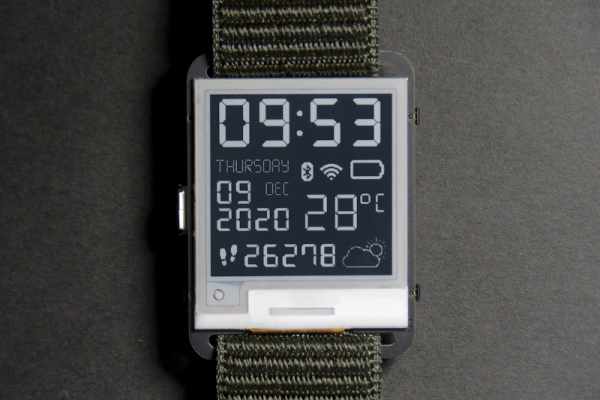
Watchy is an open source product that uses an ESP32, an E-ink display, and costs about $50. The display is 1.5 inches — good enough for a watch — and it has a real time clock, a vibration motor, an accelerometer, and four buttons. The whole thing runs on a 200 mAh lithium polymer battery. The charger is microUSB and you can also upload software to it using the usual Arduino tools.
However, [Stephen] found that none of the examples he tried would work at first. He found problems with the Mac software, but he also had problems under Windows. The answer? Switching to a Raspberry Pi seemed to work and once the watch was wiped clean, the Mac tools would work, too. It sounds like this isn’t a common problem, but he has to erase the watch with the Pi before each programming cycle.
Unlike a normal Arduino program, all the work in a typical Watchy program happens in setup() so the watch can mostly sleep and it updates the 200×200 typically just once a minute. As an example, [Stephan] wrote a watch face that uses an old Irish alphabet to tell time. He plans to add code to grab online data, too, and the phone has support for connecting wirelessly and parsing JSON to make tasks like that easier.
We always thought the EZ430-Chronos was a good-looking watch, but its screen is dated now. You can also pick up a lot of cheap import watches that can be hacked.
Source: THE IEEE BUILDS A SMART WATCH
-
What components are included in the Watchy kit?
The kit includes an ESP32, a 1.5-inch E-ink display, a real time clock, a vibration motor, an accelerometer, four buttons, and a 200 mAh lithium polymer battery. -
How much does the Watchy cost?
The Watchy costs about $50. -
Can I upload software to the Watchy using Arduino tools?
Yes, you can upload software to it using the usual Arduino tools. -
Why did the author switch to a Raspberry Pi?
The author switched to a Raspberry Pi because they encountered problems with both Mac and Windows software that prevented the examples from working initially. -
Does the Watchy require erasing before each programming cycle?
Yes, the watch must be wiped clean with a Raspberry Pi before each programming cycle for the Mac tools to work. -
When does the main code execute in a typical Watchy program?
All the work happens in the setup() function so the watch can mostly sleep and update the display once a minute. -
How can the Watchy connect to online data?
The phone has support for connecting wirelessly and parsing JSON to make tasks like grabbing online data easier.
