
Summary of Auto DraftINSPECTAR USES AUGMENTED REALITY TO HELP YOU INSPECT YOUR PCBS
This article introduces Inspectar, a new augmented reality software designed to simplify PCB validation and testing. By overlaying Gerber file data onto real-time camera feeds of physical boards, it allows designers to inspect connections, view multiple layers simultaneously, and verify designs efficiently without needing datasheets. The tool supports various EDA tools like KiCAD, Altium Designer, and Eagle (via KiCAD import), making it ideal for both personal and collaborative open-source projects.
Parts used in the Inspectar Project:
- Augmented Reality Software
- PCB Gerber Files
- Real-time Camera Feed
- KiCAD Exported Gerbers
- IPC2581B Files
- Altium Designer Files
- Zuken CADSTAR Files
- Mentor PADS Files
- OrCAD Files
- Allegro PCB Designer Files
- Pulsonix Files
- Eagle Projects (imported via KiCAD)
While making PCBs is now more affordable and easier than ever with several free open source tools for the design and several online manufacturers with fast turn around and doorstep delivery, one of its main challenges still remains board validations, and testing. As simple as this task may seem, it becomes quite laborious for complex PCBs. To solve this problem, a new software called Inspectar is adopting augmented reality to provide board designers with an easy way to view and interact with their board for validation and tests in a quick, easy and efficient way.
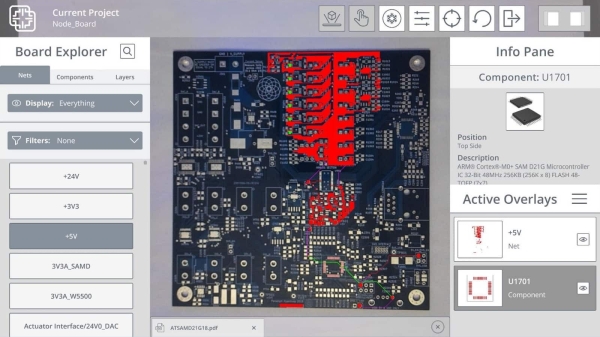
Inspectar which is currently in private beta, uses augmented reality to lay a similitude of your board’s design over a real-time image of the actual physical board. The overlayed similitude is obtained from your PCB’s original Gerber files, so you can toggle which layers are visible at any given time with an additional exploded view feature that allows you view multiple/all layers at once. As you move the board, the overlayed similitude layer automatically moves and changes orientation and view in line with the physical PCB, giving you the ability to inspect the design at any angle.
For example, by simply turning on a trace layer, users can see if a pin is properly connected to a component or if you made a mistake during the design phase — or the manufacturer made a mistake during fabrication. When used to full potentials, inspectar is able to show you as much as the function of a pin without you pulling a datasheet.
Asides being able to inspect boards designed by you, Inspectar is also very useful for working with open source boards designed by others and also good for viewing boards in a collaborative scenarios. Inspectar also currently supports Gerber files with extended comments generated from KiCAD or IPC2581B files exported from EDA tools like; Altium Designer, Zuken’s CADSTAR, Mentor PADS, OrCAD, Allegro PCB designer, and Pulsonix. The software also supports Eagle but the project will need to be imported into KiCAD first and export the gerbers from there.
Read more: Auto DraftINSPECTAR USES AUGMENTED REALITY TO HELP YOU INSPECT YOUR PCBS
- How does Inspectar help with PCB validation?
It uses augmented reality to overlay board design similitude from Gerber files onto real-time images of the physical board. - Can users toggle which layers are visible?
Yes, users can toggle visibility of specific layers or use an exploded view feature to see all layers at once. - Does the overlay move with the physical board?
Yes, the overlaid similitude layer automatically moves and changes orientation as you move the physical PCB. - What file formats does Inspectar support natively?
It supports Gerber files with extended comments from KiCAD and IPC2581B files from tools like Altium Designer and OrCAD. - How can I use Eagle projects with this software?
You must first import the Eagle project into KiCAD and then export the Gerbers from there. - Can I verify pin functions without a datasheet?
Yes, the software can show pin functions directly when used to its full potential. - Is the software suitable for collaborative scenarios?
Yes, it is useful for working with open source boards and viewing them in collaborative scenarios. - What is the current status of Inspectar?
The software is currently in private beta.
