
Summary of Control Arduino Using Your Brain and OpenBCI GUI
Control-Arduino-Using-Your-Brain-and-OpenBCI GUI shows how to stream Focus Widget data from the OpenBCI GUI over serial to an Arduino UNO, aimed at classroom use with minimal electronics experience. It outlines hardware and software requirements, grade-level timelines, roles for student groups, skills addressed (Arduino, neuroscience standards), and links to OpenBCI getting-started resources and lesson ideas.
Parts used in the Control-Arduino-Using-Your-Brain-and-OpenBCI GUI:
- A computer that meets the GUI System Requirements
- Arduino UNO (or similar device)
- OpenBCI Ganglion board
- OpenBCI Cyton board
- OpenBCI Headband Kit
- Ultracortex Mark IV EEG Headset (print-it-yourself)
- OpenBCI Classroom Bundle (5 kits) + Dedicated Support (recommended)
- Arduino IDE (software)
- Example Arduino sketch (provided)
- OpenBCI GUI standalone app or Processing sketch (software)
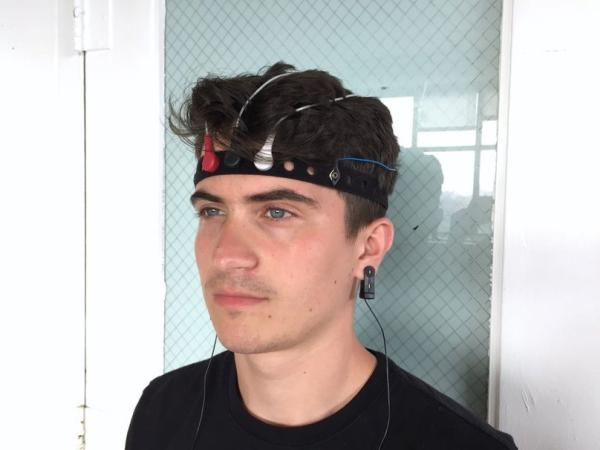
In this post, we will briefly discuss Control-Arduino-Using-Your-Brain-and-OpenBCI GUI: This tutorial shows you how to get started streaming data from the OpenBCI GUI‘s Focus Widget via Serial connection to an Arduino UNO Rev3. Specifically, this is designed for use in classroom settings for individuals who have little or no electronics experience. No “hacking” is involved!
OpenBCI hardware and software are open source! Experienced makers have the option of building this project from scratch. Full Documentation: OpenBCI Docs on GitHub.
Grade Level Recommendations and Unit Timeline:
- Middle School: 2-5 days
- High School: 1-5 days
- College: 1-4 days
This includes the time it takes to complete this instructable and then expand the project using the Arduino and available hardware (~60 mins each day). Teachers should complete this instructable before sharing with students and also account for lab setup time before each lesson.
Using just one OpenBCI board with a whole class: The teacher should complete this Instructable and then share with the whole class as a live demonstration, with a few students chosen at random to be the Connected User. Then, student groups can use the recordings in the computer lab with Arduino kits and the GUI in Playback Mode while taking turns using the OpenBCI board.
Skills Addressed:
- Computer Science: PC to Arduino Serial Communication
- NGSS: Gather and synthesize information that sensory receptors respond to stimuli by sending messages to the brain for immediate behavior or storage as memories. MS-LS1-8
- NGSS: Use argument supported by evidence for how the body is a system of interacting subsystems composed of groups of cells. MS-LS1-3
- NGSS: Develop and use a model to illustrate the hierarchical organization of interacting systems that provide specific functions within multicellular organisms. HS-LS1-2
Control Arduino Using Your Brain and OpenBCI GUI Brief:
Hardware:
- A computer that meets the GUI System Requirements
- An Arduino UNO($20), or other similar device
- A Ganglion($200) or Cyton($500) board
- The OpenBCI Headband Kit($200) or Ultracortex “Mark IV” EEG Headset($350 for Print-It-Yourself)
- Recommended: OpenBCI Classroom Bundle (5 kits) + Dedicated Support($2800)
Software:
- The Arduino IDE(free)
- The example Arduino sketch (provided)
- The OpenBCI GUI(free) standalone app or Processing sketch
Flexible Grouping:
- The Software Operator controls the computer and software.
- The Connected User is physically connected to an OpenBCI board.
- The Hardware Specialist helps make sure the Connected User is properly connected.
- The Recorder takes notes for the group and assists the Software Operator and Hardware Specialist.
Helpful Background Skills:
- Arduino Basics
- Knowledge of Arduino or C-based programming
- How to setup the OpenBCI Headband Kit with Cyton or Ganglion
OpenBCI Getting Started Guides:
Here is a helpful webpage that describes the scientific method: Science Buddies – Steps of the Scientific Method
Teachers: Start the lesson with a hook of your choice, and then ask students to write down one question on a piece of paper. This question must be directly related to the brain.
Possible Questions:
- What is the brain?
- What does the brain do?
- How does the brain control my body?
- What makes my brain different from another person’s brain?
- Can a computer read my thoughts if I connect my brain to the computer?
- How do we measure brain activity?
- What does EEG stand for?
- How do I stream data from the OpenBCI GUI to an Arduino?
Use the OpenBCI GUI Focus Widget to stream data via a serial connection to an Arduino UNO using the provided example Arduino sketch. - Can this project be used in classrooms with students who have little electronics experience?
Yes. The tutorial is designed for classroom settings and requires no hacking or advanced electronics experience. - What hardware is required to run this tutorial?
A computer meeting GUI requirements, an Arduino UNO (or similar), and an OpenBCI board such as Ganglion or Cyton, plus an OpenBCI Headband Kit or Ultracortex Mark IV headset. - What software do I need for the project?
The Arduino IDE, the provided example Arduino sketch, and the OpenBCI GUI standalone app or Processing sketch. - How long will this unit take for different grade levels?
Suggested timelines are Middle School 2–5 days, High School 1–5 days, and College 1–4 days including expansion time. - Can one OpenBCI board be used for a whole class?
Yes. The teacher can demonstrate live with one Connected User while other students use recorded sessions in Playback Mode with Arduino kits. - What classroom roles are recommended for group work?
Recommended roles are Software Operator, Connected User, Hardware Specialist, and Recorder. - What background skills are helpful before starting?
Basic Arduino knowledge, familiarity with Arduino or C-based programming, and knowing how to set up the OpenBCI Headband Kit with Cyton or Ganglion. - Where can I find full documentation for OpenBCI?
Full documentation is available on the OpenBCI Docs GitHub. - How should teachers introduce the lesson?
Start with a hook, then ask students to write one brain-related question to guide investigation.
