
This article explains how to build a simple circuit using an Arduino board, a pushbutton, and a 10K resistor to control an LED. When the button is pressed, it connects pin 2 to 5 volts, turning the LED on; releasing it grounds the pin via the resistor, turning the LED off. The text emphasizes using pull-down resistors to prevent floating input states that cause erratic behavior.
- Arduino Board
- Momentary button or switch
- 10K ohm resistor
- Breadboard
- Hook-up wire
Pushbuttons or switches connect two points in a circuit when you press them. This example turns on the built-in LED on pin 13 when you press the button.
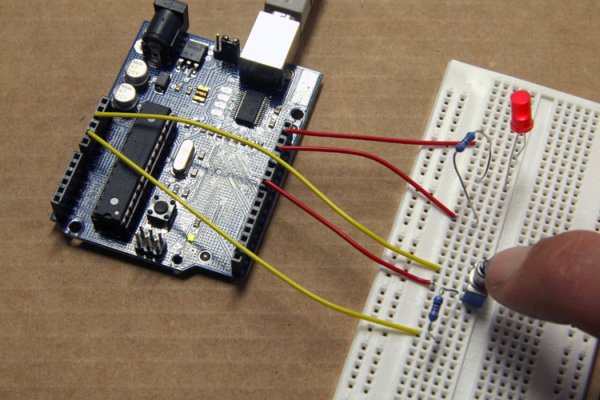
image developed using Fritzing. For more circuit examples, see the Fritzing project page
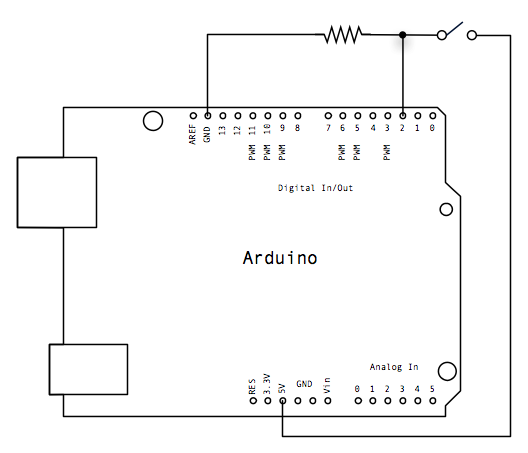
Connect three wires to the Arduino board. The first two, red and black, connect to the two long vertical rows on the side of the breadboard to provide access to the 5 volt supply and ground. The third wire goes from digital pin 2 to one leg of the pushbutton. That same leg of the button connects through a pull-down resistor (here 10 KOhms) to ground. The other leg of the button connects to the 5 volt supply.
When the pushbutton is open (unpressed) there is no connection between the two legs of the pushbutton, so the pin is connected to ground (through the pull-down resistor) and we read a LOW. When the button is closed (pressed), it makes a connection between its two legs, connecting the pin to 5 volts, so that we read a HIGH.
You can also wire this circuit the opposite way, with a pullup resistor keeping the input HIGH, and going LOW when the button is pressed. If so, the behavior of the sketch will be reversed, with the LED normally on and turning off when you press the button.
If you disconnect the digital i/o pin from everything, the LED may blink erratically. This is because the input is “floating” – that is, it will randomly return either HIGH or LOW. That’s why you need a pull-up or pull-down resistor in the circuit.
Schematic:
Code
Button
Turns on and off a light emitting diode(LED) connected to digital
pin 13, when pressing a pushbutton attached to pin 2.
The circuit:
* LED attached from pin 13 to ground
* pushbutton attached to pin 2 from +5V
* 10K resistor attached to pin 2 from ground
* Note: on most Arduinos there is already an LED on the board
attached to pin 13.
Hardware
- Arduino Board
- momentary button or switch
- 10K ohm resistor
- breadboard
- hook-up wire
- How does the pushbutton control the LED?
Pressing the button connects pin 2 to 5 volts to read HIGH and turn the LED on. - What happens when the pushbutton is unpressed?
The pin connects to ground through the pull-down resistor and reads LOW. - Why is a pull-down resistor necessary?
It prevents the input from floating, which causes the LED to blink erratically. - Can you wire this circuit with a pullup resistor instead?
Yes, but the behavior reverses so the LED is normally on and turns off when pressed. - Which pin is the LED connected to?
The LED is attached to digital pin 13. - What value resistor is used in this project?
A 10K ohm resistor is used as the pull-down resistor. - Where do the red and black wires connect?
They connect to the long vertical rows on the breadboard for 5 volt supply and ground.
