
Summary of SENSOR LETS GESTURES AND AN ARDUINO CONTROL THE TUNES
This article describes a project by [Rootsaid] using the PAJ7620 gesture sensor with an Arduino to control media playback via hand gestures. The sensor detects nine specific motions including up, down, left, right, forward, backward, clockwise, anticlockwise, and wave. By utilizing specific libraries for the sensor and media key transmission, users can easily map these gestures to keyboard commands like web navigation or media controls without complex hardware.
Parts used in the Gesture Controlled Media Project:
- PAJ7620 gesture sensor
- Arduino board
- Nicohood library
- I2C serial interface
- Optical sensor (onboard)
- IR LED (onboard)
Every time we watch Minority Report we want to make wild hand gestures at our computer — most of them polite. [Rootsaid] wanted to do the same and discovered that the PAJ7620 is an easy way to read hand gestures. The little sensor has a serial interface and can recognize quite a bit of hand waving. To be precise, the device can read nine different motions: up, down, left, right, forward, backward, clockwise, anticlockwise, and wave.
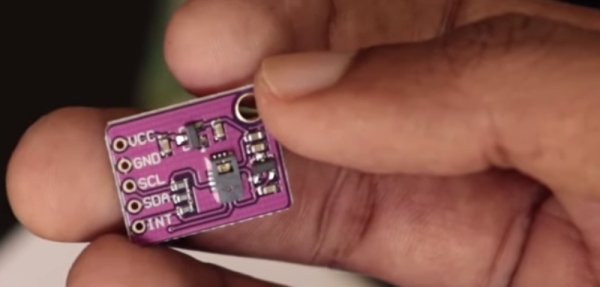
There are plenty of libraries to read it for common platforms. If you have an Arduino that can act as a keyboard for a PC, the code almost writes itself. [Rootsaid] uses a specific library for the PAJ7620 and another — Nicohood — for sending media keys.
With those two libraries, it is very simple to write the code. You simply read a register from the sensor and determine which key to send using the Nicohood library. The serial communications is I2C and there’s a tiny optical sensor onboard along with an IR LED.
Of course, you could send other keys than media controls. We wouldn’t mind going back and forward on web pages with a gesture, for example.
We’ve seen gesture recognition with radar. We’ve also seen it with ultrasonics.
Source: SENSOR LETS GESTURES AND AN ARDUINO CONTROL THE TUNES
- How many different hand motions can the PAJ7620 recognize?
The device can read nine different motions: up, down, left, right, forward, backward, clockwise, anticlockwise, and wave. - What type of interface does the PAJ7620 use for communication?
The serial communications for the device is I2C. - Can this setup be used to navigate web pages?
Yes, you could send other keys than media controls, such as going back and forward on web pages with a gesture. - Which libraries are required to make the code simple?
You need a specific library for the PAJ7620 and another called Nicohood for sending media keys. - Does the sensor require external optical components?
No, there is a tiny optical sensor onboard along with an IR LED. - Can an Arduino act as a keyboard for a PC in this project?
Yes, if you have an Arduino that can act as a keyboard for a PC, the code almost writes itself. - What specific actions can be performed with the recognized gestures?
You can determine which key to send using the Nicohood library after reading a register from the sensor. - Is gesture recognition possible without using radar or ultrasonics?
Yes, the article mentions this project uses a PAJ7620 sensor instead of radar or ultrasonics.
